

Asus Unveils P6T7 WS SuperComputer Workstation Motherboard For CUDA Parallel Programming
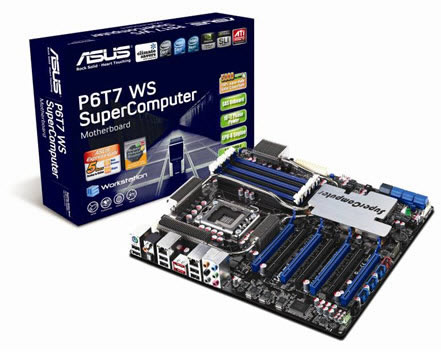
Asus today launched a Parallel Computing solution, the P6T7 WS SuperComputer motherboard.
Equipped with 7 PCI-E Gen2 x16 slots, the P6T7 WS SuperComputer has been certified for NVIDIA Tesla GPU computing which is based on the NVIDIA CUDA parallel computing architecture, supporting up to three NVIDIA Tesla cards and one NVIDIA Quadro card. This amounts to a total of 960 parallel processing cores providing a 4 teraflops of processing power?delivering 250 times faster computing and graphics processing performance.
The motherboard is also equipped with seven PCI-E Gen2 x16 slots, four of which can be set to run in x16 link mode simultaneously.
It offers natively support for both 3-way/2-way SLI and CrossFireX on Demand. Users can install up to three 3-Way SLI-capable GeForce graphics cards while having the option of running a CrossFireX setup.
An onboard SAS (Serial Attached SCSI) ports provide hard drive upgrade flexibility and compatibility with the ASUS optional SASsaby card.
It also features 16+2 power management technology for high power efficiency and effective dispelling of the heat generated by the VRM module.
During bootup, the motherboard will check key components (CPU, DRAM, VGA card and HDD) for errors. If an error is found, the diagnostic LED next to the faulty device will remain lit until the problem is solved. Once successfully booted up, the LEDs will glow brightly at a regular tempo.
Express Gate, an additional built-in Operating System, makes a host of commonly-used applications available to users in just 5 seconds from bootup. Applications including the web browser, instant messengers such as Skype, a photo manager, a music player and online games are all accessible in virtually the blink of an eye.
The P6T7 WS SuperComputer also comes with an additional G.P. Diagnosis card. This tool performs quick and precise system checks, and displays errors on its LED display?helping users pinpoint errors quickly. The G.P. Diagnosis card is connected to the TPM header.
The P6T7 WS SuperComputer Workstatio can be used for highly computational applications in the fields of life science, engineering science, financial modeling, electronic design automation and virtualization.
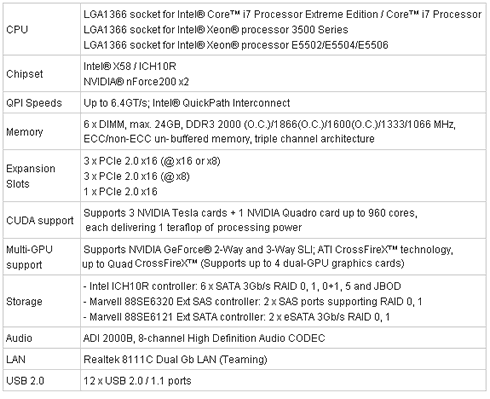
Specifications
The motherboard is also equipped with seven PCI-E Gen2 x16 slots, four of which can be set to run in x16 link mode simultaneously.
It offers natively support for both 3-way/2-way SLI and CrossFireX on Demand. Users can install up to three 3-Way SLI-capable GeForce graphics cards while having the option of running a CrossFireX setup.
An onboard SAS (Serial Attached SCSI) ports provide hard drive upgrade flexibility and compatibility with the ASUS optional SASsaby card.
It also features 16+2 power management technology for high power efficiency and effective dispelling of the heat generated by the VRM module.
During bootup, the motherboard will check key components (CPU, DRAM, VGA card and HDD) for errors. If an error is found, the diagnostic LED next to the faulty device will remain lit until the problem is solved. Once successfully booted up, the LEDs will glow brightly at a regular tempo.
Express Gate, an additional built-in Operating System, makes a host of commonly-used applications available to users in just 5 seconds from bootup. Applications including the web browser, instant messengers such as Skype, a photo manager, a music player and online games are all accessible in virtually the blink of an eye.
The P6T7 WS SuperComputer also comes with an additional G.P. Diagnosis card. This tool performs quick and precise system checks, and displays errors on its LED display?helping users pinpoint errors quickly. The G.P. Diagnosis card is connected to the TPM header.
The P6T7 WS SuperComputer Workstatio can be used for highly computational applications in the fields of life science, engineering science, financial modeling, electronic design automation and virtualization.
Specifications






