Breaking News

Logitech G325 LIGHTSPEED Delivers Comfort, Style, and Game-Ready Audio Samsung Launches Glasses-Free 3D Digital Signage Globally at ISE 2026 Levelplay Launches Combat Liquid HUD and Combat Liquid SE AIO CPU Coolers Intel Launches new Intel Xeon 600 Processors for Workstation Club 3D Announced their first new products of 2026

logo

  • Share Us
    • Facebook
    • Twitter
  • Home
  • Home
  • News
  • Reviews
  • Essays
  • Forum
  • Legacy
  • About
    • Submit News

    • Contact Us
    • Privacy

    • Promotion
    • Advertise

    • RSS Feed
    • Site Map

Search form

Epomaker Click

Mar 19,2025 0

3. Software


Review Pages

1. Introduction
2. Retail Package
3. Software
4. Conclusion


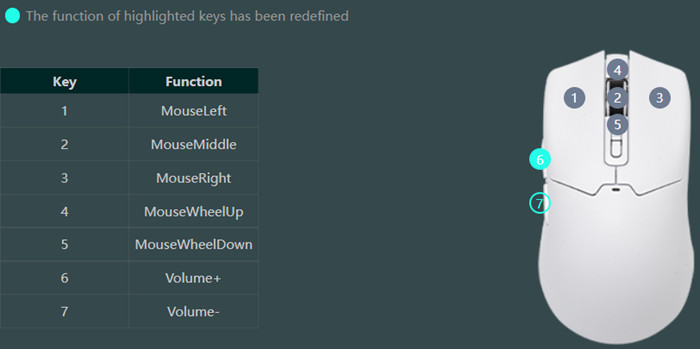
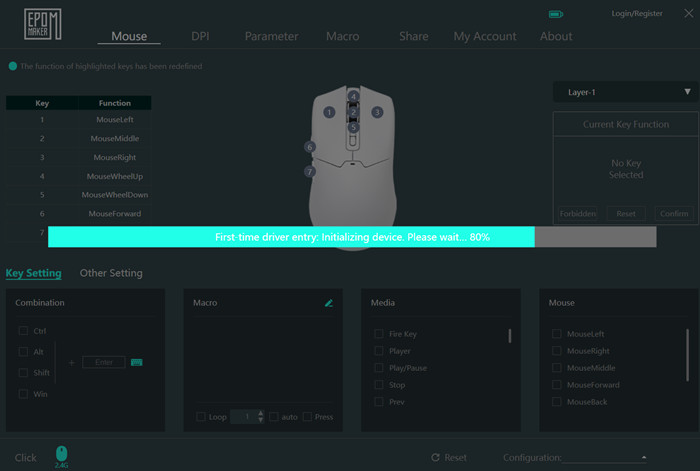
When the battery is charging there are three Lights, Fully charged: Green, Low battery: Red flashing and Charging: Purple. Users need to download the EPOMAKER Driver to fully utilize the Click mouse product. The EPOMAKER drive is a well-organized software that can set various options and aspects of the mouse. On the main screen, users can view the basic key functions of the mouse and change them if needed according to their liking.

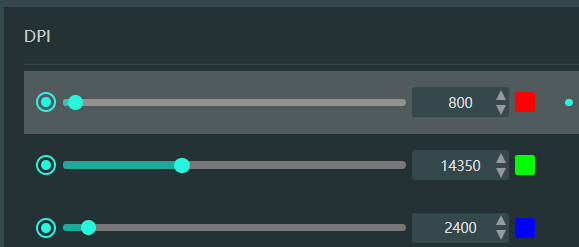
At the DPI tab, users can see the default DPI settings and LED color.
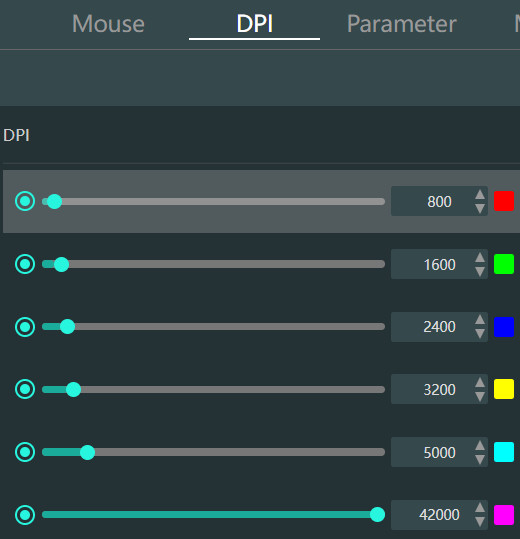
And even change the DPI settings with their likings
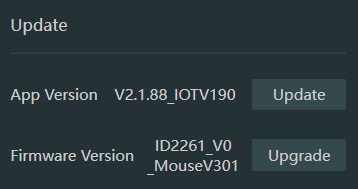
The firmware update function is only supported via USB-wired connection mode.

Our sample had the latest available firmware version (v301)

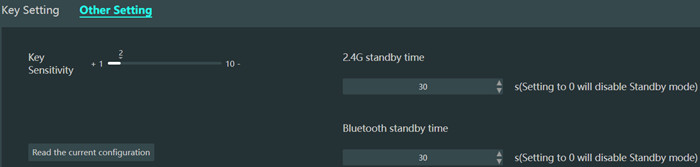
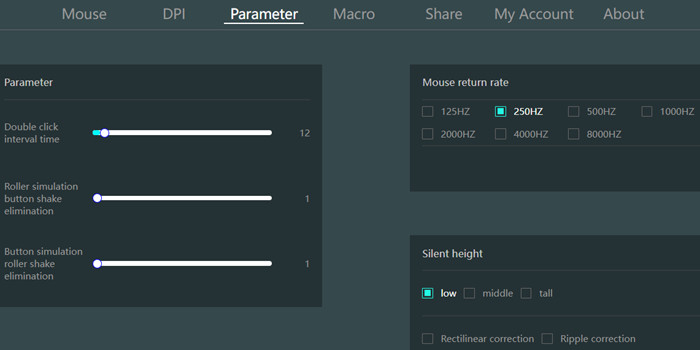
At the parameter, users can set other options like double click interval time and refresh rate from 125hz up to 8K.
Macros are also possible and you can share or download other users' macros/functions as well, interesting. For all online features, a free account is needed.

 

Review Pages

1. Introduction
2. Retail Package
3. Software
4. Conclusion


Pages

  • « first
  • ‹ previous
  • 1
  • 2
  • 3
  • 4
  • next ›
  • last »

EPOMAKER

Tags: EPOMAKER
Previous Post
Epomaker HE 68
Next Post
be quiet! Pure Base 501 DX LX

Related Posts

  • Epomaker Magcore 87

  • Epomaker Carbon 60

  • Epomaker HE 68

  • Epomaker Alice 66

  • Epomaker Split 65

  • EPOMAKER RT100

  • Epomaker HE 75 Mag

  • Epomaker P75

Latest Reviews

XbotGo Chamaleon
Consumer Electronics

XbotGo Chamaleon

be quiet! Dark Perk Mice
Gaming

be quiet! Dark Perk Mice

Acemagic W1
PC components

Acemagic W1

be quiet! Power Zone 2 1200W
PC components

be quiet! Power Zone 2 1200W

The Difference Between American and European Stakes and Why It Changes How People Bet
Enterprise & IT

The Difference Between American and European Stakes and Why It Changes How People Bet

Popular News

COLORFUL Introduces CVN B850I GAMING FROZEN Motherboard

COLORFUL Introduces CVN B850I GAMING FROZEN Motherboard

COLORFUL Presents CVN X870 ARK FROZEN Motherboard for AMD Ryzen 9000 CPUs

COLORFUL Presents CVN X870 ARK FROZEN Motherboard for AMD Ryzen 9000 CPUs

TEAMGROUP Launches EXPERT P34F Find My External SSD

TEAMGROUP Launches EXPERT P34F Find My External SSD

ASRock AM5 Motherboards Now Fully Support AMD Ryzen 9 9950X3D & 9900X3D Processors

ASRock AM5 Motherboards Now Fully Support AMD Ryzen 9 9950X3D & 9900X3D Processors

Samsung announces Galaxy Tab S11 and Galaxy S25 FE series

Samsung announces Galaxy Tab S11 and Galaxy S25 FE series

Viltrox Showcases Upcoming Lens Lineup and New TTL Flash at IBC 2025

Viltrox Showcases Upcoming Lens Lineup and New TTL Flash at IBC 2025

CORSAIR announces Vanguard Pro 96 and Vanguard 96 Gaming Keyboards

CORSAIR announces Vanguard Pro 96 and Vanguard 96 Gaming Keyboards

Panasonic Introduces the First Ultra-Telephoto Zoom Lens in the LUMIX S Series

Panasonic Introduces the First Ultra-Telephoto Zoom Lens in the LUMIX S Series

Main menu

  • Home
  • News
  • Reviews
  • Essays
  • Forum
  • Legacy
  • About
    • Submit News

    • Contact Us
    • Privacy

    • Promotion
    • Advertise

    • RSS Feed
    • Site Map
  • About
  • Privacy
  • Contact Us
  • Promotional Opportunities @ CdrInfo.com
  • Advertise on out site
  • Submit your News to our site
  • RSS Feed