Breaking News

ASUSTOR at Computex 2026 Exceed the Infinite with New ASRock X870E Taichi White Motherboard Fanatec unveils new products and performance upgrades at Spring Showcase LG Electronics Introduces First UltraGear evo Hyper Mini LED 5K Gaming Monitor CORSAIR Launches ThermalProtect PCIe 5.1 600W 12V-2x6 Cable to Help Protect GPUs from Overheating

logo

  • Share Us
    • Facebook
    • Twitter
  • Home
  • Home
  • News
  • Reviews
  • Essays
  • Forum
  • Legacy
  • About
    • Submit News

    • Contact Us
    • Privacy

    • Promotion
    • Advertise

    • RSS Feed
    • Site Map

Search form

LiteOn SLW 831SX

Apr 27,2006 0

20. Advanced Features


Review Pages

1. Introduction
2. Reading Tests
3. CD Error Correction
4. DVD Error Correction
5. Protected Discs
6. CD Recording Tests
7. CD Writing Quality - Plextools
8. CD Writing Quality - Clover System
9. DVD Writing Tests
10. DVD Writing Quality - Page 1
11. DVD Writing Quality - Page 2
12. DVD Writing Quality - Page 3
13. DVD Writing Quality - Almedio
14. DVDR DL - Page 1
15. DVDR DL - Page 2
16. 831SX vs SA300 - Page 1
17. 831SX vs SA300 - Page 2
18. 831SX vs SA300 - Page 3
19. 831SX vs SA300 - Page 4
20. Advanced Features
21. Conclusion


All LiteOn based drives support the Booktype setting, allowing the user to maximize compatibility. Users should change to the preferred booktype setting prior to burning +R, +RW or +R9 media.

In order to achieve a booktype setting change, we used the well known booktype utility, BookType (version 1.3.5). We used blank DVD+R media, and tried to change its booktype to DVD-ROM, as seen in the following screen shots.

Selecting the desired Booktype for the inserted +R media...

Even though we get the message that the Booktype has been successfully changed, the "Current Disc Booktype" remains the same...

Unfortunately, the booktype of the +R inserted media, could not be changed. We checked with our +R test media burned with Nero Burning Rom, and all reported a +R booktype. In the case of the 831S, booktype setting change is not an option.

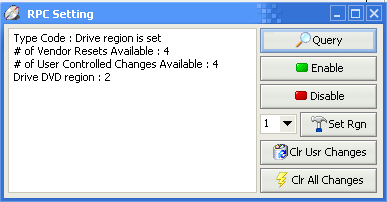
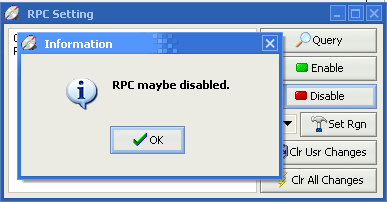
Since the drive is a LiteOn, the RPC region control can be easily disabled and the drive made region free.
 

Review Pages

1. Introduction
2. Reading Tests
3. CD Error Correction
4. DVD Error Correction
5. Protected Discs
6. CD Recording Tests
7. CD Writing Quality - Plextools
8. CD Writing Quality - Clover System
9. DVD Writing Tests
10. DVD Writing Quality - Page 1
11. DVD Writing Quality - Page 2
12. DVD Writing Quality - Page 3
13. DVD Writing Quality - Almedio
14. DVDR DL - Page 1
15. DVDR DL - Page 2
16. 831SX vs SA300 - Page 1
17. 831SX vs SA300 - Page 2
18. 831SX vs SA300 - Page 3
19. 831SX vs SA300 - Page 4
20. Advanced Features
21. Conclusion

 

Pages

  • « first
  • ‹ previous
  • …
  • 13
  • 14
  • 15
  • 16
  • 17
  • 18
  • 19
  • 20
  • 21
  • next ›
  • last »

LiteOn

Tags: LiteOn
Previous Post
DVD Media Quality Tests - DaTARIUS
Next Post
JingTing Force (JTS-0005)

Related Posts

  • LITE-ON Technology Delays Transfer of Its Solid State Drives Business to Kioxia

  • SSSTC is Sampling the CA6 PCIe Gen 4 SSDs

  • LITE-ON Technology Approves the Transfer of its Solid State Drives Business to Toshiba Memory

  • Toshiba to Buy Lite-On Technology’s Storage Business Unit

  • LITE-ON to Release Project Denali Compliant SSDs

  • LITE-ON Unveils New SSD for Enterprise Workloads

  • Lite-On to Unveil New NVRAM Hybrid Solid-State Drive at OCP 2018

  • LITE-ON Transfers its Camera Module Business to LuxVisions

Latest Reviews

Why Low-Latency Infrastructure Matters More Than Raw Specs
Enterprise & IT

Why Low-Latency Infrastructure Matters More Than Raw Specs

In the Age of AI Phishing, the Best User Experience Might Be the One That Feels Safest
Enterprise & IT

In the Age of AI Phishing, the Best User Experience Might Be the One That Feels Safest

SoundPeats C30
Consumer Electronics

SoundPeats C30

Why Streaming Live Casino Games Demands Smarter Tech
Enterprise & IT

Why Streaming Live Casino Games Demands Smarter Tech

Kioxia Exceria Plus G3 512GB microSD
Cameras

Kioxia Exceria Plus G3 512GB microSD

Popular News

TEAMGROUP Launches EXPERT P34F Find My External SSD

TEAMGROUP Launches EXPERT P34F Find My External SSD

Samsung announces Galaxy Tab S11 and Galaxy S25 FE series

Samsung announces Galaxy Tab S11 and Galaxy S25 FE series

CORSAIR announces Vanguard Pro 96 and Vanguard 96 Gaming Keyboards

CORSAIR announces Vanguard Pro 96 and Vanguard 96 Gaming Keyboards

Viltrox Showcases Upcoming Lens Lineup and New TTL Flash at IBC 2025

Viltrox Showcases Upcoming Lens Lineup and New TTL Flash at IBC 2025

MSI Launches FORGE GK600 TKL WIRELESS Special Edition Compact Mechanical Keyboard

MSI Launches FORGE GK600 TKL WIRELESS Special Edition Compact Mechanical Keyboard

Panasonic Introduces the First Ultra-Telephoto Zoom Lens in the LUMIX S Series

Panasonic Introduces the First Ultra-Telephoto Zoom Lens in the LUMIX S Series

MSI Launches DATAMAG 40Gbps Magnetic Portable SSD

MSI Launches DATAMAG 40Gbps Magnetic Portable SSD

Viltrox Joins the L-Mount Alliance, Expanding Creative Possibilities

Viltrox Joins the L-Mount Alliance, Expanding Creative Possibilities

Main menu

  • Home
  • News
  • Reviews
  • Essays
  • Forum
  • Legacy
  • About
    • Submit News

    • Contact Us
    • Privacy

    • Promotion
    • Advertise

    • RSS Feed
    • Site Map
  • About
  • Privacy
  • Contact Us
  • Promotional Opportunities @ CdrInfo.com
  • Advertise on out site
  • Submit your News to our site
  • RSS Feed