
Breaking News

Intel Announces New Intel Core Ultra 200S Plus Series Desktop Processors Sharkoon announces OfficePal KB70W Akasa Unveils Pascal MX Mini-ITX Fanless Case Intel Launches Core Series 2 Processor with Real-Time Performance and Expands Edge AI Portfolio ASUS Announces New-Gen NUC 16 Pro Mini PC

logo

  • Share Us
    • Facebook
    • Twitter
  • Home
  • Home
  • News
  • Reviews
  • Essays
  • Forum
  • Legacy
  • About
    • Submit News

    • Contact Us
    • Privacy

    • Promotion
    • Advertise

    • RSS Feed
    • Site Map

Search form

Nero Express

Apr 15,2002 0

2. Page 1


Review Pages

1. Page 2
2. Page 1
3. Page 3
4. Page 4
5. Page 5


NERO EXPRESS - Page 2

DATA BURNING

The choices for Data burning are two, to create a data disc and a data and audio CD. (CD-Extra).
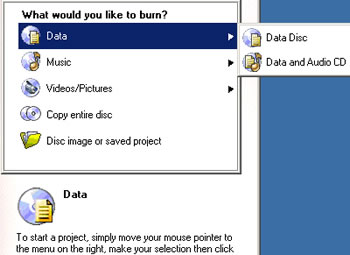
We choose Data Disc and proceed to the second window in order to add the compilation files.
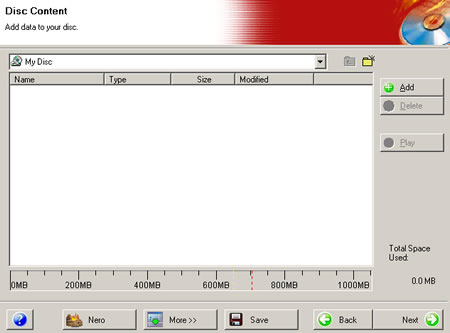
The "More" button on the bottom of the window allows user to make date and time settings for his new CD.

If you choose to burn a Data and Audio disc, you are firstly requested to add the data contents with the usual add window or with drag & drop from Windows Explorer, and then you can add the audio files.

In the audio files window, there are two more choices on the right, the "normalize audio files" and the "No pause between tracks" options. Also. In the "More" button there is a language selection list box and of course a picture button, which allows you too add any pictures on the CD-Extra.


Our CD is ready for burning. The next window has the final burn settings. You can choose the recorder, the writing speed, and the number of copies. Options such as Multisession and data verification after burning are there and the "More" button allows you choose the write mode (DAO or TAO), simulation or straight writing process. You can also let the software to determine the maximum writing speed by checking the appropriate box in the same tab.

After a successful burning, you can ask the program to save a detailed log file about your PC configuration and of course the burning details of the process. You can also print these details easily with the "print" button:

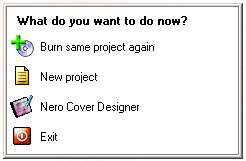
If you press the next button, you see the following picture that asks you how you want to continue, with a new or an existing project, or even to exit the application.

The final version of Nero Express will also incorporate the bootable CD creation option.


Review Pages

1. Page 2
2. Page 1
3. Page 3
4. Page 4
5. Page 5


Pages

  • « first
  • ‹ previous
  • 1
  • 2
  • 3
  • 4
  • 5
  • next ›
  • last »

Tags:
Previous Post
LiteOn LXR-24101A CD-RW
Next Post
Promise FastTrack TX2000

Related Posts

Latest Reviews

Why Streaming Live Casino Games Demands Smarter Tech
Enterprise & IT

Why Streaming Live Casino Games Demands Smarter Tech

Kioxia Exceria Plus G3 512GB microSD
Cameras

Kioxia Exceria Plus G3 512GB microSD

SoundPeats Cove Pro
Consumer Electronics

SoundPeats Cove Pro

Asustor AS5404T 4-Bay NAS System
Enterprise & IT

Asustor AS5404T 4-Bay NAS System

be quiet! Pure Power 13M 1200W
PC components

be quiet! Pure Power 13M 1200W

Popular News

COLORFUL Presents CVN X870 ARK FROZEN Motherboard for AMD Ryzen 9000 CPUs

COLORFUL Presents CVN X870 ARK FROZEN Motherboard for AMD Ryzen 9000 CPUs

TEAMGROUP Launches EXPERT P34F Find My External SSD

TEAMGROUP Launches EXPERT P34F Find My External SSD

Samsung announces Galaxy Tab S11 and Galaxy S25 FE series

Samsung announces Galaxy Tab S11 and Galaxy S25 FE series

Viltrox Showcases Upcoming Lens Lineup and New TTL Flash at IBC 2025

Viltrox Showcases Upcoming Lens Lineup and New TTL Flash at IBC 2025

CORSAIR announces Vanguard Pro 96 and Vanguard 96 Gaming Keyboards

CORSAIR announces Vanguard Pro 96 and Vanguard 96 Gaming Keyboards

Panasonic Introduces the First Ultra-Telephoto Zoom Lens in the LUMIX S Series

Panasonic Introduces the First Ultra-Telephoto Zoom Lens in the LUMIX S Series

MSI Launches DATAMAG 40Gbps Magnetic Portable SSD

MSI Launches DATAMAG 40Gbps Magnetic Portable SSD

MSI Launches FORGE GK600 TKL WIRELESS Special Edition Compact Mechanical Keyboard

MSI Launches FORGE GK600 TKL WIRELESS Special Edition Compact Mechanical Keyboard

Main menu

  • Home
  • News
  • Reviews
  • Essays
  • Forum
  • Legacy
  • About
    • Submit News

    • Contact Us
    • Privacy

    • Promotion
    • Advertise

    • RSS Feed
    • Site Map
  • About
  • Privacy
  • Contact Us
  • Promotional Opportunities @ CdrInfo.com
  • Advertise on out site
  • Submit your News to our site
  • RSS Feed



