
Breaking News

Viltrox Launches AF 75mm F1.8 EVO and AF 90mm F2.2 Lenses COLORFUL Unveils New iGame M15 and M16 Origo Gaming Laptops at COMPUTEX 2026 GIGABYTE Showcases Sleek STEALTH and Elegant WOOD PC Builds at COMPUTEX 2026 GIGABYTE Showcases Industry-leading CQDIMM Performance and Ecosystem Expansion at COMPUTEX 2026 G.SKILL Demos Trident Z5 NeoX RGB Series DDR5 with AMD EXPOT Technology

logo

  • Share Us
    • Facebook
    • Twitter
  • Home
  • Home
  • News
  • Reviews
  • Essays
  • Forum
  • Legacy
  • About
    • Submit News

    • Contact Us
    • Privacy

    • Promotion
    • Advertise

    • RSS Feed
    • Site Map

Search form

NeuNeo DV308 MPEG4 DVD Player

Nov 24,2004 0

4. Connections


Review Pages

1. Introduction
2. Interior Look
3. Main Chipset
4. Connections
5. Menus - Page 1
6. Menus - Page 2
7. Menus - Page 3
8. Menus - Page 4
9. Reading tests
10. Error Correction Tests
11. Conclusion


NeuNeo DV308 MPEG4 DVD Player

Connections

The package includes: 1 DVD Player, 1 Remote Control with 2xAAA sized batteries, 1 pair analog Video /Audio Cables and User Manual.

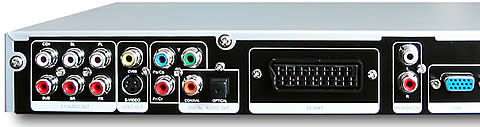
Power 100 ~ 240V AC/50 ~ 60Hz.

On the rear and at the left hand side of the device, there is the 5.1CH output, which indicates that the player has a built-in decoder for analogue multichannel sound reproduction.

Next to it, (see the screenshot below), are the composite and S-Video outputs.

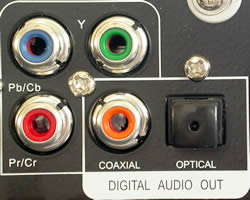
Continuing to the right, there are the Component Video (PbPrY) outputs. Next to these there are the coaxial and optical digital outputs for digital multichannel audio reproduction.
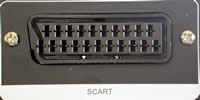
Next, there is the SCART connector and the stereo output connectors, as well as a VGA connector. In case you were wondering, yes, a VGA monitor can be connected using this output and video can be displayed. This type of connection is not available on most DVD players, but is usually reserved for high priced players.

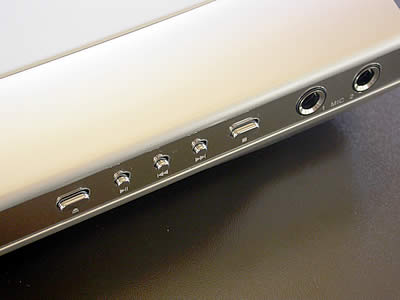
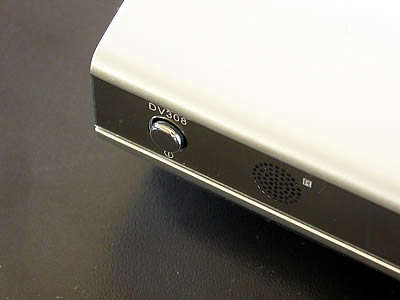
On the front and top right of the player, there are all the appropriate controls for functionng the device without the need for a remote control.

Below you can see the included remote control that comes with the DV308. Simple and complete, you have total control over the device and it won't take you long to get acquainted with to. Click on the image to view a larger picture.


Review Pages

1. Introduction
2. Interior Look
3. Main Chipset
4. Connections
5. Menus - Page 1
6. Menus - Page 2
7. Menus - Page 3
8. Menus - Page 4
9. Reading tests
10. Error Correction Tests
11. Conclusion


Pages

  • « first
  • ‹ previous
  • 1
  • 2
  • 3
  • 4
  • 5
  • 6
  • 7
  • 8
  • 9
  • …
  • next ›
  • last »

NeuNeo

Tags: NeuNeo
Previous Post
BenQ DW1620 (vB7P9)
Next Post
DVD-ROM Roundup Vol.4

Related Posts

  • NeuNeo HVD108 DVD Player

  • NeuNeos High Definition DVD player hits the market

Latest Reviews

Swit NP-FZ100 Battery
Cameras

Swit NP-FZ100 Battery

The Technology Stack Behind Modern Digital Gaming Platforms
Consumer Electronics

The Technology Stack Behind Modern Digital Gaming Platforms

be quiet! Dark Rock Pro 6
Cooling Systems

be quiet! Dark Rock Pro 6

How Online Casinos Use Encryption, Verification, and Risk Controls to Build User Trust
Enterprise & IT

How Online Casinos Use Encryption, Verification, and Risk Controls to Build User Trust

Why Low-Latency Infrastructure Matters More Than Raw Specs
Enterprise & IT

Why Low-Latency Infrastructure Matters More Than Raw Specs

Popular News

CORSAIR announces Vanguard Pro 96 and Vanguard 96 Gaming Keyboards

CORSAIR announces Vanguard Pro 96 and Vanguard 96 Gaming Keyboards

TEAMGROUP Launches EXPERT P34F Find My External SSD

TEAMGROUP Launches EXPERT P34F Find My External SSD

MSI Launches FORGE GK600 TKL WIRELESS Special Edition Compact Mechanical Keyboard

MSI Launches FORGE GK600 TKL WIRELESS Special Edition Compact Mechanical Keyboard

Samsung announces Galaxy Tab S11 and Galaxy S25 FE series

Samsung announces Galaxy Tab S11 and Galaxy S25 FE series

Viltrox Showcases Upcoming Lens Lineup and New TTL Flash at IBC 2025

Viltrox Showcases Upcoming Lens Lineup and New TTL Flash at IBC 2025

Panasonic Introduces the First Ultra-Telephoto Zoom Lens in the LUMIX S Series

Panasonic Introduces the First Ultra-Telephoto Zoom Lens in the LUMIX S Series

MSI Launches DATAMAG 40Gbps Magnetic Portable SSD

MSI Launches DATAMAG 40Gbps Magnetic Portable SSD

Viltrox Joins the L-Mount Alliance, Expanding Creative Possibilities

Viltrox Joins the L-Mount Alliance, Expanding Creative Possibilities

Main menu

  • Home
  • News
  • Reviews
  • Essays
  • Forum
  • Legacy
  • About
    • Submit News

    • Contact Us
    • Privacy

    • Promotion
    • Advertise

    • RSS Feed
    • Site Map
  • About
  • Privacy
  • Contact Us
  • Promotional Opportunities @ CdrInfo.com
  • Advertise on out site
  • Submit your News to our site
  • RSS Feed

