
Breaking News

GIGABYTE Announces the Availability of AORUS GeForce RTX 50 INFINITY Series Graphics Cards LG Electronics Launches LG xboom Blast Party Speaker Intel Gamer Days 2026 Kicking Off with AAA Gaming Bundle - Partnerships CORSAIR Expands Stream Deck Ecosystem with NIGHTSWORD v2 WIRELESS SD Sharkoon announces Rebel P20 Gen2 PSU

logo

  • Share Us
    • Facebook
    • Twitter
  • Home
  • Home
  • News
  • Reviews
  • Essays
  • About
    • Submit News

    • Contact Us
    • Privacy

    • Promotion
    • Advertise

    • RSS Feed

Search form

NeuNeo DV308 MPEG4 DVD Player

Nov 24,2004 0

6. Menus - Page 2


Review Pages

1. Introduction
2. Interior Look
3. Main Chipset
4. Connections
5. Menus - Page 1
6. Menus - Page 2
7. Menus - Page 3
8. Menus - Page 4
9. Reading tests
10. Error Correction Tests
11. Conclusion


NeuNeo DV308 MPEG4 DVD Player

Menus

The "Sound" option provides all the necessary selections in order to set the audio to your liking.
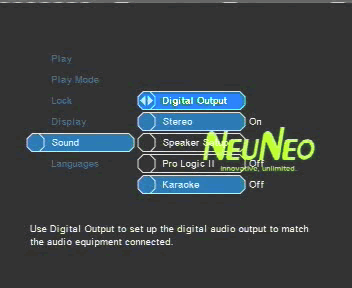
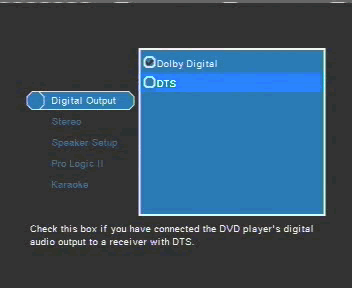
The Digital Output menu option can be used to enable/disable the digital output's Dolby Digital/DTS feature if the device is connected to a Dolby Digital/DTS receiver.
The Stereo menu option when enabled, enables the stereo output connectors. That way, any 5.1CH/DTS audio signal is down-mixed to stereo if only stereo speakers are available.

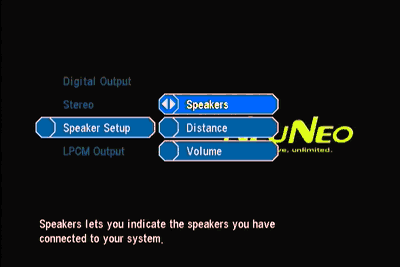
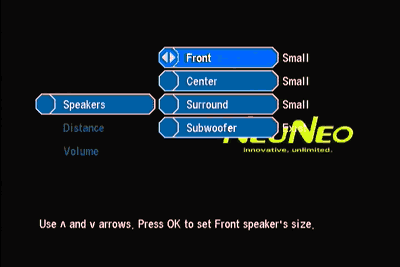
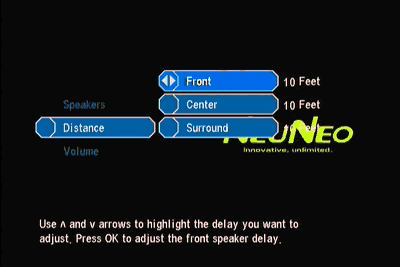
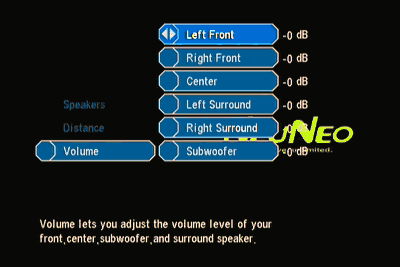
In the "Speaker Setup" menu, you can set the size and power of your speakers and the distance and volume for each one. A useful feature found here is the ability to disable speakers, if the built-in 5.1CH decoder is used. We managed to connect a four point surround speaker system with subwoofer, by just disabling the center speaker through the menu. The DV308 automatically directed the signal for the center speaker to the front left and right speakers.
 

Review Pages

1. Introduction
2. Interior Look
3. Main Chipset
4. Connections
5. Menus - Page 1
6. Menus - Page 2
7. Menus - Page 3
8. Menus - Page 4
9. Reading tests
10. Error Correction Tests
11. Conclusion


Pages

  • « first
  • ‹ previous
  • …
  • 2
  • 3
  • 4
  • 5
  • 6
  • 7
  • 8
  • 9
  • 10
  • next ›
  • last »

NeuNeo

Tags: NeuNeo
Previous Post
BenQ DW1620 (vB7P9)
Next Post
DVD-ROM Roundup Vol.4

Related Posts

  • NeuNeo HVD108 DVD Player

  • NeuNeos High Definition DVD player hits the market

Latest Reviews

KIOXIA Exceria Pro G2 NVME 2TB
PC components

KIOXIA Exceria Pro G2 NVME 2TB

Online Casino Games That Offer Something Different
Consumer Electronics

Online Casino Games That Offer Something Different

SOUNDPEATS Air6 HS
Consumer Electronics

SOUNDPEATS Air6 HS

Arctic MX-7
Cooling Systems

Arctic MX-7

Latency Is No Longer a Backend Detail
Enterprise & IT

Latency Is No Longer a Backend Detail

Popular News

CORSAIR announces Vanguard Pro 96 and Vanguard 96 Gaming Keyboards

CORSAIR announces Vanguard Pro 96 and Vanguard 96 Gaming Keyboards

MSI Launches FORGE GK600 TKL WIRELESS Special Edition Compact Mechanical Keyboard

MSI Launches FORGE GK600 TKL WIRELESS Special Edition Compact Mechanical Keyboard

TEAMGROUP Launches EXPERT P34F Find My External SSD

TEAMGROUP Launches EXPERT P34F Find My External SSD

Samsung announces Galaxy Tab S11 and Galaxy S25 FE series

Samsung announces Galaxy Tab S11 and Galaxy S25 FE series

Viltrox Showcases Upcoming Lens Lineup and New TTL Flash at IBC 2025

Viltrox Showcases Upcoming Lens Lineup and New TTL Flash at IBC 2025

Panasonic Introduces the First Ultra-Telephoto Zoom Lens in the LUMIX S Series

Panasonic Introduces the First Ultra-Telephoto Zoom Lens in the LUMIX S Series

MSI Launches DATAMAG 40Gbps Magnetic Portable SSD

MSI Launches DATAMAG 40Gbps Magnetic Portable SSD

Viltrox Joins the L-Mount Alliance, Expanding Creative Possibilities

Viltrox Joins the L-Mount Alliance, Expanding Creative Possibilities

Main menu

  • Home
  • News
  • Reviews
  • Essays
  • About
    • Submit News

    • Contact Us
    • Privacy

    • Promotion
    • Advertise

    • RSS Feed
  • About
  • Privacy
  • Contact Us
  • Promotional Opportunities @ CdrInfo.com
  • Advertise on out site
  • Submit your News to our site
  • RSS Feed

