
Breaking News

Western Digital Accelerates Storage Innovation for AI Era Leica LUX Case for the iPhone 17 Pro/Pro Max ASUS Announces ROG Strix Aiolos Viltrox Launches AF 16mm F1.8 L for Full Frame Casio to Release G-SHOCK with Minimalist Metal Design and Even Better Fit

logo

  • Share Us
    • Facebook
    • Twitter
  • Home
  • Home
  • News
  • Reviews
  • Essays
  • Forum
  • Legacy
  • About
    • Submit News

    • Contact Us
    • Privacy

    • Promotion
    • Advertise

    • RSS Feed
    • Site Map

Search form

Sunbeam Core-Contact Freezer

Dec 8,2008 0

2. Inside the package


Review Pages

1. Features
2. Inside the package
3. Installation
4. Test methodology
5. Results
6. Final words


The Sunbeamtech Core-Contact Freezer came into a medium sized box.

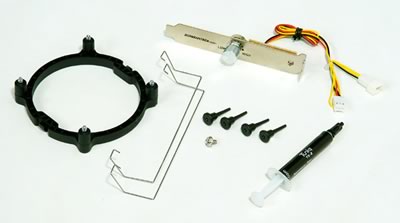
Inside the box you will find the cooler as well as plenty of accessories. The black plastic secure shell has standard "pop on/off" clips, while the included printed manual includes information about the installation procedure.

Four plastic screws are provided in order to use them to secure the plastic shell. A PCI fan controller can be installed and use it to control the rotation speed of the fan. Two metal clips are available that will help you secure the 120mm rotating fan, while the essential Tuniq TX-2 thermal past ensures efficient thermal conduction.
The Core Contact Freezer is a massive cpu cooler made of a mix of aluminum and copper. Four copper heatpipes are running through the heatsink up to the aluminum fins - a typical design for CPU coolers.
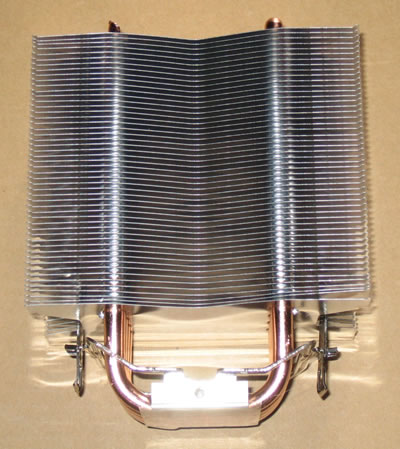
Top view

Below you can see the cooler's base. The heatpipes have been flattened to create a surface that will hopefully enable efficient dissipation of the produced heat.

The installation clips clips can be used to secure the cpu cooler installed on both AMD and Intel systems (with the included base).

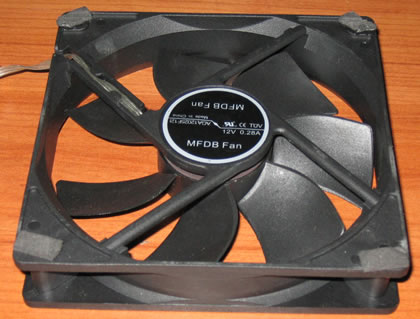
The 120mm fan has also a backlight:

The other side of the fan has four rubber pads that absorb the vibration and obviously reduce the operation noise.
 

Review Pages

1. Features
2. Inside the package
3. Installation
4. Test methodology
5. Results
6. Final words


Pages

  • « first
  • ‹ previous
  • 1
  • 2
  • 3
  • 4
  • 5
  • 6
  • next ›
  • last »

Sunbeam

Tags: Sunbeam
Previous Post
Titan Cool-Idol
Next Post
Gaming Performance Analysis - 4GB vs. 2GB

Related Posts

Latest Reviews

Akaso Brave 8 Lite
Cameras

Akaso Brave 8 Lite

Soundpeats Air 5
Consumer Electronics

Soundpeats Air 5

XbotGo Chamaleon
Consumer Electronics

XbotGo Chamaleon

be quiet! Dark Perk Mice
Gaming

be quiet! Dark Perk Mice

Acemagic W1
PC components

Acemagic W1

Popular News

COLORFUL Introduces CVN B850I GAMING FROZEN Motherboard

COLORFUL Introduces CVN B850I GAMING FROZEN Motherboard

COLORFUL Presents CVN X870 ARK FROZEN Motherboard for AMD Ryzen 9000 CPUs

COLORFUL Presents CVN X870 ARK FROZEN Motherboard for AMD Ryzen 9000 CPUs

TEAMGROUP Launches EXPERT P34F Find My External SSD

TEAMGROUP Launches EXPERT P34F Find My External SSD

ASRock AM5 Motherboards Now Fully Support AMD Ryzen 9 9950X3D & 9900X3D Processors

ASRock AM5 Motherboards Now Fully Support AMD Ryzen 9 9950X3D & 9900X3D Processors

Samsung announces Galaxy Tab S11 and Galaxy S25 FE series

Samsung announces Galaxy Tab S11 and Galaxy S25 FE series

Viltrox Showcases Upcoming Lens Lineup and New TTL Flash at IBC 2025

Viltrox Showcases Upcoming Lens Lineup and New TTL Flash at IBC 2025

CORSAIR announces Vanguard Pro 96 and Vanguard 96 Gaming Keyboards

CORSAIR announces Vanguard Pro 96 and Vanguard 96 Gaming Keyboards

Panasonic Introduces the First Ultra-Telephoto Zoom Lens in the LUMIX S Series

Panasonic Introduces the First Ultra-Telephoto Zoom Lens in the LUMIX S Series

Main menu

  • Home
  • News
  • Reviews
  • Essays
  • Forum
  • Legacy
  • About
    • Submit News

    • Contact Us
    • Privacy

    • Promotion
    • Advertise

    • RSS Feed
    • Site Map
  • About
  • Privacy
  • Contact Us
  • Promotional Opportunities @ CdrInfo.com
  • Advertise on out site
  • Submit your News to our site
  • RSS Feed