Breaking News

Nikon releases the Z5IIC full-frame mirrorless camera Announcing the New ASUS Googlebook 14 Razer Unveils Kiyo V2 Pro 4K Webcam Transcend Launches 64GB DDR5-6400 Embedded DRAM Modules for High-Speed Performance and Enhanced System Stability Hollyland Introduces LARK M3 Wireless Audio System

logo

  • Share Us
    • Facebook
    • Twitter
  • Home
  • Home
  • News
  • Reviews
  • Essays
  • About
    • Submit News

    • Contact Us
    • Privacy

    • Promotion
    • Advertise

    • RSS Feed

Search form

Thermaltake Hardcano 14

Jan 18,2006 0

1. Introduction


Review Pages

1. Introduction
2. Installation
3. Performance
4. Conclusion


Thermaltake is one of the better known manufacturers of PC cooling solutions and PC case modding, among other things. Even though the company was founded in the late 90's, 1999 to be specific, it has managed to become one of the top brands in cooling solutions with a range of products that provide cures for "thermal" problems.

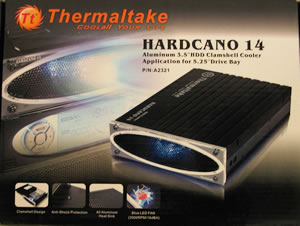
For this review, we received the new HDD cooling solution from Thermaltake, the Hardcano 14, an aluminium case for 3.5" hard discs, with support for a variety of connection interfaces.

Features

- Clamshell design for easy installation
- All aluminium heatsink helps spread and dissipate heat
- Wire mesh promotes better airflow
- Blue mystic LED streamer lights up your system
- Silent and powerful mini 12V pump with excellent reliability
- Fully anti-shock protection, guards your storage system
- Application for 3.5" HDD with IDE, SCSI, SATA, SAS interface

Specifications

Product name HARDCANO 14 ( A2321)
Weight 986g
Dimension 210 x 150 x 44 mm
Material Aluminium
Fan Dimension 50 x 50 x 10 mm
Rated Voltage 12V
Start Voltage 9V
Power Input 2.88W
Rated Current 0.24A
Bearing Sleeve
Fan Speed 3000 rpm
Max Air Flow 6.55 CFM
Air Pressure 1.28MM-H2O
Noise 16.0 dBA

The box...

The retail package we received from Thermaltake includes the Hardcano 14, two thermal pads, four HDD gaskets, four screws and the installation manual.

The following "compact" fan is responsible for maintaining air flow in the Hardcano 14.

We will now move onto detailed information regarding the installation procedure, on the next page...


Review Pages

1. Introduction
2. Installation
3. Performance
4. Conclusion


Pages

  • 1
  • 2
  • 3
  • 4
  • next ›
  • last »

Thermaltake

Tags: Thermaltake
Previous Post
Making Professional DVD from Authoring to Replication
Next Post
ASUS Extreme N7800GT Dual

Related Posts

  • Thermaltake Launches AW360/420 AIO Liquid Cooler and WAir CPU Cooler for Workstations

  • Begin the Racing Journey with the Thermaltake GR300 Racing Simulator Cockpit

  • Thermaltake Unveils the Massive EXTREME with Cross-flow Fan

  • Thermaltake Releases the Toughpower TF3 1300W with Support for RTX50 Series GPUs

  • Thermaltake Unveils G6 Direct Drive Racing Wheel Bundle and GM5 3DOF Motion System

  • Thermaltake Launches the TT150 LED Bag in Different Sizes and New Colors

  • Thermaltake New TH V2 Ultra EX ARGB Sync AIO – Snow Edition is Now Available Worldwide

  • Thermaltake Coolers Support New-Gen Intel and AMD CPUs

Latest Reviews

Fanxiang MP83 M.2 NVMe SSD Enclosure
Enterprise & IT

Fanxiang MP83 M.2 NVMe SSD Enclosure

Ugreen CM642 USB4.0 Enclosure
PC components

Ugreen CM642 USB4.0 Enclosure

be quiet! Dark Power 14 IO
PC components

be quiet! Dark Power 14 IO

SanDisk High Endurance 512GB microSDXC
Cameras

SanDisk High Endurance 512GB microSDXC

Samsung PRO Ultimate 512GB microSDXC
Cameras

Samsung PRO Ultimate 512GB microSDXC

Popular News

MSI’s Latest AMD X870E MAX & EVO Series Motherboards

MSI’s Latest AMD X870E MAX & EVO Series Motherboards

COLORFUL Launches iGame B850M ULTRA Series Micro-ATX Motherboards

COLORFUL Launches iGame B850M ULTRA Series Micro-ATX Motherboards

COLORFUL Presents Limited Edition Chitu MAG-60 Magnetic Keyboard Inspired by the Year of the Horse

COLORFUL Presents Limited Edition Chitu MAG-60 Magnetic Keyboard Inspired by the Year of the Horse

COLORFUL Presents iGame Z890 ULTRA-S W and iGame Z890M ULTRA Z Motherboards

COLORFUL Presents iGame Z890 ULTRA-S W and iGame Z890M ULTRA Z Motherboards

COLORFUL Launches iGame B850I MINI OC V14 Motherboard

COLORFUL Launches iGame B850I MINI OC V14 Motherboard

COLORFUL Expands B850 Motherboard Lineup with New CVN, Battle-Ax, and MEOW Models

COLORFUL Expands B850 Motherboard Lineup with New CVN, Battle-Ax, and MEOW Models

ASRock Adds Support for One Sub-Channel DRAM Module on Intel DDR5 Motherboards

ASRock Adds Support for One Sub-Channel DRAM Module on Intel DDR5 Motherboards

Exceed the Infinite with New ASRock X870E Taichi White Motherboard

Exceed the Infinite with New ASRock X870E Taichi White Motherboard

Main menu

  • Home
  • News
  • Reviews
  • Essays
  • About
    • Submit News

    • Contact Us
    • Privacy

    • Promotion
    • Advertise

    • RSS Feed
  • About
  • Privacy
  • Contact Us
  • Promotional Opportunities @ CdrInfo.com
  • Advertise on out site
  • Submit your News to our site
  • RSS Feed