Breaking News

G.SKILL Showcases DDR5-9200 1.1V 16GBx2 High-Speed CU-DIMM Memory Kit Sony Introduces BRAVIA 9 II and BRAVIA 7 II RGB TVs and the BRAVIA Theatre Trio Creative Announces Sound Blaster AE-X Acer Expands Gaming Portfolio With Predator Atlas 8 Handheld Powered by Intel COLORFUL Presents Limited Edition iGame GeForce RTX 5070 Ultra OC 12GB x 007 First Light Edition

logo

  • Share Us
    • Facebook
    • Twitter
  • Home
  • Home
  • News
  • Reviews
  • Essays
  • Forum
  • Legacy
  • About
    • Submit News

    • Contact Us
    • Privacy

    • Promotion
    • Advertise

    • RSS Feed
    • Site Map

Search form

Titan VGA Cooler

Feb 26,2008 0

3. Installation


Review Pages

1. Features, Specifications
2. The package
3. Installation
4. Benchmarks


Before installing the cooler you need to remove any previous cooling system from your graphic card. Titan has an online page where it shows the exact installation process, even we would like to have it printed on the retail package. In any case you can view the installation process over here. In our tests we used the MSI 7600GT graphics card with Passive cooling. While passive cooling is practically noiseless, it does get pretty hot when running at full load. Removing the stock passive cooling system does require some time and removing several screws. According to your graphics board, you should mount the cooler as it is illustrated below:

You should also use the included washers and mount the screws

Apply, thermal grease and gently attach the GPU on the cooler. Place the mounting screws and flip the card to secure the whole structure:

We used only two mounting screws since the other holes are much smaller than the included screws

The whole structure does require two slots at the back panel:

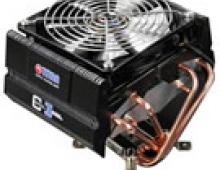
Finally, this is how the graphic card cooler looks after it is installed in the case. Don't forget to plug the power fan cable at a motherboard' s 3-pin header to get them powered up. The rotation speed of the fans can be controlled either through your BIOS settings or through an an external hardware controller.


 

Review Pages

1. Features, Specifications
2. The package
3. Installation
4. Benchmarks


Pages

  • « first
  • ‹ previous
  • 1
  • 2
  • 3
  • 4
  • next ›
  • last »

Titan

Tags: Titan
Previous Post
Sena iPod Touch case
Next Post
Blackberry Curve 8320

Related Posts

  • Titan Skalli

  • LGA 1366 CPU Coolers: GlacialTech UFO V51 Vs Titan Fenrir

  • Titan Cool-Idol

  • Titan TTC-HD90

Latest Reviews

Swit NP-FZ100 Battery
Cameras

Swit NP-FZ100 Battery

The Technology Stack Behind Modern Digital Gaming Platforms
Consumer Electronics

The Technology Stack Behind Modern Digital Gaming Platforms

be quiet! Dark Rock Pro 6
Cooling Systems

be quiet! Dark Rock Pro 6

How Online Casinos Use Encryption, Verification, and Risk Controls to Build User Trust
Enterprise & IT

How Online Casinos Use Encryption, Verification, and Risk Controls to Build User Trust

Why Low-Latency Infrastructure Matters More Than Raw Specs
Enterprise & IT

Why Low-Latency Infrastructure Matters More Than Raw Specs

Popular News

TEAMGROUP Launches EXPERT P34F Find My External SSD

TEAMGROUP Launches EXPERT P34F Find My External SSD

CORSAIR announces Vanguard Pro 96 and Vanguard 96 Gaming Keyboards

CORSAIR announces Vanguard Pro 96 and Vanguard 96 Gaming Keyboards

Samsung announces Galaxy Tab S11 and Galaxy S25 FE series

Samsung announces Galaxy Tab S11 and Galaxy S25 FE series

MSI Launches FORGE GK600 TKL WIRELESS Special Edition Compact Mechanical Keyboard

MSI Launches FORGE GK600 TKL WIRELESS Special Edition Compact Mechanical Keyboard

Viltrox Showcases Upcoming Lens Lineup and New TTL Flash at IBC 2025

Viltrox Showcases Upcoming Lens Lineup and New TTL Flash at IBC 2025

Panasonic Introduces the First Ultra-Telephoto Zoom Lens in the LUMIX S Series

Panasonic Introduces the First Ultra-Telephoto Zoom Lens in the LUMIX S Series

MSI Launches DATAMAG 40Gbps Magnetic Portable SSD

MSI Launches DATAMAG 40Gbps Magnetic Portable SSD

Viltrox Joins the L-Mount Alliance, Expanding Creative Possibilities

Viltrox Joins the L-Mount Alliance, Expanding Creative Possibilities

Main menu

  • Home
  • News
  • Reviews
  • Essays
  • Forum
  • Legacy
  • About
    • Submit News

    • Contact Us
    • Privacy

    • Promotion
    • Advertise

    • RSS Feed
    • Site Map
  • About
  • Privacy
  • Contact Us
  • Promotional Opportunities @ CdrInfo.com
  • Advertise on out site
  • Submit your News to our site
  • RSS Feed