
Breaking News

ASUS Hardware Showcase: AI Accelerators, Collector GPUs, and Esport Monitors Apple Unveils Major Hardware and Creative Suite Ecosystem Updates XPG Launches Third-Generation CORE REACTOR III for Next-Gen Power Safety TCL’s New Monitor Range Fits Every Kind of Gaming Setup Viltrox Launches AF 35mm F1.4 Pro FE/Z

logo

  • Share Us
    • Facebook
    • Twitter
  • Home
  • Home
  • News
  • Reviews
  • Essays
  • About
    • Submit News

    • Contact Us
    • Privacy

    • Promotion
    • Advertise

    • RSS Feed

Search form

Asus P5WD2 Premium

Jul 15,2005 0

21. Asus AIBooster


Review Pages

1. Introduction
2. The mainboard - Packaging
3. Test System
4. SLI Mode
5. 3DMark05
6. 3DMark03
7. Codecreatures
8. Aquamark/3DMark 2001
9. Half Life 2
10. Doom 3
11. FarCry
12. Thief 3
13. Colin McRae 2005
14. Ground Control II
15. Performance Test v5.0
16. Overclocking
17. BIOS - Page 1
18. BIOS - Page 2
19. Asus Update
20. Asus PCProbeII
21. Asus AIBooster
22. WiFi-TV set
23. Conclusion


AIBooster is a convenient utility to help overclock your system. With AIBooster, there is no need to enter the BIOS. However, we think that the BIOS is still the best and safest way to do overclocking.
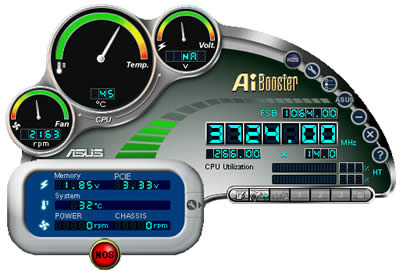
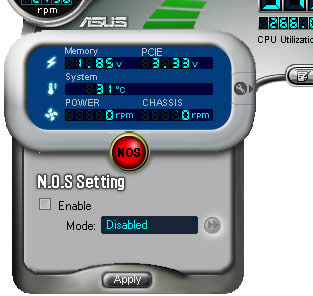
You can select between some pre-set overclocking profiles, the same as those you'll find in the BIOS.
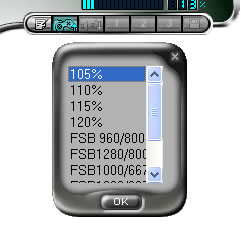
.

Similarly, you can also of manually adjust the CPU or Memory Voltages as well as the FSB speed.
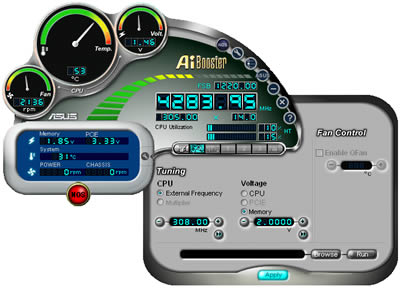
After any change, you'll have to restart your system. You'll be informed with the appropriate message.

 

Review Pages

1. Introduction
2. The mainboard - Packaging
3. Test System
4. SLI Mode
5. 3DMark05
6. 3DMark03
7. Codecreatures
8. Aquamark/3DMark 2001
9. Half Life 2
10. Doom 3
11. FarCry
12. Thief 3
13. Colin McRae 2005
14. Ground Control II
15. Performance Test v5.0
16. Overclocking
17. BIOS - Page 1
18. BIOS - Page 2
19. Asus Update
20. Asus PCProbeII
21. Asus AIBooster
22. WiFi-TV set
23. Conclusion


Pages

  • « first
  • ‹ previous
  • …
  • 15
  • 16
  • 17
  • 18
  • 19
  • 20
  • 21
  • 22
  • 23
  • next ›
  • last »

ASUS

Tags: ASUS
Previous Post
AMD Athlon64 4000+
Next Post
CROSSFIRE vs SLI

Related Posts

  • ASUS Hardware Showcase: AI Accelerators, Collector GPUs, and Esport Monitors

  • ASUS Announces ExpertBook A7 (AMD)

  • ASUS ProArt RTX Spark Windows PCs Available for Immediate Pre-Order

  • ASUS Announces New 64GB Configuration of ASUS Ascent GX10

  • Announcing the New ASUS Googlebook 14

  • ASUS Announces Ascent QN10 Mini PC

  • ASUS Announces WiFi 8 Router

  • Asus announces ExpertBook B3 G2 and ExpertBook P3 G2

Latest Reviews

be quiet! Light Wings Pro IO fan
Cooling Systems

be quiet! Light Wings Pro IO fan

Why Intelligent Firmware Matters More Than Peak Throughput in NAS Systems
Enterprise & IT

Why Intelligent Firmware Matters More Than Peak Throughput in NAS Systems

Fanxiang MP83 M.2 NVMe SSD Enclosure
Enterprise & IT

Fanxiang MP83 M.2 NVMe SSD Enclosure

Ugreen CM642 USB4.0 Enclosure
PC components

Ugreen CM642 USB4.0 Enclosure

be quiet! Dark Power 14 IO
PC components

be quiet! Dark Power 14 IO

Popular News

MSI’s Latest AMD X870E MAX & EVO Series Motherboards

MSI’s Latest AMD X870E MAX & EVO Series Motherboards

COLORFUL Launches iGame B850M ULTRA Series Micro-ATX Motherboards

COLORFUL Launches iGame B850M ULTRA Series Micro-ATX Motherboards

COLORFUL Presents Limited Edition Chitu MAG-60 Magnetic Keyboard Inspired by the Year of the Horse

COLORFUL Presents Limited Edition Chitu MAG-60 Magnetic Keyboard Inspired by the Year of the Horse

COLORFUL Launches iGame B850I MINI OC V14 Motherboard

COLORFUL Launches iGame B850I MINI OC V14 Motherboard

COLORFUL Launches the iGame X870E VULCAN W OC Motherboard

COLORFUL Launches the iGame X870E VULCAN W OC Motherboard

COLORFUL Presents iGame Z890 ULTRA-S W and iGame Z890M ULTRA Z Motherboards

COLORFUL Presents iGame Z890 ULTRA-S W and iGame Z890M ULTRA Z Motherboards

COLORFUL Expands B850 Motherboard Lineup with New CVN, Battle-Ax, and MEOW Models

COLORFUL Expands B850 Motherboard Lineup with New CVN, Battle-Ax, and MEOW Models

ASRock Adds Support for One Sub-Channel DRAM Module on Intel DDR5 Motherboards

ASRock Adds Support for One Sub-Channel DRAM Module on Intel DDR5 Motherboards

Main menu

  • Home
  • News
  • Reviews
  • Essays
  • About
    • Submit News

    • Contact Us
    • Privacy

    • Promotion
    • Advertise

    • RSS Feed
  • About
  • Privacy
  • Contact Us
  • Promotional Opportunities @ CdrInfo.com
  • Advertise on out site
  • Submit your News to our site
  • RSS Feed