Breaking News

SAMA Introduces the S32 WOOD, a Compact M-ATX Case Bundled with an 80 PLUS Gold PSU Thypoch Completes Simera-C Cine Prime Lineup with New 100mm T1.9 Lens CORSAIR Launches the RM1200e Power Supply with Built-in PinProtect GPU Overcurrent Protection and Platinum-certified Efficiency CORSAIR Changes the Game with PureVector, a Science-Based Personalized Aiming Technology, Launching Exclusively in the SABRE v3 PRO PureVector Mouse Series AMD FSR Upscaling 4.1 Boosts Frames and Image Quality on More Devices

logo

  • Share Us
    • Facebook
    • Twitter
  • Home
  • Home
  • News
  • Reviews
  • Essays
  • About
    • Submit News

    • Contact Us
    • Privacy

    • Promotion
    • Advertise

    • RSS Feed

Search form

Microsoft Introduces Sway App For Office

Microsoft Introduces Sway App For Office

Enterprise & IT Oct 2,2014 0

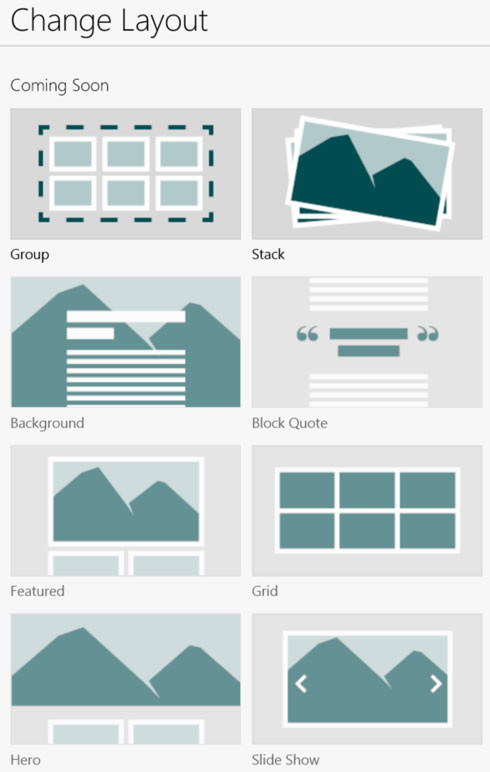
Microsoft is adding a new app to the Office portfolio. Called "Sway," the app can be used to easily create and share a polished, interactive, web-based canvas of your ideas. Currnetly in an early "preview" version, Sway is more than a document in the traditional sense. It’s built from the ground up for the web and devices. A Sway adapts to fit the device that it’s viewed on and it is cloud native, meaning you can just drop in your content from your cloud storage, your devices or your social networks. For example, you can select a few of your photos from OneDrive or Facebook, click Layout and you can turn them into an interactive photo stack that people can tap to sift through.

It is easy to collect your content from a variety of sources within Sway. Sway shows you the stuff you have stored in the cloud: just tap or click, drag, and drop it right onto your canvas. Built-in content sources include OneDrive, Facebook, Twitter, YouTube, your devices, or even embeds for your other content (coming soon).
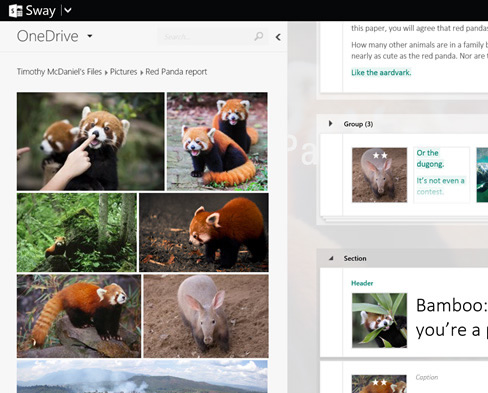
Sway’s built-in design engine automatically formats your content by putting all of it into a cohesive layout as you create. As you add more of your content, Sway continues to analyze and arrange it based on the algorithms and design styles Microsoft has incorporated. You can adjust also and customize the format Sway has created in many ways.

Sway offers a traditional linear, scrolling vertical layout and a horizontal one to pan through too. But you can also experimnent with different layouts. For example, there is a high-level concepts structure that gives section overviews before jumping into the details. There’s a flashcard layout where you can flip over digital cards to see their details. You can pan and zoom over a single flat 2-D canvas, or fly in 3-D. And with the Remix! button you can see what layout and style Sway suggests.

Microsoft will also expand the set of business-specific features, too. A few examples include OneDrive for Business and SharePoint connectivity, integrating the Office Graph, and capabilities for information protection and IT management.

You can Request an invitation to use Sway at Sway.com.

Tags: Sway
Previous Post
Panasonic To Close DVD-player Factory In Slovakia
Next Post
Facebook To Change Real-name Policy

Related Posts

Latest News

SAMA Introduces the S32 WOOD, a Compact M-ATX Case Bundled with an 80 PLUS Gold PSU
Enterprise & IT

SAMA Introduces the S32 WOOD, a Compact M-ATX Case Bundled with an 80 PLUS Gold PSU

Thypoch Completes Simera-C Cine Prime Lineup with New 100mm T1.9 Lens
Cameras

Thypoch Completes Simera-C Cine Prime Lineup with New 100mm T1.9 Lens

CORSAIR Launches the RM1200e Power Supply with Built-in PinProtect GPU Overcurrent Protection and Platinum-certified Efficiency
PC components

CORSAIR Launches the RM1200e Power Supply with Built-in PinProtect GPU Overcurrent Protection and Platinum-certified Efficiency

CORSAIR Changes the Game with PureVector, a Science-Based Personalized Aiming Technology, Launching Exclusively in the SABRE v3 PRO PureVector Mouse Series
Gaming

CORSAIR Changes the Game with PureVector, a Science-Based Personalized Aiming Technology, Launching Exclusively in the SABRE v3 PRO PureVector Mouse Series

AMD FSR Upscaling 4.1 Boosts Frames and Image Quality on More Devices
GPUs

AMD FSR Upscaling 4.1 Boosts Frames and Image Quality on More Devices

Popular Reviews

Endorfy Thock V2 Wireless Keyboard

Endorfy Thock V2 Wireless Keyboard

SoundPeats Cove Pro

SoundPeats Cove Pro

The Quiet Technology Behind the Spin

The Quiet Technology Behind the Spin

Akaso Brave 8 Lite

Akaso Brave 8 Lite

SoundPeats C30

SoundPeats C30

Kioxia Exceria Plus G3 512GB microSD

Kioxia Exceria Plus G3 512GB microSD

be quiet! Dark Perk Mice

be quiet! Dark Perk Mice

XbotGo Chamaleon

XbotGo Chamaleon

Main menu

  • Home
  • News
  • Reviews
  • Essays
  • About
    • Submit News

    • Contact Us
    • Privacy

    • Promotion
    • Advertise

    • RSS Feed
  • About
  • Privacy
  • Contact Us
  • Promotional Opportunities @ CdrInfo.com
  • Advertise on out site
  • Submit your News to our site
  • RSS Feed