
Breaking News

SAMA Introduces the S32 WOOD, a Compact M-ATX Case Bundled with an 80 PLUS Gold PSU Thypoch Completes Simera-C Cine Prime Lineup with New 100mm T1.9 Lens CORSAIR Launches the RM1200e Power Supply with Built-in PinProtect GPU Overcurrent Protection and Platinum-certified Efficiency CORSAIR Changes the Game with PureVector, a Science-Based Personalized Aiming Technology, Launching Exclusively in the SABRE v3 PRO PureVector Mouse Series AMD FSR Upscaling 4.1 Boosts Frames and Image Quality on More Devices

logo

  • Share Us
    • Facebook
    • Twitter
  • Home
  • Home
  • News
  • Reviews
  • Essays
  • About
    • Submit News

    • Contact Us
    • Privacy

    • Promotion
    • Advertise

    • RSS Feed

Search form

Primera Inscripta Thermal CD Printer

Feb 18,2002 0

2. Package/First Impressions


Review Pages

1. Features
2. Package/First Impressions
3. Installing Ribbons
4. Intergration with Composer system
5. Driver installation and setting up
6. Printing software
7. Printing Performance - Conclusion


Primera Inscripta Thermal Printer - Page 2

Package/First Impressions

- Unpacking:

Among with the main unit, our special package included:
- Power Adapter and Power Cord
- Printer driver and software
- Black monochrome and blue/black ink ribbons
- Warranty statement and registration card
- Quick start guide

Let's take a look at the main printer

On the front you can see the CD tray button which opens or closes the CD tray for loading and ejecting CDs. The button also is pressed and held while power is applied in order to perform a self-test. Also, the printer can be reset while unit's power is on by pressing and holding this button.

The Ribbon Catridge eject button is pressed to remove the ribbon catridge for ribbon replacement.

The LED status light indicates that power is ON. It is solid when the printer is busy processing data, blinks slowly when it is requesting a new CD, and blinks fast to indicate an error, such as the ribbon is out, wrong ribbon installed, tray movement error, tray lift error or memory error.
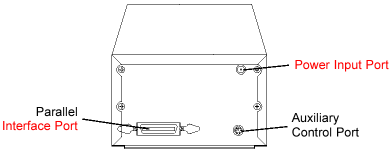
On the back there is the parallel interface port for Windows-based PC connection. The printer's auxiliary control is for OEM connection to an autoloader or robotic duplication system to control tray in / out and other printer functions.

Above the auxiliary control there is the Image Placement values label. These values must be entered into the vertical and horizontal boxes during the Tab calibration option. These values have been optimized specifically for each printer during final assembly and allow images to be centered on a CD when printed.
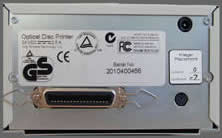
The printer provided worked best with the adjusting values shown on the left. The vertical value was "0" and the horizontal "-7"


Review Pages

1. Features
2. Package/First Impressions
3. Installing Ribbons
4. Intergration with Composer system
5. Driver installation and setting up
6. Printing software
7. Printing Performance - Conclusion


Pages

  • « first
  • ‹ previous
  • 1
  • 2
  • 3
  • 4
  • 5
  • 6
  • 7
  • next ›
  • last »

Tags:
Previous Post
Sanyo CRD-BP1500P CD-RW
Next Post
Iomega Predator USB CD-RW

Related Posts

Latest Reviews

Why Intelligent Firmware Matters More Than Peak Throughput in NAS Systems
Enterprise & IT

Why Intelligent Firmware Matters More Than Peak Throughput in NAS Systems

Fanxiang MP83 M.2 NVMe SSD Enclosure
Enterprise & IT

Fanxiang MP83 M.2 NVMe SSD Enclosure

Ugreen CM642 USB4.0 Enclosure
PC components

Ugreen CM642 USB4.0 Enclosure

be quiet! Dark Power 14 IO
PC components

be quiet! Dark Power 14 IO

SanDisk High Endurance 512GB microSDXC
Cameras

SanDisk High Endurance 512GB microSDXC

Popular News

MSI’s Latest AMD X870E MAX & EVO Series Motherboards

MSI’s Latest AMD X870E MAX & EVO Series Motherboards

COLORFUL Launches iGame B850M ULTRA Series Micro-ATX Motherboards

COLORFUL Launches iGame B850M ULTRA Series Micro-ATX Motherboards

COLORFUL Presents Limited Edition Chitu MAG-60 Magnetic Keyboard Inspired by the Year of the Horse

COLORFUL Presents Limited Edition Chitu MAG-60 Magnetic Keyboard Inspired by the Year of the Horse

COLORFUL Launches iGame B850I MINI OC V14 Motherboard

COLORFUL Launches iGame B850I MINI OC V14 Motherboard

COLORFUL Launches the iGame X870E VULCAN W OC Motherboard

COLORFUL Launches the iGame X870E VULCAN W OC Motherboard

COLORFUL Presents iGame Z890 ULTRA-S W and iGame Z890M ULTRA Z Motherboards

COLORFUL Presents iGame Z890 ULTRA-S W and iGame Z890M ULTRA Z Motherboards

COLORFUL Expands B850 Motherboard Lineup with New CVN, Battle-Ax, and MEOW Models

COLORFUL Expands B850 Motherboard Lineup with New CVN, Battle-Ax, and MEOW Models

ASRock Adds Support for One Sub-Channel DRAM Module on Intel DDR5 Motherboards

ASRock Adds Support for One Sub-Channel DRAM Module on Intel DDR5 Motherboards

Main menu

  • Home
  • News
  • Reviews
  • Essays
  • About
    • Submit News

    • Contact Us
    • Privacy

    • Promotion
    • Advertise

    • RSS Feed
  • About
  • Privacy
  • Contact Us
  • Promotional Opportunities @ CdrInfo.com
  • Advertise on out site
  • Submit your News to our site
  • RSS Feed