
Breaking News

SAMA Introduces the S32 WOOD, a Compact M-ATX Case Bundled with an 80 PLUS Gold PSU Thypoch Completes Simera-C Cine Prime Lineup with New 100mm T1.9 Lens CORSAIR Launches the RM1200e Power Supply with Built-in PinProtect GPU Overcurrent Protection and Platinum-certified Efficiency CORSAIR Changes the Game with PureVector, a Science-Based Personalized Aiming Technology, Launching Exclusively in the SABRE v3 PRO PureVector Mouse Series AMD FSR Upscaling 4.1 Boosts Frames and Image Quality on More Devices

logo

  • Share Us
    • Facebook
    • Twitter
  • Home
  • Home
  • News
  • Reviews
  • Essays
  • About
    • Submit News

    • Contact Us
    • Privacy

    • Promotion
    • Advertise

    • RSS Feed

Search form

Qstarz BT-Q1000P GPS

Jun 6,2008 0

3. Installation, Software


Review Pages

1. Features, specifications
2. Inside the package
3. Installation, Software
4. Using the device
5. Conclusions


Charging the device via the miniUSB port is the first step you should take before actually using it. This means that the device should be connected to your PC and install the included drivers. These special drivers can be also downloaded at from Qstarz's website.
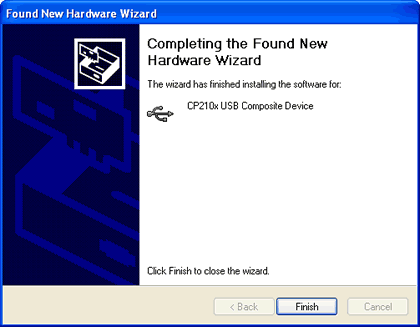
The next step is to install the software. The device is not directly accessible through so you Windows and you need to get the latest version of the Qstarz Travel Recorder (v4.1) software. This would give you access to all the features the device offers. In sort, the software offers:

  • Double software included with built-in Google Map, multi-language support, and visualization UI
  • Configure the device and with built-in Google Map and visualization UI for users to easily manage their travel
  • Supports Track Edit function allowing you to remove unnecessary waypoints
  • Active NMEA protocol VTG / GLL manually via Qstarz setup tool.
  • Backup your travel record as GPX / PLT / CSV / NMEA / Google Earth file format.
  • Draw your navigation path immediately on Google Earth as default
  • Support GeoTagging function for digital photo and generate KMZ file easily.The waypoints would be decreased when the more options of Log Format are selected

The latest version of the software (v4.1) was released in April 2008.

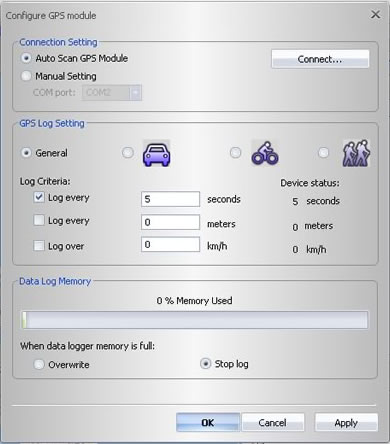
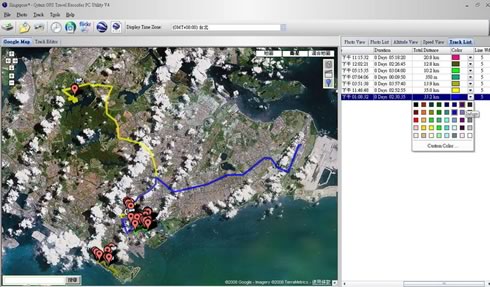
In the configuration panel you can choose between autoscan or manual scan for GPS modes, choose the appropriate log setting according to the use of the device (car, bike, pedestrian) and of course set the so-called "log criteria", which set the intervals between the continuous log operations. A data memory progress bar shows the memory used.
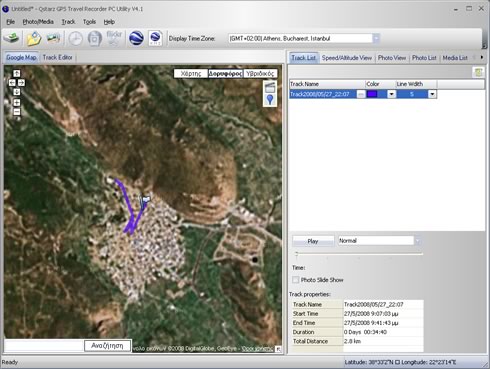
Uploading a route to the Travel Recorder utility is very easy. Through the support for Google Earth you can have a very good idea of the selected track and your position around the globe.
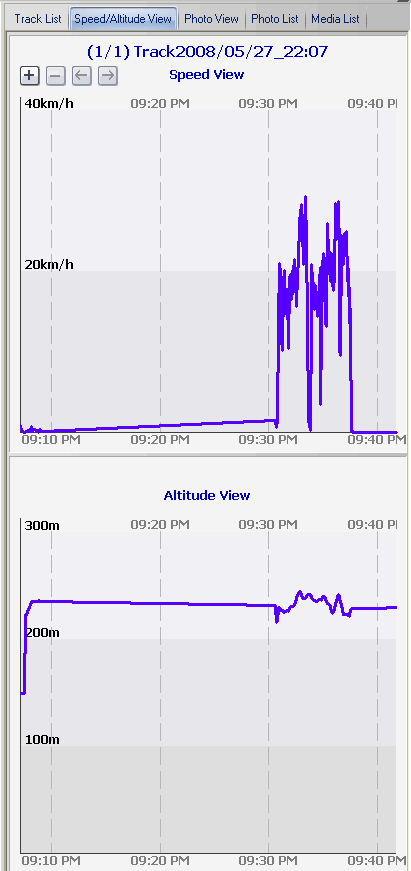
There are various other tabs that users can play with, like get graphs for the speed/altitude of the selected course:
Geotagging is also available supported by the Qstarz Q1000P.

 

Review Pages

1. Features, specifications
2. Inside the package
3. Installation, Software
4. Using the device
5. Conclusions


Pages

  • « first
  • ‹ previous
  • 1
  • 2
  • 3
  • 4
  • 5
  • next ›
  • last »

Qstarz

Tags: Qstarz
Previous Post
Asus EN9600GT Top
Next Post
Asus 8800GTS 512 Top

Related Posts

  • QSTARZ Released 10Hz Bluetooth GPS Receiver

  • QSTARZ Releases New GPS Travel Recorder

  • QSTARZ Launched the GPS QFinder, GF-Q900

  • QSTARZ Launches QSports - Your Private Sports Coach

  • QSTARZ Introduces New GPS Sports Recorder

  • Qstarz Q1300BT GPS

Latest Reviews

Why Intelligent Firmware Matters More Than Peak Throughput in NAS Systems
Enterprise & IT

Why Intelligent Firmware Matters More Than Peak Throughput in NAS Systems

Fanxiang MP83 M.2 NVMe SSD Enclosure
Enterprise & IT

Fanxiang MP83 M.2 NVMe SSD Enclosure

Ugreen CM642 USB4.0 Enclosure
PC components

Ugreen CM642 USB4.0 Enclosure

be quiet! Dark Power 14 IO
PC components

be quiet! Dark Power 14 IO

SanDisk High Endurance 512GB microSDXC
Cameras

SanDisk High Endurance 512GB microSDXC

Popular News

MSI’s Latest AMD X870E MAX & EVO Series Motherboards

MSI’s Latest AMD X870E MAX & EVO Series Motherboards

COLORFUL Launches iGame B850M ULTRA Series Micro-ATX Motherboards

COLORFUL Launches iGame B850M ULTRA Series Micro-ATX Motherboards

COLORFUL Presents Limited Edition Chitu MAG-60 Magnetic Keyboard Inspired by the Year of the Horse

COLORFUL Presents Limited Edition Chitu MAG-60 Magnetic Keyboard Inspired by the Year of the Horse

COLORFUL Launches iGame B850I MINI OC V14 Motherboard

COLORFUL Launches iGame B850I MINI OC V14 Motherboard

COLORFUL Launches the iGame X870E VULCAN W OC Motherboard

COLORFUL Launches the iGame X870E VULCAN W OC Motherboard

COLORFUL Presents iGame Z890 ULTRA-S W and iGame Z890M ULTRA Z Motherboards

COLORFUL Presents iGame Z890 ULTRA-S W and iGame Z890M ULTRA Z Motherboards

COLORFUL Expands B850 Motherboard Lineup with New CVN, Battle-Ax, and MEOW Models

COLORFUL Expands B850 Motherboard Lineup with New CVN, Battle-Ax, and MEOW Models

ASRock Adds Support for One Sub-Channel DRAM Module on Intel DDR5 Motherboards

ASRock Adds Support for One Sub-Channel DRAM Module on Intel DDR5 Motherboards

Main menu

  • Home
  • News
  • Reviews
  • Essays
  • About
    • Submit News

    • Contact Us
    • Privacy

    • Promotion
    • Advertise

    • RSS Feed
  • About
  • Privacy
  • Contact Us
  • Promotional Opportunities @ CdrInfo.com
  • Advertise on out site
  • Submit your News to our site
  • RSS Feed