Airfanta 3 Pro Air
5. Use
Because the AirFanta 3Pro uses a continuously variable voltage knob, there are some guidelines you could use, depending the scenario:
Hotel/arrival purge (fastest clean)
- Run Speed 6 for 10–20 minutes (or until the PM spike/smoke odor dissipates), then drop to a sleep‑friendly setting (Speed 2–3) for background cleaning.
- Why it works: Speed 6 delivers maximum CADR for the fastest particle reduction; Speed 2–3 dramatically cuts noise and power while still providing meaningful ACH in typical rooms.
- Trade‑offs: Pros—fastest air cleaning. Cons—loudest operation.
Sleeping / quiet background
- Start on Speed 1–2 and place the unit several feet away from the bed. Use the lowest setting that’s barely audible in your room.
- Why it works: Speed 2 delivers ~141 CFM at ~38 dB and ~4.7 W—often enough for bedrooms when doors are kept closed and ventilation is consistent.
- Trade-offs: Some units may have a “tone band” where a mid-range pitch is more noticeable. If a specific setting is irritating, avoid that band—either stay very low or move to the next stable level that sounds smoother.
Work calls / meetings
- Run Speed 2–3 so it reads as soft “fan” noise or white noise during calls, then use a 10–15 minute Speed 5–6 burst between sessions (or when the room is empty).
- Why it works: This keeps perceived noise moderate while still delivering periodic high-CADR “resets” to quickly knock down particle levels.
- Trade-offs: Prioritize steady, non-pulsing airflow and a smooth sound profile—tone often matters more than raw dB. If a particular speed produces an irritating pitch, avoid that band and use the next stable level.
Allergy season / continuous home use
- Run Speed 3–4 continuously in the primary occupied zone. Thanks to the unit’s high throughput, you often don’t need full speed to achieve meaningful air changes. Use Speed 6 as a short “reset” after vacuuming, dusting, or opening windows on high‑pollen days.
- Why it works: Speed 3–4 typically offers the best CADR-to-noise compromise for day-to-day use, while Speed 6 provides a rapid post-event purge when particle levels spike.
- Trade-offs: Vacuum the exterior mesh periodically—especially in homes with pets—to keep intake resistance low and maintain performance.
Cooking / litter box / short-term odors
- For particle spikes (smoke/PM), run Speed 5–6 during the event and for ~15 minutes after, then drop to a mid setting for maintenance. For odors/VOCs, use the HEPA + Activated Carbon filter set (HEPA alone won’t meaningfully remove gases).
- Why it works: HEPA targets particulate matter; activated carbon is the correct tool for gaseous odors and VOCs. A short high-speed burst gives the fastest particle reduction, while a mid setting maintains reasonable ACH with lower noise.
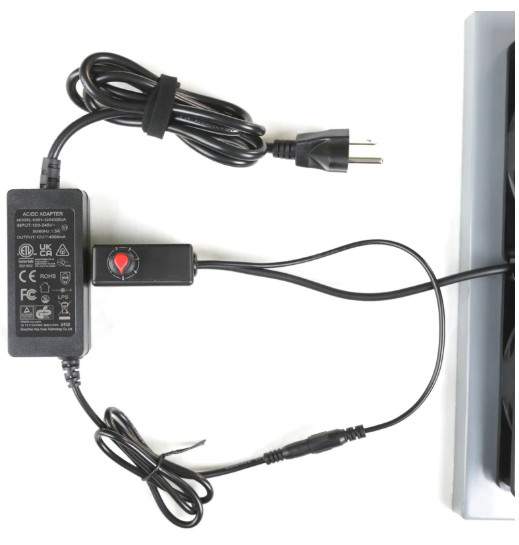
- Trade-offs: If you run high speed for extended periods, keep the power brick/speed controller in open air (it can get warm). Also consider vacuuming the exterior mesh periodically to prevent intake restriction.
Apart from the scenarios, for sure after using this device you will feel the difference. Performance as we explained depends upon fan rotation speed (1 ~ 6). The sound also depends upon the fan speed, we didn't had any weird noises from the unit during our testing.
Some users reported that their units exhibit a high-pitched humming/coil-whine-like sound at mid settings (often around levels 2–5), while others are described as smooth ‘white noise’. For sure at low speeds its near-silent; at maximum, it becomes loud but acceptable for short ‘purge’ cycles (e.g., on hotel arrival or after cooking).
Another plus of the device is its portability. You can easily disassemble it to fit in carry-ons, bags or suitcases, and then reassemble in 2–5 minutes.
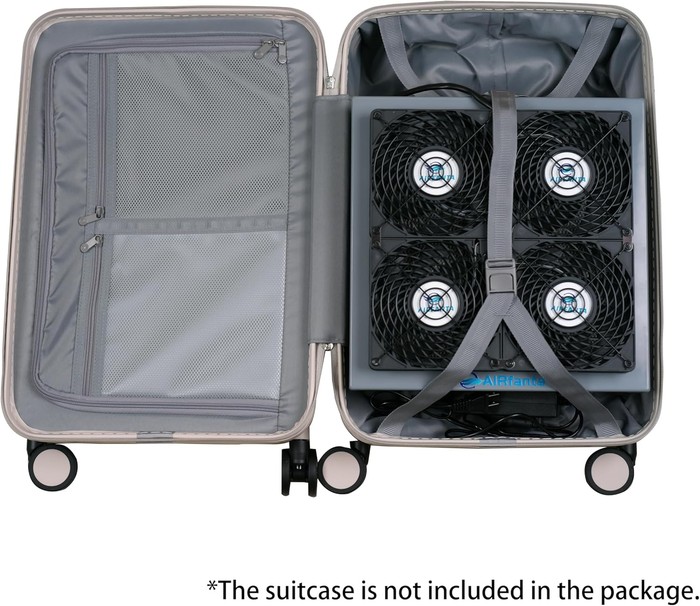
In case you travel to other countries, be sure to have an adapter, since the stock power adapter supports 100–240V.
In case you store the unit for a long-term, wrap the unit and filters in plastic to avoid moisture uptake. There have been cases where users used the device for a small amount of time and after sometime weird odors occured. Vacuumming the exterior mesh periodically (especially in pet homes) to reduce hair/dust loading is a great idea as well.
The used fans have stock 140x140mm dimensions, and you could also possibly modify it with other fans to lower noise at full speed (but also reduce performance). The used controller/power brick may running warm at high voltage for an extened period time, so keep that in mind as well. Some practical tips to get the best results:
- Use a ‘purge then maintain’ routine: run high for 10–20 minutes, then drop to a quieter setting.
- Place it where it can ‘see’ the room: avoid corners blocked by furniture; keep clearance on all sides.
- If used for odors, consider activated carbon add-on filters; HEPA alone targets particulates, not smells.
- If you notice new mechanical noise, stop and check for debris; contact support early if a fan is failing.
- For humid environments, continuous low-speed operation may help avoid moisture stagnation in filters.
- Treat max speed as a short-term tool (purge), not necessarily an all-night setting.
- If your unit has an annoying mid-speed tone, try either very low or slightly higher than that band; some users report the tone disappears past a point.
- The power/controller brick can run warm at high voltage—keep it on a hard surface with free air around it.
- Replace filters every 6–12 months per the manual; earlier if airflow drops, odors appear, or noise increases.
- For smell/VOC problems, plan on activated carbon add-ons; HEPA is for particles.