
Breaking News

Kioxia Introduces Direct Liquid Cooling Support for Enterprise SSDs Apple announces new product for 2026 be quiet! launches Light Wings Pro IO all in one frame fan series with advanced lighting and cooling options Elgato Enters Wireless Audio with Wave Go, a Convertible Microphone That Adapts to How Creators Record AMD announces Ryzen AI Halo

logo

  • Share Us
    • Facebook
    • Twitter
  • Home
  • Home
  • News
  • Reviews
  • Essays
  • About
    • Submit News

    • Contact Us
    • Privacy

    • Promotion
    • Advertise

    • RSS Feed

Search form

Arkon DM520

Apr 11,2006 0

2. Features - A Closer Look


Review Pages

1. Introduction
2. Features - A Closer Look
3. Installation
4. Conclusion


- Features

  1. Compatible with: Dell Axim X50, X50v, X51, X51v
  2. Integrated GPS receiver
  3. Industry’s most powerful speaker
  4. High-quality built-in
  5. Hands-free function (with microphone and noise cancellation)
  6. Docking PDA-specific power connector

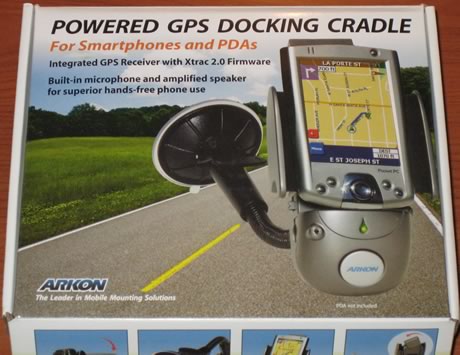
For our test purposes, Arkon sent us the retail package that includes:

  • the DM520 Docking cradle
  • the window attachable suction arm
  • a male to male cable (audio out from Dell, audio in to DM520)
  • a cigarette lighter adaptor
  • a battery (optional)
  • a leaflet and CD-ROM with corresponding software

The current price for the product is around US$139.90, as found on Arkon's website. The price includes a battery, which is optional, since the device can run from DC power.
Lets now examine the DM520 device. The device is well build, with silver colour. The Arkon logo can be found at the bottom.
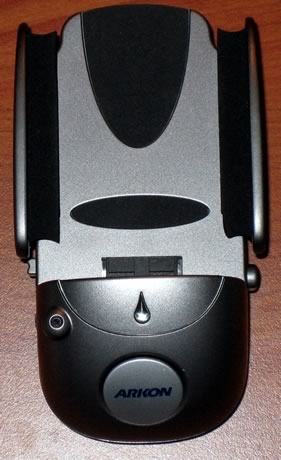
By pressing a button on the right hand side, the flaps open up and you can install your PDA (Dell Axim x50V in our case). Also on the right, we find the ear phone jack and the DC power input.

On the bottom, there is the GPS antenna (which is rotational) and the battery cover.

On the left, we have the speaker jack, the battery on/off switch and finally, the volume knob.

The DM 520 uses a 3.7V 900mAh battery, in case you need to operate it without DC power, (if you carry it with you for example, which we don't recommend due to its big size).

Let's now see how easy it was to install our Dell Axim x50V. After having pressed the "release button" located on the right of the device, the padded flaps open up.

Install your PDA in the docking connector and gently close the flaps. Your PDA is now secured and you don't need to worry about anything, it will stay there no matter what!

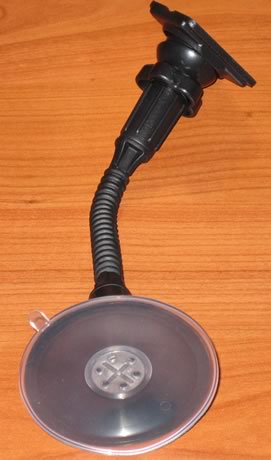
The next step is to install the windshield mounting bracket. This is probably the most important part, since if it fails, your PDA can get damaged.
Finally, our PDA is installed and we are ready to begin using it in our car.


Review Pages

1. Introduction
2. Features - A Closer Look
3. Installation
4. Conclusion


Pages

  • « first
  • ‹ previous
  • 1
  • 2
  • 3
  • 4
  • next ›
  • last »

Arkon

Tags: Arkon
Previous Post
Pioneer DVR-111DBK
Next Post
LG GSA-5169D

Related Posts

Latest Reviews

Fanxiang MP83 M.2 NVMe SSD Enclosure
Enterprise & IT

Fanxiang MP83 M.2 NVMe SSD Enclosure

Ugreen CM642 USB4.0 Enclosure
PC components

Ugreen CM642 USB4.0 Enclosure

be quiet! Dark Power 14 IO
PC components

be quiet! Dark Power 14 IO

SanDisk High Endurance 512GB microSDXC
Cameras

SanDisk High Endurance 512GB microSDXC

Samsung PRO Ultimate 512GB microSDXC
Cameras

Samsung PRO Ultimate 512GB microSDXC

Popular News

MSI’s Latest AMD X870E MAX & EVO Series Motherboards

MSI’s Latest AMD X870E MAX & EVO Series Motherboards

COLORFUL Launches iGame B850M ULTRA Series Micro-ATX Motherboards

COLORFUL Launches iGame B850M ULTRA Series Micro-ATX Motherboards

COLORFUL Presents Limited Edition Chitu MAG-60 Magnetic Keyboard Inspired by the Year of the Horse

COLORFUL Presents Limited Edition Chitu MAG-60 Magnetic Keyboard Inspired by the Year of the Horse

COLORFUL Launches iGame B850I MINI OC V14 Motherboard

COLORFUL Launches iGame B850I MINI OC V14 Motherboard

COLORFUL Presents iGame Z890 ULTRA-S W and iGame Z890M ULTRA Z Motherboards

COLORFUL Presents iGame Z890 ULTRA-S W and iGame Z890M ULTRA Z Motherboards

COLORFUL Launches the iGame X870E VULCAN W OC Motherboard

COLORFUL Launches the iGame X870E VULCAN W OC Motherboard

COLORFUL Expands B850 Motherboard Lineup with New CVN, Battle-Ax, and MEOW Models

COLORFUL Expands B850 Motherboard Lineup with New CVN, Battle-Ax, and MEOW Models

ASRock Adds Support for One Sub-Channel DRAM Module on Intel DDR5 Motherboards

ASRock Adds Support for One Sub-Channel DRAM Module on Intel DDR5 Motherboards

Main menu

  • Home
  • News
  • Reviews
  • Essays
  • About
    • Submit News

    • Contact Us
    • Privacy

    • Promotion
    • Advertise

    • RSS Feed
  • About
  • Privacy
  • Contact Us
  • Promotional Opportunities @ CdrInfo.com
  • Advertise on out site
  • Submit your News to our site
  • RSS Feed
