ASUS CRW4816A
2. Installation/Package
ASUS CRW4816A IDE CD-RW - Page 2
- The package
 The
retail kit we tested contained: the drive, 1 piece of ASUS 80min 48x CD-R blank
(manufactured by Acer, 97m 22s 67f), 1 piece of ASUS 80min 4-16x HS-RW blank
(Acer 97m 22s 62f), audio cable and mounting screws. The software supplied with
the drive was Nero Burning ROM v5.5.8.2 and Ahead InCD v3.27 (for packet writing
use).
The
retail kit we tested contained: the drive, 1 piece of ASUS 80min 48x CD-R blank
(manufactured by Acer, 97m 22s 67f), 1 piece of ASUS 80min 4-16x HS-RW blank
(Acer 97m 22s 62f), audio cable and mounting screws. The software supplied with
the drive was Nero Burning ROM v5.5.8.2 and Ahead InCD v3.27 (for packet writing
use).
The drive came with v1.00 firmware revision installed and we hope this time that ASUS will support further its drive with firmware updates. So far there were not released any newer firmware for ASUS 32x and 40x recorders. We don't know yet whether ASUS CRW-4816A comes with a 2-year warranty (only in Europe) or not. Lastly as the package says the drive is "XP" compatible which was confirmed from our test results, since the drive worked without any problems in UDMA-33 mode.
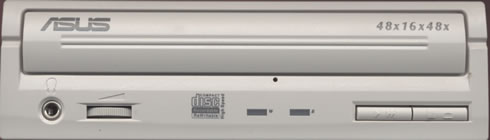
On the front of the drive there are the "ASUS", "HS-RW" and the "48x16x48" logos. You will also find only two leds, the eject/play buttons and the headphone input jack/volume selector:
In the rear panel of the drive we will find the usual connectors (IDE interface, power), the jumpers for making the drive Master/Slave, the SPDIF output connector and the analog/digital output connectors. The 3 jumpers at the left are used to setup the drive's working mode, PIO-4Mode (default) or UDMA33. For setting up the UDMA33 mode you just have to remove the middle jumper:

- Inside the drive
After removing the bottom screws we can see the internal of the drive:
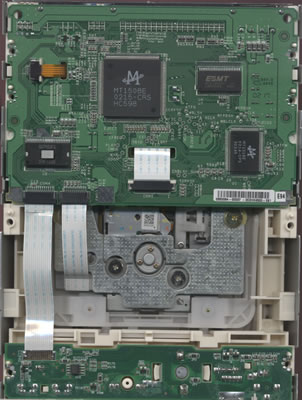
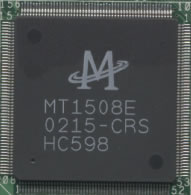
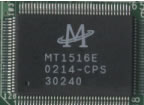
The drive is based upon MediaTek chipsets. Below are the MediaTek chipsets from the ASUS 48x and 40x drives:
|
ASUS CRW4816A
|
ASUS CRW4012A
|
 |
 |
 |
 |
In case you wonder if you can use the firmware from ASUS CRW4816A to the ASUS CRW4012A in order to gain the higher recording speeds you will be disappointed, unlike with LiteOn recorders...
- Installation
ASUS CRW-4816A was installed as a Master in the secondary IDE BUS. The drive worked in UDMA33 mode and after booting, identified itself as "ASUS CRW-4816A". We used WinXP for the recording, reading tests and the DMA was automatically enabled.
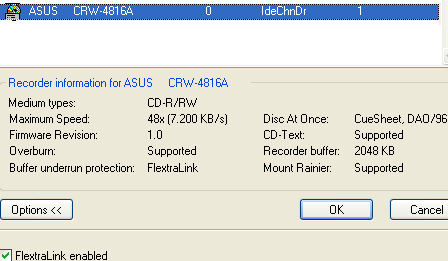
The drive is a June 2002 model with firmware revision v1.00 installed. We used the latest build of Nero (5.5.8.2), InCD (3.31), and CloneCD (4.0.1.3) for our recording tests.
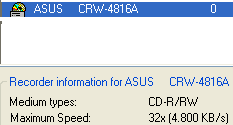
ASUS CRW-4816A will automatically reduce the maximum writing speed (48x) when it detects lower quality media for burning. The pictures below come from Nero when blank media was inserted. The drive with firmware v1.00 supports limited media for the 48x recording speed, something that will disappoint some users who would wish to write all their media at the maximum speed: