Breaking News

Hollyland Launches Pyro 7 Ultra, an All-in-One Wireless Monitoring System for Professional Film Production ADATA Powers AI Servers, Edge Systems and Intelligent Applications with Enterprise Memory and Storage Acer Expands Gaming Handheld Portfolio with Predator Atlas 7 Sony Expands its ULT POWER SOUND series Lineup with 3 New Bass-Powered Speakers Sonos Introduces Sonos 27, the Next Generation of Its Audio Operating System

logo

  • Share Us
    • Facebook
    • Twitter
  • Home
  • Home
  • News
  • Reviews
  • Essays
  • About
    • Submit News

    • Contact Us
    • Privacy

    • Promotion
    • Advertise

    • RSS Feed

Search form

ASUS EN7800GT TOP SILENT

Aug 17,2006 0

14. Overclocking


Review Pages

1. Introduction
2. Features
3. Testbed
4. Benchmarks - 1
5. Benchmarks - 2
6. Benchmarks - 3
7. Benchmarks - 4
8. Benchmarks - 5
9. Benchmarks - 6
10. Benchmarks - 7
11. Benchmarks - 8
12. Benchmarks - 9
13. Benchmarks - 10
14. Overclocking
15. Conclusion


No matter your graphics card, there comes a time in your computer's life when it can no longer cope with the latest technological demands the ever so popular games impose. This is one of the main reasons for overclocking your graphics card. Gamers are always looking forward to a little extra boost in terms of framerate. Even though most of the time the boost is far from noticeable, overclocking remains the last resort when you can't afford to buy a brand new VGA card.

The ASUS EN7800 GT TOP SILENT comes already stock overclocked. The default running frequencies for the 7800 GT series cards are 400MHz core clock and 1.0GHz memory clock. But the default core and memory clock for the EN7800 GT Edition are set to 420MHz and 1.24GHz respectively.

In order to measure the temperature, we left the PC on, without running any tasks. The temperature reported was 60 °C, which is close to typical temperature that we had seen with other cards, even cards that use a fan cooling system. During the 3DMark05 benchmarks, the temperature rose to 80 °C, with the default clock speeds.

IDLE temperature Gaming temperature

We overclocked the card and ran some tests to see how far we could go, and we managed to get a stable system running at 458MHz core clock and 1.31GHz memory clock. This might not seem like much, but the default frequencies for this card are already high (420MHz/1.24GHz), and it is a significant increase when we consider that this card uses a passive cooling system. You could probably squeeze a few more MHz out of the card with better air-flow in the PC case, but remember, overclocking to the absolute limits also shortens the lifespan of you card.

During gaming, the card reached 80 °C, while overclocking with no artifacts or screen distortions of any kind, the temperature level rose to 92 °C. We do not recommend overclocking this card, unless you have very good air-flow in your system. While we had no problems, even at 92 °C, ours was only a short duration test. Running the card on a daily basis at that temperature is far from ideal.

Overclocked
3D Mark05 temperature

Let's see if we achieved any differences in performance.

The boost after overclocking in both 3D marks was significant...

However, in NFS MW overclocking didn't impact on the game...
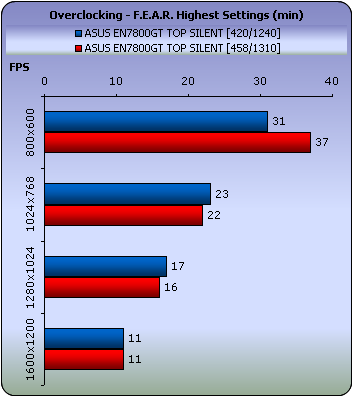
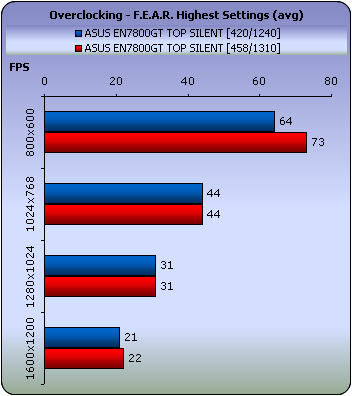
Little change here as well.
 

Review Pages

1. Introduction
2. Features
3. Testbed
4. Benchmarks - 1
5. Benchmarks - 2
6. Benchmarks - 3
7. Benchmarks - 4
8. Benchmarks - 5
9. Benchmarks - 6
10. Benchmarks - 7
11. Benchmarks - 8
12. Benchmarks - 9
13. Benchmarks - 10
14. Overclocking
15. Conclusion


Pages

  • « first
  • ‹ previous
  • …
  • 7
  • 8
  • 9
  • 10
  • 11
  • 12
  • 13
  • 14
  • 15
  • next ›
  • last »

Tags:
Previous Post
Samsung SH-S182D SB02
Next Post
Evermore BT-R900

Related Posts

  • ASUS EXPEDITION GTX1050TI-4G review

  • ASUS STRIX R9 380X OC review

  • Asus Maximus IV Gene-Z review

  • Asus SaberTooth P67 B3 review

  • Asus P6T Deluxe Vs Foxconn Renaissance

  • Asus Rampage Extreme

  • Asus P5Q Deluxe

  • Asus Xonar DX

Latest Reviews

be quiet! Dark Power 14 IO
PC components

be quiet! Dark Power 14 IO

SanDisk High Endurance 512GB microSDXC
Cameras

SanDisk High Endurance 512GB microSDXC

Samsung PRO Ultimate 512GB microSDXC
Cameras

Samsung PRO Ultimate 512GB microSDXC

be quiet! Light Mount TKL
Consumer Electronics

be quiet! Light Mount TKL

be quiet! Light Loop IO LCD
Cooling Systems

be quiet! Light Loop IO LCD

Popular News

CORSAIR announces Vanguard Pro 96 and Vanguard 96 Gaming Keyboards

CORSAIR announces Vanguard Pro 96 and Vanguard 96 Gaming Keyboards

MSI Launches FORGE GK600 TKL WIRELESS Special Edition Compact Mechanical Keyboard

MSI Launches FORGE GK600 TKL WIRELESS Special Edition Compact Mechanical Keyboard

TEAMGROUP Launches EXPERT P34F Find My External SSD

TEAMGROUP Launches EXPERT P34F Find My External SSD

Samsung announces Galaxy Tab S11 and Galaxy S25 FE series

Samsung announces Galaxy Tab S11 and Galaxy S25 FE series

Viltrox Showcases Upcoming Lens Lineup and New TTL Flash at IBC 2025

Viltrox Showcases Upcoming Lens Lineup and New TTL Flash at IBC 2025

Panasonic Introduces the First Ultra-Telephoto Zoom Lens in the LUMIX S Series

Panasonic Introduces the First Ultra-Telephoto Zoom Lens in the LUMIX S Series

MSI Launches DATAMAG 40Gbps Magnetic Portable SSD

MSI Launches DATAMAG 40Gbps Magnetic Portable SSD

MSI’s Latest AMD X870E MAX & EVO Series Motherboards

MSI’s Latest AMD X870E MAX & EVO Series Motherboards

Main menu

  • Home
  • News
  • Reviews
  • Essays
  • About
    • Submit News

    • Contact Us
    • Privacy

    • Promotion
    • Advertise

    • RSS Feed
  • About
  • Privacy
  • Contact Us
  • Promotional Opportunities @ CdrInfo.com
  • Advertise on out site
  • Submit your News to our site
  • RSS Feed