Breaking News

Kioxia and Sandisk Extend Yokkaichi Joint Venture Agreement Through 2034 KIOXIA Unveils EXCERIA PRO G2 SD Memory Card Series Leica announces Noctilux-M 35 f/1.2 ASPH CORSAIR’s GALLEON 100 SD now Shipping Worldwide DJI Launches the RS 5, an All-New Lightweight Commercial Gimbal

logo

  • Share Us
    • Facebook
    • Twitter
  • Home
  • Home
  • News
  • Reviews
  • Essays
  • Forum
  • Legacy
  • About
    • Submit News

    • Contact Us
    • Privacy

    • Promotion
    • Advertise

    • RSS Feed
    • Site Map

Search form

Asus N6600GT AGP

Apr 13,2005 0

15. Overclocking


Review Pages

1. Introduction
2. Features-TurboCache
3. A closer look
4. Test System
5. 3DMark05
6. 3DMark 2003
7. Codecreatures
8. Aquamark3 / 3DMark 2001
9. Half life 2
10. Doom 3
11. Far Cry
12. Thief 3
13. Colin McRae 05
14. Ground Control II
15. Overclocking
16. Conclusion


No matter your graphics card, there comes a time in your computer's life when it can no longer cope with the latest technology the ever so popular games use. This is one of the main reasons for overclocking your graphics card. Gamers are always looking forward for a little extra boost in terms of framerate. Even though most of the times the boost is far from noticeable, overclocking remains the last resort when you can't afford to buy a brand new VGA card.
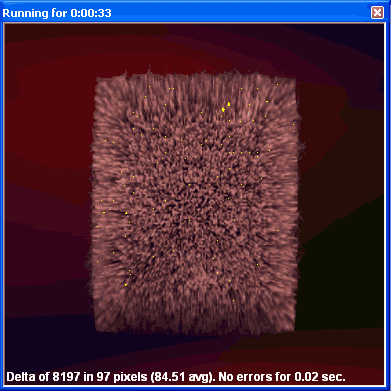
Increasing the memory clock too much,
produces the so-called "artifacts".

As we explained earlier, the Asus N6600GT comes stock clocked higher than other vendor implementations of the 6600GT. It's core runs at 520MHz and the memory at 550MHz.

Unlike other 6600GTs, the memory chosen by Asus is the 1.6ns K4J55323QF-GC16 by Samsung. This means that the theoretical maximum for the memory parts is 625MHz.

Encouraged by that fact, we immediately set the memory clock to 600MHz. That would create an effective memory fetch frequency of 1.2GHz which would boost memory bandwidth even more. The card could run 3DMark05 and games without producing artifacts so we set the clock to 605MHz. Once more, we got no artifacts, but that was the highest frequency where this was possible.

It was time to play around with the GPU clock speeds. Being used to other 6600GT versions we were hoping to push the clock from 520MHz to 550MHz. Unfortunately this wasn't possible and any option above 530MHz would at some point create artifacts or other screen anomalies and finally the system would freeze.

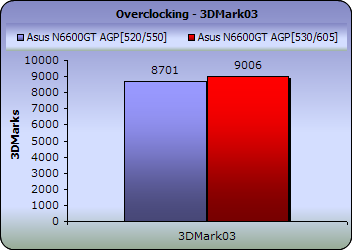
Here are some benchmark results, with the maximum stable overclocking settings on the Asus N6600GT :
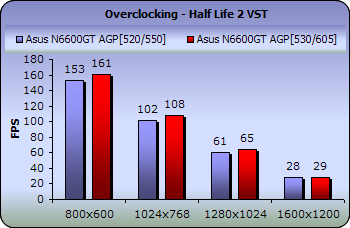
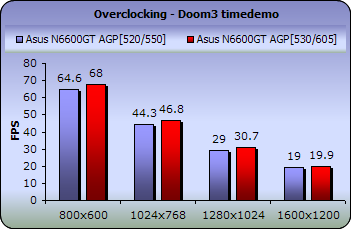
The boost in performance is much less than we originally expected as the GPU clock could not be overclocked as high as we had hoped or seen on similar graphics cards. As a result, we got a boost of 300 3DMarks in 3DMark03 and an average of 2 to 3 fps in the rest of the games.


Review Pages

1. Introduction
2. Features-TurboCache
3. A closer look
4. Test System
5. 3DMark05
6. 3DMark 2003
7. Codecreatures
8. Aquamark3 / 3DMark 2001
9. Half life 2
10. Doom 3
11. Far Cry
12. Thief 3
13. Colin McRae 05
14. Ground Control II
15. Overclocking
16. Conclusion


Pages

  • « first
  • ‹ previous
  • …
  • 8
  • 9
  • 10
  • 11
  • 12
  • 13
  • 14
  • 15
  • 16
  • next ›
  • last »

ASUS

Tags: ASUS
Previous Post
VSO latest results April 17th 2005
Next Post
Toshiba SD-R5372

Related Posts

  • ASUS Unveils Mac-Friendly Features on ProArt Displays to Enhance Workflows

  • Asus at CES 2026

  • ASUS Announces ProArt PF120 Case Fan

  • ASUS Announces Prime AP303 Compact Mid-Tower ATX Case

  • ASUS TUF Gaming Unveils Call of Duty Black Ops 7 Edition AMD Radeon RX 9070 XT

  • ASUS Announces October Availability of ProArt Display 8K PA32KCX

  • ASUS Unveils ProArt PA401, PA602 Wood Edition PC Cases with Retro Colors

  • ASUS Announces ExpertCenter PN54-S1 Mini PC

Latest Reviews

be quiet! Power Zone 2 1200W
PC components

be quiet! Power Zone 2 1200W

The Difference Between American and European Stakes and Why It Changes How People Bet
Enterprise & IT

The Difference Between American and European Stakes and Why It Changes How People Bet

Endorfy Thock V2 Wireless Keyboard
PC components

Endorfy Thock V2 Wireless Keyboard

Noctua NH-D15 G2 Chromax.Black
Cooling Systems

Noctua NH-D15 G2 Chromax.Black

EnGenius ECW520 AP
Enterprise & IT

EnGenius ECW520 AP

Popular News

COLORFUL Introduces CVN B850I GAMING FROZEN Motherboard

COLORFUL Introduces CVN B850I GAMING FROZEN Motherboard

COLORFUL Presents CVN X870 ARK FROZEN Motherboard for AMD Ryzen 9000 CPUs

COLORFUL Presents CVN X870 ARK FROZEN Motherboard for AMD Ryzen 9000 CPUs

TEAMGROUP Launches EXPERT P34F Find My External SSD

TEAMGROUP Launches EXPERT P34F Find My External SSD

ASRock AM5 Motherboards Now Fully Support AMD Ryzen 9 9950X3D & 9900X3D Processors

ASRock AM5 Motherboards Now Fully Support AMD Ryzen 9 9950X3D & 9900X3D Processors

Samsung announces Galaxy Tab S11 and Galaxy S25 FE series

Samsung announces Galaxy Tab S11 and Galaxy S25 FE series

Viltrox Showcases Upcoming Lens Lineup and New TTL Flash at IBC 2025

Viltrox Showcases Upcoming Lens Lineup and New TTL Flash at IBC 2025

CORSAIR announces Vanguard Pro 96 and Vanguard 96 Gaming Keyboards

CORSAIR announces Vanguard Pro 96 and Vanguard 96 Gaming Keyboards

Panasonic Introduces the First Ultra-Telephoto Zoom Lens in the LUMIX S Series

Panasonic Introduces the First Ultra-Telephoto Zoom Lens in the LUMIX S Series

Main menu

  • Home
  • News
  • Reviews
  • Essays
  • Forum
  • Legacy
  • About
    • Submit News

    • Contact Us
    • Privacy

    • Promotion
    • Advertise

    • RSS Feed
    • Site Map
  • About
  • Privacy
  • Contact Us
  • Promotional Opportunities @ CdrInfo.com
  • Advertise on out site
  • Submit your News to our site
  • RSS Feed