Breaking News

G.SKILL Demo New Memory Solutions for Gaming, Server, AI, Workstation Applications at Computex 2026 LIAN LI Launches HydroShift II OLED Curved 360 AIO LIAN LI Unveils O11 VISION-M CORSAIR PRO launches AI Workstations and Servers ASUS Announces T1 GeForce RTX 5070 and RTX 5060 Ti Graphics Cards

logo

  • Share Us
    • Facebook
    • Twitter
  • Home
  • Home
  • News
  • Reviews
  • Essays
  • Forum
  • Legacy
  • About
    • Submit News

    • Contact Us
    • Privacy

    • Promotion
    • Advertise

    • RSS Feed
    • Site Map

Search form

Asus P5B Deluxe/WiFi-AP

Nov 28,2006 0

3. BIOS


Review Pages

1. Introduction
2. The Package
3. BIOS
4. Installation
5. Tests - Page 1
6. Tests - Page 2
7. Tests - Page 3
8. F.E.A.R.
9. Splinter Cell Chaos Theory
10. Overclocking - Page 1
11. WiFi-AP
12. Crossfire/SLI or both
13. Conclusion


The BIOS is the usual one seen with most ASUS boards. The first tab includes the system time/date and storage devices:

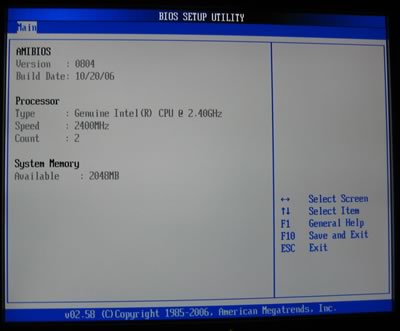
Under System Information, we can see our Bios Version and Build Data, the CPU processor type and available RAM:
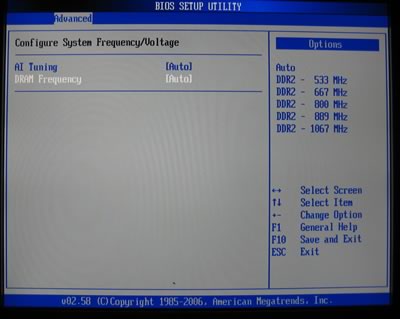
The Advanced chipset feature, is the "heart" of Asus P5B Deluxe, where we can tweak all major overclocking settings. By default, AI Tuning and DRAM Frequency are set to AUTO:
In order to take control of your board, set AI Tuning to Manual and all available settings will appear:
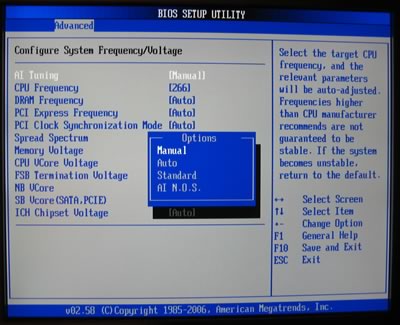
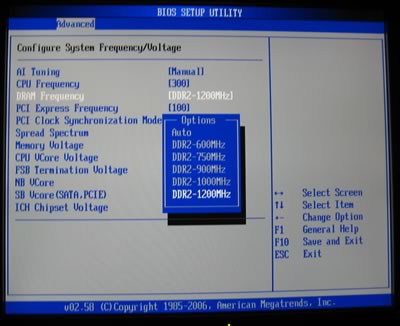
The CPU Frequency sets the FSB, while the DRAM Frequency has several settings, from Auto to DDR2-1067MHz. Each setting represents a different CPU:RAM ratio, so be careful what to select:

  • DDR2-533 (1:1)
  • DDR2-667 (4:5)
  • DDR2-800 (2:3)
  • DDR2-889 (3:5)
  • DDR2-1067 (1:2)

If you overclock and increasing the FSB, the DRAM Frequency changes on-the-fly accordingly, a very useful feature:
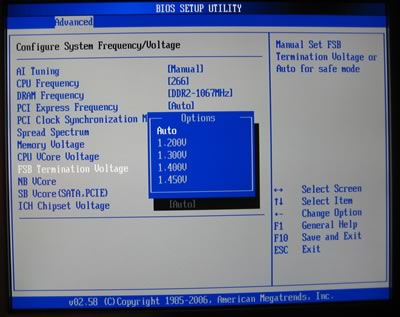
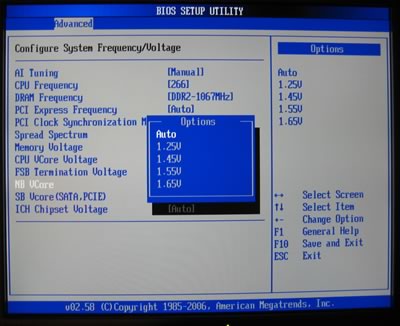
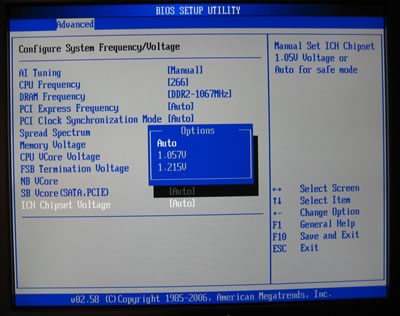
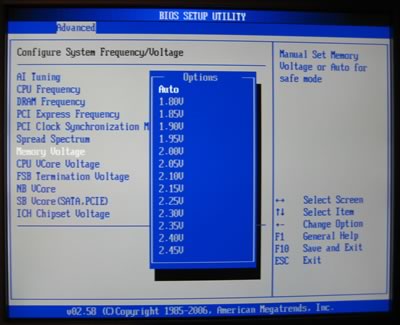
Memory, CPU, FSB, NB, SB and ICH voltages can also be set. Note, that unfortunately, the P5B Deluxe doesn't support 2.2V for DRAM:
 

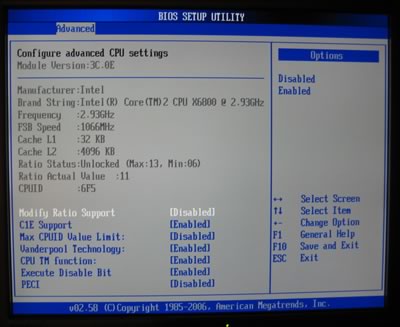
Moving on to the Advanced CPU settings, we can set important information about our processor, in this case the Core2Duo, Ratio status (set modify Ratio Support to Enabled) and disable SpeedStep Technology (set C1E Support to Disabled):
If we decide to manually set the CPU ratio (internal multiplier), another dialogue menu appears, and with +/- we can increase/decrease ratio value:

The Northbridge chipset controls the DRAM. By default, all settings are set to Auto.
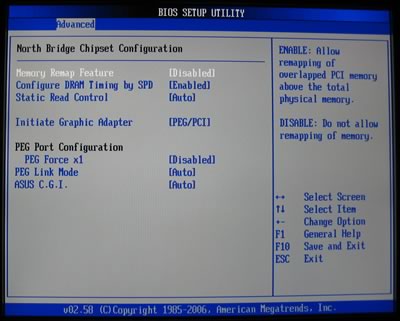
Taking control of memory timings is important if you want to maximize the performance of your system
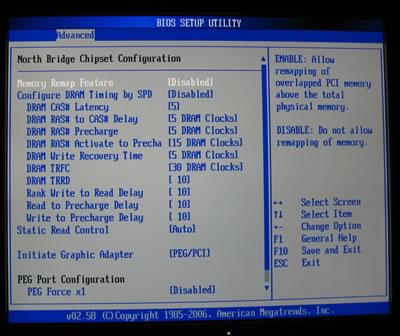
Other features include setting the HD Audio controller and On board LAN:

And of course, the hardware monitor:

Boot priority can be set under Boot settings menu

The user has the option to set OC Profiles in the BIOS:

 

Review Pages

1. Introduction
2. The Package
3. BIOS
4. Installation
5. Tests - Page 1
6. Tests - Page 2
7. Tests - Page 3
8. F.E.A.R.
9. Splinter Cell Chaos Theory
10. Overclocking - Page 1
11. WiFi-AP
12. Crossfire/SLI or both
13. Conclusion


Pages

  • « first
  • ‹ previous
  • 1
  • 2
  • 3
  • 4
  • 5
  • 6
  • 7
  • 8
  • 9
  • …
  • next ›
  • last »

Tags:
Previous Post
Mushkin HP2-6400
Next Post
TeleType GPS WorldNav 3100 Portable GPS - Premium Edition

Related Posts

  • ASUS EXPEDITION GTX1050TI-4G review

  • ASUS STRIX R9 380X OC review

  • Asus Maximus IV Gene-Z review

  • Asus SaberTooth P67 B3 review

  • Asus P6T Deluxe Vs Foxconn Renaissance

  • Asus Rampage Extreme

  • Asus P5Q Deluxe

  • Asus Xonar DX

Latest Reviews

Swit NP-FZ100 Battery
Cameras

Swit NP-FZ100 Battery

The Technology Stack Behind Modern Digital Gaming Platforms
Consumer Electronics

The Technology Stack Behind Modern Digital Gaming Platforms

be quiet! Dark Rock Pro 6
Cooling Systems

be quiet! Dark Rock Pro 6

How Online Casinos Use Encryption, Verification, and Risk Controls to Build User Trust
Enterprise & IT

How Online Casinos Use Encryption, Verification, and Risk Controls to Build User Trust

Why Low-Latency Infrastructure Matters More Than Raw Specs
Enterprise & IT

Why Low-Latency Infrastructure Matters More Than Raw Specs

Popular News

TEAMGROUP Launches EXPERT P34F Find My External SSD

TEAMGROUP Launches EXPERT P34F Find My External SSD

CORSAIR announces Vanguard Pro 96 and Vanguard 96 Gaming Keyboards

CORSAIR announces Vanguard Pro 96 and Vanguard 96 Gaming Keyboards

Samsung announces Galaxy Tab S11 and Galaxy S25 FE series

Samsung announces Galaxy Tab S11 and Galaxy S25 FE series

Viltrox Showcases Upcoming Lens Lineup and New TTL Flash at IBC 2025

Viltrox Showcases Upcoming Lens Lineup and New TTL Flash at IBC 2025

MSI Launches FORGE GK600 TKL WIRELESS Special Edition Compact Mechanical Keyboard

MSI Launches FORGE GK600 TKL WIRELESS Special Edition Compact Mechanical Keyboard

Panasonic Introduces the First Ultra-Telephoto Zoom Lens in the LUMIX S Series

Panasonic Introduces the First Ultra-Telephoto Zoom Lens in the LUMIX S Series

MSI Launches DATAMAG 40Gbps Magnetic Portable SSD

MSI Launches DATAMAG 40Gbps Magnetic Portable SSD

Viltrox Joins the L-Mount Alliance, Expanding Creative Possibilities

Viltrox Joins the L-Mount Alliance, Expanding Creative Possibilities

Main menu

  • Home
  • News
  • Reviews
  • Essays
  • Forum
  • Legacy
  • About
    • Submit News

    • Contact Us
    • Privacy

    • Promotion
    • Advertise

    • RSS Feed
    • Site Map
  • About
  • Privacy
  • Contact Us
  • Promotional Opportunities @ CdrInfo.com
  • Advertise on out site
  • Submit your News to our site
  • RSS Feed