
Breaking News

Flowtica Announces Commercial Availability of Upgraded Flowtica Scribe AI Recording Pen Toshiba Demonstrates Storage Infrastructure for Scientific AI and Research at ISC 2026 DZOFILM Announces Octopus II Multi-Mount Lens Adapter & Marlin 1.4x Extender TerraMaster Prime Day 2026 Sale Offers Up to 25% Off XPG Launches INFINITY Fans and MAESTRO Air Coolers

logo

  • Share Us
    • Facebook
    • Twitter
  • Home
  • Home
  • News
  • Reviews
  • Essays
  • Forum
  • Legacy
  • About
    • Submit News

    • Contact Us
    • Privacy

    • Promotion
    • Advertise

    • RSS Feed
    • Site Map

Search form

Dragon Touch Digital Calendar

Aug 29,2025 0

5. Conclusion


Review Pages

1. Introduction
2. Retail Package
3. Installation
4. Setting up
5. Conclusion


After using the Dragon Touch Calendar, we have nothing but good words to talk about. The device is well constructed, and it gives you that feeling of a digital frame that can also be used for something other than photographs. We didn't have any problems syncing our Google calendar with the device and operating it via its 15.6" touchscreen. You can also add new events/tasks with the built-in touchscreen or via the eCalendar app. There is also the ability to show photo slideshows. The device, by default, showcases the entire week ahead so you can quickly view upcoming events/tasks without dealing with your phone. There is a color-coding that separates work, school, travel, and personal events so you can check what is coming up. The device with the built-in stand can be safely placed, either horizontal or vertical, and you can also wall mount it if you like. Note that the 10.1" model cannot be wall-mounted.
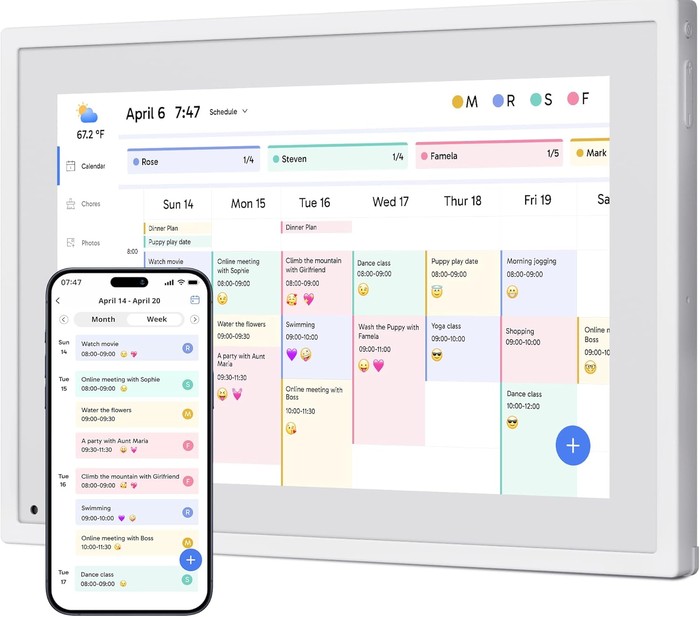
The screen, while highly reflective, when closed, when operated, has a good brightness when closed and operated, and the auto-dimming function does seem to work properly, in day or night. The setup process, as we demonstrated before, is easy and understandable for most users. The user GUI is separated into several functions that are navigated via touchscreen. Of course, you can set up reminders, appointments, or personal events that can be shared with your whole family. In fact, you can have several users adding content to the device by sharing the device with other users as well. The device is passively cooled, meaning you won't hear any noise, while the built-in speakers are present, but nothing special. The Weather app, while it shows the weather, isn't something special; it only shows basic information. There is also an online PDF manual and FAQ for users who want to get deeper into their device. On the more technical side, the device is stuck at Android 10. We hope that it will get updated to a more decent version. The device, while it seems to support Bluetooth, is locked, so you cannot transmit audio or transfer local files or APKs; you can only transfer photos via the eCalendar app. The device is also locked, so you cannot side-load other apps and further enhance the overall experience, for example, playing Videos.

Overall, we find the Dragon Touch Digital Calendar to be an interesting product that people who need such a digital organizer will find useful. Since the product has many different dimensions and options, users can start from the 10.1" model and move up to the 32" model as well. The retail price of the 10.1" model on the Amazon USA online store is around $130, while the tested 15.6" version, according to the official website, can be bought for around $250.


Review Pages

1. Introduction
2. Retail Package
3. Installation
4. Setting up
5. Conclusion


Pages

  • « first
  • ‹ previous
  • 1
  • 2
  • 3
  • 4
  • 5

Dragon Touch

Tags: Dragon Touch
Previous Post
be quiet! Pure Loop 3 280mm
Next Post
Soft2bet and the unseen hardware that makes instant play possible

Related Posts

Latest Reviews

Swit NP-FZ100 Battery
Cameras

Swit NP-FZ100 Battery

The Technology Stack Behind Modern Digital Gaming Platforms
Consumer Electronics

The Technology Stack Behind Modern Digital Gaming Platforms

be quiet! Dark Rock Pro 6
Cooling Systems

be quiet! Dark Rock Pro 6

How Online Casinos Use Encryption, Verification, and Risk Controls to Build User Trust
Enterprise & IT

How Online Casinos Use Encryption, Verification, and Risk Controls to Build User Trust

Why Low-Latency Infrastructure Matters More Than Raw Specs
Enterprise & IT

Why Low-Latency Infrastructure Matters More Than Raw Specs

Popular News

CORSAIR announces Vanguard Pro 96 and Vanguard 96 Gaming Keyboards

CORSAIR announces Vanguard Pro 96 and Vanguard 96 Gaming Keyboards

TEAMGROUP Launches EXPERT P34F Find My External SSD

TEAMGROUP Launches EXPERT P34F Find My External SSD

MSI Launches FORGE GK600 TKL WIRELESS Special Edition Compact Mechanical Keyboard

MSI Launches FORGE GK600 TKL WIRELESS Special Edition Compact Mechanical Keyboard

Samsung announces Galaxy Tab S11 and Galaxy S25 FE series

Samsung announces Galaxy Tab S11 and Galaxy S25 FE series

Viltrox Showcases Upcoming Lens Lineup and New TTL Flash at IBC 2025

Viltrox Showcases Upcoming Lens Lineup and New TTL Flash at IBC 2025

Panasonic Introduces the First Ultra-Telephoto Zoom Lens in the LUMIX S Series

Panasonic Introduces the First Ultra-Telephoto Zoom Lens in the LUMIX S Series

MSI Launches DATAMAG 40Gbps Magnetic Portable SSD

MSI Launches DATAMAG 40Gbps Magnetic Portable SSD

Viltrox Joins the L-Mount Alliance, Expanding Creative Possibilities

Viltrox Joins the L-Mount Alliance, Expanding Creative Possibilities

Main menu

  • Home
  • News
  • Reviews
  • Essays
  • Forum
  • Legacy
  • About
    • Submit News

    • Contact Us
    • Privacy

    • Promotion
    • Advertise

    • RSS Feed
    • Site Map
  • About
  • Privacy
  • Contact Us
  • Promotional Opportunities @ CdrInfo.com
  • Advertise on out site
  • Submit your News to our site
  • RSS Feed
