
Breaking News

COLORFUL Presents Limited Edition Chitu MAG-60 Magnetic Keyboard Inspired by the Year of the Horse AMD Advances the Hybrid Future of Quantum Computing Flowtica Announces Commercial Availability of Upgraded Flowtica Scribe AI Recording Pen Toshiba Demonstrates Storage Infrastructure for Scientific AI and Research at ISC 2026 DZOFILM Announces Octopus II Multi-Mount Lens Adapter & Marlin 1.4x Extender

logo

  • Share Us
    • Facebook
    • Twitter
  • Home
  • Home
  • News
  • Reviews
  • Essays
  • Forum
  • Legacy
  • About
    • Submit News

    • Contact Us
    • Privacy

    • Promotion
    • Advertise

    • RSS Feed
    • Site Map

Search form

Freecom FC-1

Feb 20,2004 0

9. Flash Memory card reader


Review Pages

1. Data CD reading Tests
2. Package - Installation
3. CD Error Correction Tests
4. Protected Disc Tests
5. CD-DA - DAE Tests
6. CD Recording Tests
7. Writing quality - 3T Jitter Tests
8. C1 / C2 Error Measurements
9. Flash Memory card reader
10. Conclusion


Freecom FC-1 - Page 9

7 in 1 Flash Memory card reader

Flash Memory cards are very popular nowadays, being used in several devices such as digital cameras, MP3 players etc. For our convenience the drive is capable of reading/writing almost all the memory card types currently available on the market. All the supported cards are summarized below :

- Compact Flash / Micro Drive

- Secure Digital

- Memory Stick / Memory Stick Pro

- Smart Media

- MultiMediaCard

Only the XD card reader is missing from the drive!

As soon as we connect the unit on our PC, from "My Computer", we will see the following icons :
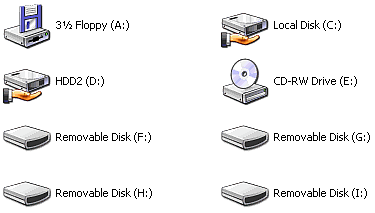
If we take look at the drive's front panel, we will see that there are four slots for memory cards. So for each slot there is one independent "Removable Disk" icon. So, Freecom FC-1 offers nothing more than a convenient build-in card, and its operation as a "card reader" is independent to the operation of the IDE drive. This means that you can use it as a card reader without connecting the IDE and power cables on your PC. The USB cable connection is enough to power up the reader.

As we mention in the first page of this article, user can either connect the USB cable directly to the corresponding pins on the motherboard, or use the provided adapter to connect it to the USB slot on the rear panel of the PC.


Review Pages

1. Data CD reading Tests
2. Package - Installation
3. CD Error Correction Tests
4. Protected Disc Tests
5. CD-DA - DAE Tests
6. CD Recording Tests
7. Writing quality - 3T Jitter Tests
8. C1 / C2 Error Measurements
9. Flash Memory card reader
10. Conclusion


Pages

  • « first
  • ‹ previous
  • …
  • 2
  • 3
  • 4
  • 5
  • 6
  • 7
  • 8
  • 9
  • 10
  • next ›
  • last »

Tags:
Previous Post
Teac DV-W58G
Next Post
Nec ND-2500A

Related Posts

Latest Reviews

Swit NP-FZ100 Battery
Cameras

Swit NP-FZ100 Battery

The Technology Stack Behind Modern Digital Gaming Platforms
Consumer Electronics

The Technology Stack Behind Modern Digital Gaming Platforms

be quiet! Dark Rock Pro 6
Cooling Systems

be quiet! Dark Rock Pro 6

How Online Casinos Use Encryption, Verification, and Risk Controls to Build User Trust
Enterprise & IT

How Online Casinos Use Encryption, Verification, and Risk Controls to Build User Trust

Why Low-Latency Infrastructure Matters More Than Raw Specs
Enterprise & IT

Why Low-Latency Infrastructure Matters More Than Raw Specs

Popular News

CORSAIR announces Vanguard Pro 96 and Vanguard 96 Gaming Keyboards

CORSAIR announces Vanguard Pro 96 and Vanguard 96 Gaming Keyboards

TEAMGROUP Launches EXPERT P34F Find My External SSD

TEAMGROUP Launches EXPERT P34F Find My External SSD

MSI Launches FORGE GK600 TKL WIRELESS Special Edition Compact Mechanical Keyboard

MSI Launches FORGE GK600 TKL WIRELESS Special Edition Compact Mechanical Keyboard

Samsung announces Galaxy Tab S11 and Galaxy S25 FE series

Samsung announces Galaxy Tab S11 and Galaxy S25 FE series

Viltrox Showcases Upcoming Lens Lineup and New TTL Flash at IBC 2025

Viltrox Showcases Upcoming Lens Lineup and New TTL Flash at IBC 2025

Panasonic Introduces the First Ultra-Telephoto Zoom Lens in the LUMIX S Series

Panasonic Introduces the First Ultra-Telephoto Zoom Lens in the LUMIX S Series

MSI Launches DATAMAG 40Gbps Magnetic Portable SSD

MSI Launches DATAMAG 40Gbps Magnetic Portable SSD

Viltrox Joins the L-Mount Alliance, Expanding Creative Possibilities

Viltrox Joins the L-Mount Alliance, Expanding Creative Possibilities

Main menu

  • Home
  • News
  • Reviews
  • Essays
  • Forum
  • Legacy
  • About
    • Submit News

    • Contact Us
    • Privacy

    • Promotion
    • Advertise

    • RSS Feed
    • Site Map
  • About
  • Privacy
  • Contact Us
  • Promotional Opportunities @ CdrInfo.com
  • Advertise on out site
  • Submit your News to our site
  • RSS Feed
