
Breaking News

ASUS Announces WiFi 8 Router DJI Launches Osmo 360 II Razer introduces Clio X Wireless Speaker Head Cushion That Delivers THX Spatial Audio LiberNovo Showcases Ergonomic Innovation at IFA 2026 with Maxis Series for Big And Tall Users TIMEKETTLE UNVEILS NEW W4 PLUS AI INTERPRETER EARBUDS EXPANDING REAL-TIME TRANSLATION ACROSS CALLS, MEETINGS AND MULTIMEDIA CONTENT

logo

  • Share Us
    • Facebook
    • Twitter
  • Home
  • Home
  • News
  • Reviews
  • Essays
  • About
    • Submit News

    • Contact Us
    • Privacy

    • Promotion
    • Advertise

    • RSS Feed

Search form

Gigabyte GA-EP35-DS4

May 14,2008 0

3. BIOS, test configuration, Energy Saving function


Review Pages

1. Features, specifications
2. The Package
3. BIOS, test configuration, Energy Saving function
4. Benchmarks - Everest Ultimate Edition, SiSoftware Sandra
5. Benchmarks - PCMark Vantage, SYSmark 2007 Preview
6. Benchmarks - MAXON CINEBENCH, x264 HD Benchmark, - TMPGEnc 4 Xpress
7. Benchmarks - SuperPI, wPrime
8. Benchmarks - 3DMark 06, Crysis, Unreal Tournament 3
9. Overclocking
10. Conclusion


Not much have changed in the BIOS settings. There are various auto overclocking modes (Gigabyte C.I.A.) and performance boosters ("Performance Enhance" & and "Robust Graphics Booster").

While the settings are well layout, they don't have the depth that other motherboard makers offer, at least at their top lines. For example, you cannot exactly set the cpu/memory voltages, since the BIOS offers only + offsets of the basic value. Under windows you can also select the exact memory/cpu voltage with EasyTune Pro, but of course settings through BIOS would be ideal. The profile saving option is very useful, although you need to press the F11/F12 buttons to access it.

- Test Configuration

Let's see now how our CPU was identified under CPU-Z:

Our testbed included an Intel Q9300 processor, paired with 2x1GB of Crucial PC2-8000 memory modules @ CL5-5-5-15-2T.

- Energy Saving function

In order to use the Dynamic Energy Saver function, you will have to install the corresponding software.

The software starts automatically when windows loads. The energy saving function are turned off by default, but you can enable it by clicking on the big oval button:

Several menus have now been enabled and it may take you some time experimenting with the buttons in order to find out how it works. First of all the three CPU Voltage levels, each of them set to offer different power saving levels. However, changing these power settings does not reveal their actual impact to the core voltage.

Note that when Dynamic Energy Saver is enabled, the EasyTunePro software doesnt work...
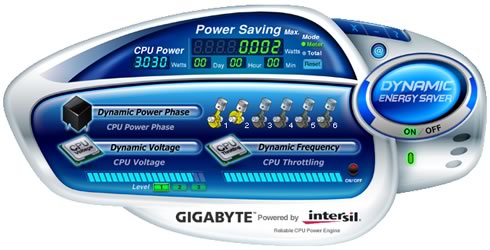
The software also records the current power use, the amount of power you have consumed in total and of course how much energy has been saved in terms of wattage. Of course these numbers are refering to main cpu and not the whole system... If you like cars, you will have fun with the animated cylinders that represent the six power phases of the motherboard.

The Dynamic Frequency CPU throttling tab also uses a progress bar without giving any specific values for each setting.

After using the Gigabyte Dynamic Energy Saver for some time, we saw that it actually works and hopefully it offers some kind of energy saving. However, the absence of a calibrated scale for the various settings does not allow us to give you some actual figures...


Review Pages

1. Features, specifications
2. The Package
3. BIOS, test configuration, Energy Saving function
4. Benchmarks - Everest Ultimate Edition, SiSoftware Sandra
5. Benchmarks - PCMark Vantage, SYSmark 2007 Preview
6. Benchmarks - MAXON CINEBENCH, x264 HD Benchmark, - TMPGEnc 4 Xpress
7. Benchmarks - SuperPI, wPrime
8. Benchmarks - 3DMark 06, Crysis, Unreal Tournament 3
9. Overclocking
10. Conclusion

 

Pages

  • « first
  • ‹ previous
  • 1
  • 2
  • 3
  • 4
  • 5
  • 6
  • 7
  • 8
  • 9
  • next ›
  • last »

Gigabyte

Tags: Gigabyte
Previous Post
Crucial 32GB SSD
Next Post
Jabra BT8030

Related Posts

  • GIGABYTE Brings AORUS INFINITY to Gamescom 2026 with an Immersive Gaming Playground

  • GIGABYTE Announces the Availability of AORUS GeForce RTX 50 INFINITY Series Graphics Cards

  • GIGABYTE Brings Flagship Power to Enthusiast PC Builds and Local AI with AORUS P1600W

  • GIGABYTE announces AORUS GeForce RTX 50 Series AI BOX

  • GIGABYTE Showcases Sleek STEALTH and Elegant WOOD PC Builds at COMPUTEX 2026

  • GIGABYTE Showcases Industry-leading CQDIMM Performance and Ecosystem Expansion at COMPUTEX 2026

  • GIGABYTE Announces World's First DDR5-7200 at Full 256GB with CQDIMM at CES 2026

  • GIGABYTE Launches AORUS GeForce RTX 5090 INFINITY Graphics Card

Latest Reviews

be quiet! Dark Power 14 IO
PC components

be quiet! Dark Power 14 IO

SanDisk High Endurance 512GB microSDXC
Cameras

SanDisk High Endurance 512GB microSDXC

Samsung PRO Ultimate 512GB microSDXC
Cameras

Samsung PRO Ultimate 512GB microSDXC

be quiet! Light Mount TKL
Consumer Electronics

be quiet! Light Mount TKL

be quiet! Light Loop IO LCD
Cooling Systems

be quiet! Light Loop IO LCD

Popular News

CORSAIR announces Vanguard Pro 96 and Vanguard 96 Gaming Keyboards

CORSAIR announces Vanguard Pro 96 and Vanguard 96 Gaming Keyboards

MSI Launches FORGE GK600 TKL WIRELESS Special Edition Compact Mechanical Keyboard

MSI Launches FORGE GK600 TKL WIRELESS Special Edition Compact Mechanical Keyboard

Viltrox Showcases Upcoming Lens Lineup and New TTL Flash at IBC 2025

Viltrox Showcases Upcoming Lens Lineup and New TTL Flash at IBC 2025

Panasonic Introduces the First Ultra-Telephoto Zoom Lens in the LUMIX S Series

Panasonic Introduces the First Ultra-Telephoto Zoom Lens in the LUMIX S Series

MSI Launches DATAMAG 40Gbps Magnetic Portable SSD

MSI Launches DATAMAG 40Gbps Magnetic Portable SSD

MSI’s Latest AMD X870E MAX & EVO Series Motherboards

MSI’s Latest AMD X870E MAX & EVO Series Motherboards

COLORFUL Launches iGame B850M ULTRA Series Micro-ATX Motherboards

COLORFUL Launches iGame B850M ULTRA Series Micro-ATX Motherboards

COLORFUL Presents Limited Edition Chitu MAG-60 Magnetic Keyboard Inspired by the Year of the Horse

COLORFUL Presents Limited Edition Chitu MAG-60 Magnetic Keyboard Inspired by the Year of the Horse

Main menu

  • Home
  • News
  • Reviews
  • Essays
  • About
    • Submit News

    • Contact Us
    • Privacy

    • Promotion
    • Advertise

    • RSS Feed
  • About
  • Privacy
  • Contact Us
  • Promotional Opportunities @ CdrInfo.com
  • Advertise on out site
  • Submit your News to our site
  • RSS Feed


