Breaking News

Club3D announces new Qi2 products for 2026 LIAN LI Launches Vector V100 MINI Compact mATX Case Starting at $49.99 GAMEMAX Unveils NEX C56 and NEX C56 VC Dual-Chamber Cases ASUS Announces ProArt PF120 Case Fan ASUSTOR has announced the release of the new upgraded Lockerstor Gen2 Plus

logo

  • Share Us
    • Facebook
    • Twitter
  • Home
  • Home
  • News
  • Reviews
  • Essays
  • Forum
  • Legacy
  • About
    • Submit News

    • Contact Us
    • Privacy

    • Promotion
    • Advertise

    • RSS Feed
    • Site Map

Search form

Intel Celeron D 341, 346

Feb 7,2006 0

10. Overclocking


Review Pages

1. Introduction
2. Test System - Configuration
3. SiSoftware Sandra 2005
4. PCMark04 - 05
5. 3DMark Tests
6. Performance Test v5.0
7. Prime95
8. Encoding
9. Half Life 2
10. Overclocking
11. Conclusion


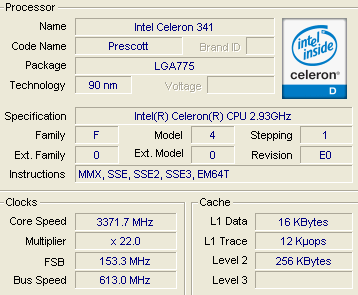
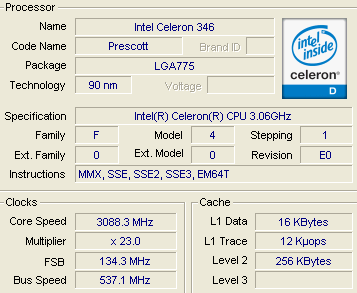
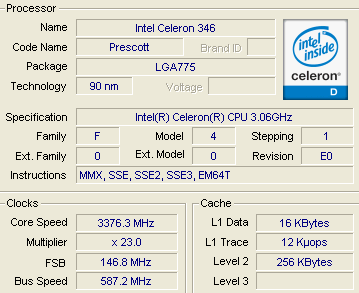
In order to overclock the CPU, we used the preset settings of our ASUS motherboard and set the overclocking profile to 10%. We also tried 15% and 20% but the system failed to boot.

- Intel Celeron D 341
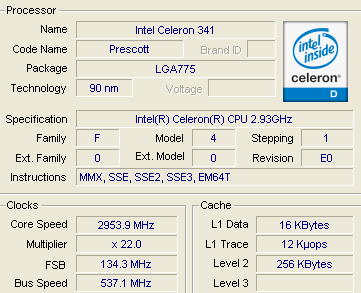
The default clocks...
Overclocked 10%

- Intel Celeron D 346

The default clocks...
Overclocked 10%

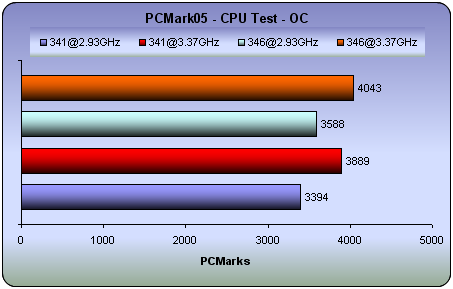
With the new, overclocked profiles, we repeated some of the tests:

- The Tests
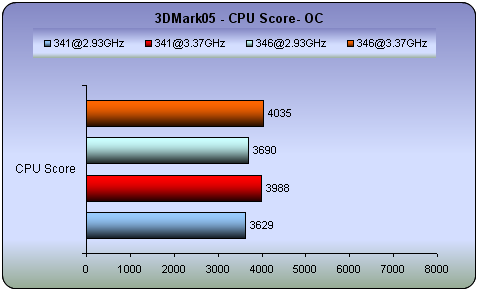
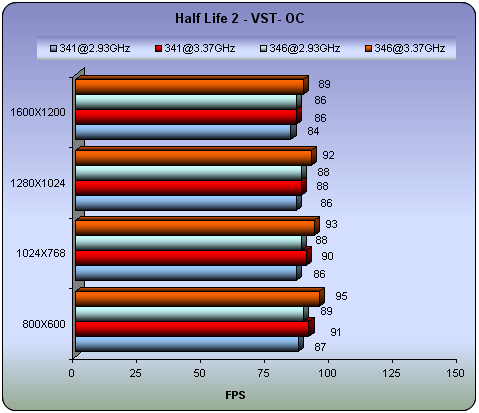
The overclocking profile increased the performance in the PCM05 and 3DM05 benchmarks for both processors. However, in games you won't notice any marked difference with only a 2~6fps increase.

 

Review Pages

1. Introduction
2. Test System - Configuration
3. SiSoftware Sandra 2005
4. PCMark04 - 05
5. 3DMark Tests
6. Performance Test v5.0
7. Prime95
8. Encoding
9. Half Life 2
10. Overclocking
11. Conclusion


Pages

  • « first
  • ‹ previous
  • …
  • 3
  • 4
  • 5
  • 6
  • 7
  • 8
  • 9
  • 10
  • 11
  • next ›
  • last »

Intel

Tags: Intel
Previous Post
Memorex Mega TravelDrive
Next Post
GlobalSat BTA-806, BTA-830 and BTH-820

Related Posts

  • Intel and NVIDIA to Jointly Develop AI Infrastructure and Personal Computing Products

  • An Intel-HP Collaboration Delivers Next-Gen AI PCs

  • New Intel Xeon 6 CPUs to Maximize GPU-Accelerated AI Performance

  • Intel Unveils New GPUs for AI and Workstations at Computex 2025

  • G.SKILL Releases DDR5 Memory Support List for Intel 200S Boost

  • Intel and its partners release BIOS update for Intel 15th Gen to increase performance

  • Intel-AMD new motherboards announced

  • Intel at CES 2025

Latest Reviews

EnGenius ECW520 AP
Enterprise & IT

EnGenius ECW520 AP

Noctua NP-DM3 desk mat
Gaming

Noctua NP-DM3 desk mat

Crucial P510 2TB NMVE
PC components

Crucial P510 2TB NMVE

The Quiet Technology Behind the Spin
Enterprise & IT

The Quiet Technology Behind the Spin

Crucial DDR5 Pro 6400 CL32
PC components

Crucial DDR5 Pro 6400 CL32

Popular News

COLORFUL Introduces CVN B850I GAMING FROZEN Motherboard

COLORFUL Introduces CVN B850I GAMING FROZEN Motherboard

COLORFUL Presents CVN X870 ARK FROZEN Motherboard for AMD Ryzen 9000 CPUs

COLORFUL Presents CVN X870 ARK FROZEN Motherboard for AMD Ryzen 9000 CPUs

COLORFUL Presents the B860 Series Motherboards

COLORFUL Presents the B860 Series Motherboards

Intel-AMD new motherboards announced

Intel-AMD new motherboards announced

TEAMGROUP Launches EXPERT P34F Find My External SSD

TEAMGROUP Launches EXPERT P34F Find My External SSD

ASRock AM5 Motherboards Now Fully Support AMD Ryzen 9 9950X3D & 9900X3D Processors

ASRock AM5 Motherboards Now Fully Support AMD Ryzen 9 9950X3D & 9900X3D Processors

Samsung announces Galaxy Tab S11 and Galaxy S25 FE series

Samsung announces Galaxy Tab S11 and Galaxy S25 FE series

Viltrox Showcases Upcoming Lens Lineup and New TTL Flash at IBC 2025

Viltrox Showcases Upcoming Lens Lineup and New TTL Flash at IBC 2025

Main menu

  • Home
  • News
  • Reviews
  • Essays
  • Forum
  • Legacy
  • About
    • Submit News

    • Contact Us
    • Privacy

    • Promotion
    • Advertise

    • RSS Feed
    • Site Map
  • About
  • Privacy
  • Contact Us
  • Promotional Opportunities @ CdrInfo.com
  • Advertise on out site
  • Submit your News to our site
  • RSS Feed