Breaking News

Powerful Cooling with the Freezer 4U-OneX Samsung Launches Galaxy A07 5G Mobile phone Samsung Ships Industry-First Commercial HBM4 With Ultimate Performance for AI Computing BIOSTAR INTRODUCES DDR5 16GB UDIMM 4800MHz/5600MHz MEMORY GAMEMAX Launches NEX C51 and NEX C31 Panoramic PC Cases

logo

  • Share Us
    • Facebook
    • Twitter
  • Home
  • Home
  • News
  • Reviews
  • Essays
  • Forum
  • Legacy
  • About
    • Submit News

    • Contact Us
    • Privacy

    • Promotion
    • Advertise

    • RSS Feed
    • Site Map

Search form

Linux Raid Guide

Feb 14,2007 0

2. Partitioning


Review Pages

1. Introduction
2. Partitioning
3. Kernel and modules
4. Making the array
5. Performance


Untitled Document Get r00t

Ok, I'm not really going to show you how to get root access. Let's assume that you have root access and proceed to the next step.

Partitioning

This is not hard, if you know how to make partitions with any of the popular linux tools, like cfdisk, fdisk, sfdisk and parted. My favorite is cfdisk, because it is relatively easier and confusion has to be avoided when partitioning your drive! Your distribution definitely includes one or more of these tools and, quite possibly, a graphical front-end for KDE or Gnome, so choose the one that suits you best. All you have to do is make two partitions of the approximate same size (say 10GB or whatever you think is necessary for your most important files) and mark them as “fd” instead of “82” or “83”. This last step is particularly important, because “fd” marks the partition as Linux RAID autodetect and enables the kernel to recognize it at boot time as part of a RAID setup.

―DANGER―

Creating and deleting partitions can result in loss of data. Be really careful.

Backup your drives at this point. No, not later. Now.

You partition table should contain the new partition, marked as Linux raid autodetect. Repeat the process for both disks, of course. In the following example, /dev/sdb5 and /dev/sda5 will be used as part of the RAID mirror. The fact that they are both fifth is irrelevant, we could have used /dev/sdb1 and /dev/sda3, but not /dev/sda1 and /dev/sda2, because they are on the same device:

The output from /dev/sda follows, here too we have a partition of equal length (97659103 blocks), marked as Linux raid autodetect (fd):
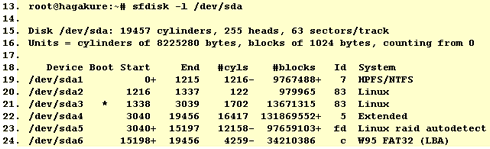
Now we have to ensure that the system RAID devices are available under /dev (ls -l /dev/md* or ls -l /dev/md/*). Most probably they are available. If not, you can create them with (mdadm can also do that automatically, but you should also know how to do it by hand):

or (depending on your /dev structure)

We will now assume that you will use the /dev/md0 device, so substitute accordingly if you're using /dev/md/0 or /dev/md1, for example. You are free to use any other name, of course, like /dev/md/home or /dev/md/stuff. You only need one md device for every RAID array.

 

Review Pages

1. Introduction
2. Partitioning
3. Kernel and modules
4. Making the array
5. Performance


Pages

  • « first
  • ‹ previous
  • 1
  • 2
  • 3
  • 4
  • 5
  • next ›
  • last »

Linux

Tags: Linux
Previous Post
Motorola Q (Sprint Moto Q)
Next Post
Asus P5W64WS Pro

Related Posts

  • NVIDIA Accelerates Open Data Center Innovation

  • System76's Lemur Pro Linux Laptop Now Available

  • System76 Is Designing Its Own Keyboard

  • Microsoft Brings Microsoft Defender ATP to Linux, iOS and Android

  • Tuxedo Computers and Manjaro Team Up on New Linux Laptops

  • Huawei Unveils The openEuler CentOS-based Linux Distribution

  • Lazarus Group Targets Linux With New Malware

  • Microsoft Teams Available on Linux

Latest Reviews

Asustor AS5404T 4-Bay NAS System
Enterprise & IT

Asustor AS5404T 4-Bay NAS System

be quiet! Pure Power 13M 1200W
PC components

be quiet! Pure Power 13M 1200W

Server-Side Gaming Why Canadian Online Casinos Are Abandoning Local Clients for HTML5 Clouds
Enterprise & IT

Server-Side Gaming Why Canadian Online Casinos Are Abandoning Local Clients for HTML5 Clouds

Airfanta 3 Pro Air
Consumer Electronics

Airfanta 3 Pro Air

Akaso Brave 8 Lite
Cameras

Akaso Brave 8 Lite

Popular News

COLORFUL Introduces CVN B850I GAMING FROZEN Motherboard

COLORFUL Introduces CVN B850I GAMING FROZEN Motherboard

COLORFUL Presents CVN X870 ARK FROZEN Motherboard for AMD Ryzen 9000 CPUs

COLORFUL Presents CVN X870 ARK FROZEN Motherboard for AMD Ryzen 9000 CPUs

TEAMGROUP Launches EXPERT P34F Find My External SSD

TEAMGROUP Launches EXPERT P34F Find My External SSD

Samsung announces Galaxy Tab S11 and Galaxy S25 FE series

Samsung announces Galaxy Tab S11 and Galaxy S25 FE series

Viltrox Showcases Upcoming Lens Lineup and New TTL Flash at IBC 2025

Viltrox Showcases Upcoming Lens Lineup and New TTL Flash at IBC 2025

CORSAIR announces Vanguard Pro 96 and Vanguard 96 Gaming Keyboards

CORSAIR announces Vanguard Pro 96 and Vanguard 96 Gaming Keyboards

Panasonic Introduces the First Ultra-Telephoto Zoom Lens in the LUMIX S Series

Panasonic Introduces the First Ultra-Telephoto Zoom Lens in the LUMIX S Series

MSI Launches DATAMAG 40Gbps Magnetic Portable SSD

MSI Launches DATAMAG 40Gbps Magnetic Portable SSD

Main menu

  • Home
  • News
  • Reviews
  • Essays
  • Forum
  • Legacy
  • About
    • Submit News

    • Contact Us
    • Privacy

    • Promotion
    • Advertise

    • RSS Feed
    • Site Map
  • About
  • Privacy
  • Contact Us
  • Promotional Opportunities @ CdrInfo.com
  • Advertise on out site
  • Submit your News to our site
  • RSS Feed