Breaking News

Arctic announces Senza AI 370 Under Desk PC for AI Applications CORSAIR Announces the Airflow-focused 3200D Mid Tower for Ambitious DIY PC Builds Silicon Power Launches Enterprise-Grade DDR5 RDIMM to Accelerate AI Workloads World Backup Day 2026: A Backup Doesn’t Always Need to be in the Cloud Sharkoon announces S100 ARGB AIO Cooler

logo

  • Share Us
    • Facebook
    • Twitter
  • Home
  • Home
  • News
  • Reviews
  • Essays
  • Forum
  • Legacy
  • About
    • Submit News

    • Contact Us
    • Privacy

    • Promotion
    • Advertise

    • RSS Feed
    • Site Map

Search form

LiteOn LVW-5005

May 27,2004 0

4. Recording Tests


Review Pages

1. Introduction - Specifications
2. Unpacking - Control Menu
3. Reading Tests
4. Recording Tests
5. Writing Quality Tests
6. Error Correction Tests
7. Conclusion


LiteOn LVW-5005 DVD Recorder - page 4

Recording Tests

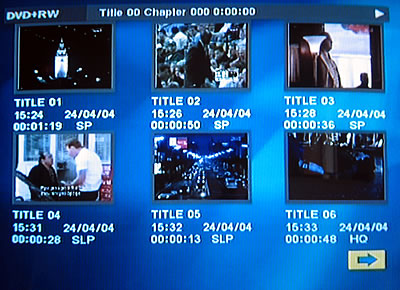
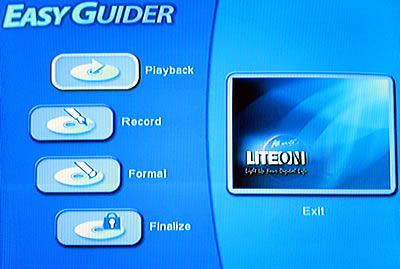
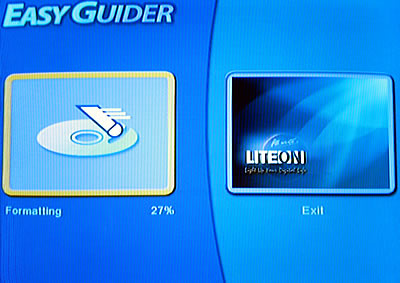
Before starting the recording procedure, we should state that LiteOn recorders offer users a very simple recording interface. After pressing the "Guider" button, on the remote control, the following screen will be appear: For convenience, there is also an option to record immediately by pressing the "Record" button.
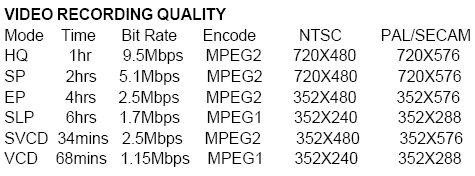
Below you can see information from Power DVD while playback HQ, SP, EP and SLP quality respectively:


We tried to any the difference between different image qualities, by grabbing the same frame from each one while playing. The results are below:


HQ Quality

SP Quality

EP Quality

SLP Quality

After recording a DVD media, we open the media on our PC. The contents of the disc are:

where in the VIDEO_RM folder are:
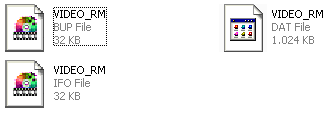
and in the VIDEO_TS folder, the usual files:
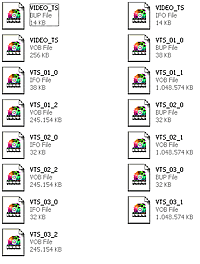
Below you can acquaint yourselves with more details about the media we used for the tests:

Name
ID
CMC Magnetics 2.4X DVD+R
CMC MAG R01
Traxdata 4X DVD+R
RICOHJPNR01
MMore 4X DVD+R
MBIPG101R03
CMC Magnetics 4X DVD-R
CMC MAG AF1
MMore 4X DVD-R
MBI01RG20
Mitsubishi Chemicals 4X DVD-R
MCC 01RG20
Traxdata 4X DVD+RW
RICOHJPNW11
Traxdata 4X DVD-RW
RITEKW04


Review Pages

1. Introduction - Specifications
2. Unpacking - Control Menu
3. Reading Tests
4. Recording Tests
5. Writing Quality Tests
6. Error Correction Tests
7. Conclusion


Pages

  • « first
  • ‹ previous
  • 1
  • 2
  • 3
  • 4
  • 5
  • 6
  • 7
  • next ›
  • last »

LiteOn

Tags: LiteOn
Previous Post
VGA Roundup
Next Post
LiteOn SDW-431S

Related Posts

  • LITE-ON Technology Delays Transfer of Its Solid State Drives Business to Kioxia

  • SSSTC is Sampling the CA6 PCIe Gen 4 SSDs

  • LITE-ON Technology Approves the Transfer of its Solid State Drives Business to Toshiba Memory

  • Toshiba to Buy Lite-On Technology’s Storage Business Unit

  • LITE-ON to Release Project Denali Compliant SSDs

  • LITE-ON Unveils New SSD for Enterprise Workloads

  • Lite-On to Unveil New NVRAM Hybrid Solid-State Drive at OCP 2018

  • LITE-ON Transfers its Camera Module Business to LuxVisions

Latest Reviews

Why Streaming Live Casino Games Demands Smarter Tech
Enterprise & IT

Why Streaming Live Casino Games Demands Smarter Tech

Kioxia Exceria Plus G3 512GB microSD
Cameras

Kioxia Exceria Plus G3 512GB microSD

SoundPeats Cove Pro
Consumer Electronics

SoundPeats Cove Pro

Asustor AS5404T 4-Bay NAS System
Enterprise & IT

Asustor AS5404T 4-Bay NAS System

be quiet! Pure Power 13M 1200W
PC components

be quiet! Pure Power 13M 1200W

Popular News

COLORFUL Presents CVN X870 ARK FROZEN Motherboard for AMD Ryzen 9000 CPUs

COLORFUL Presents CVN X870 ARK FROZEN Motherboard for AMD Ryzen 9000 CPUs

TEAMGROUP Launches EXPERT P34F Find My External SSD

TEAMGROUP Launches EXPERT P34F Find My External SSD

Samsung announces Galaxy Tab S11 and Galaxy S25 FE series

Samsung announces Galaxy Tab S11 and Galaxy S25 FE series

Viltrox Showcases Upcoming Lens Lineup and New TTL Flash at IBC 2025

Viltrox Showcases Upcoming Lens Lineup and New TTL Flash at IBC 2025

CORSAIR announces Vanguard Pro 96 and Vanguard 96 Gaming Keyboards

CORSAIR announces Vanguard Pro 96 and Vanguard 96 Gaming Keyboards

Panasonic Introduces the First Ultra-Telephoto Zoom Lens in the LUMIX S Series

Panasonic Introduces the First Ultra-Telephoto Zoom Lens in the LUMIX S Series

MSI Launches DATAMAG 40Gbps Magnetic Portable SSD

MSI Launches DATAMAG 40Gbps Magnetic Portable SSD

MSI Launches FORGE GK600 TKL WIRELESS Special Edition Compact Mechanical Keyboard

MSI Launches FORGE GK600 TKL WIRELESS Special Edition Compact Mechanical Keyboard

Main menu

  • Home
  • News
  • Reviews
  • Essays
  • Forum
  • Legacy
  • About
    • Submit News

    • Contact Us
    • Privacy

    • Promotion
    • Advertise

    • RSS Feed
    • Site Map
  • About
  • Privacy
  • Contact Us
  • Promotional Opportunities @ CdrInfo.com
  • Advertise on out site
  • Submit your News to our site
  • RSS Feed