LiteOn SHW-16H5S
25. LightScribe Feature
Review Pages
2. Reading Tests
3. CD Error Correction
4. DVD Error Correction
5. Protected Discs
6. CD Recording Tests
7. CD Writing Quality - Plextools
8. CD Writing Quality - Clover System
9. DVD Writing Tests
10. Supported Media List
11. DVD Writing Quality - Page 1
12. DVD Writing Quality - Page 2
13. DVD Writing Quality - Page 3
14. DVD Writing Quality - Page 4
15. DVD Writing Quality - Page 5
16. DVD Writing Quality - Almedio
17. DVDR DL - Page 1
18. DVDR DL - Page 2
19. Booktype Setting
20. 16H5S vs SA300 - Page 1
21. 16H5S vs SA300 - Page 2
22. 16H5S vs SA300 - Page 3
23. 16H5S vs SA300 - Page 4
24. Firmware Hacks
25. LightScribe Feature
26. Conclusion
 As mentioned in the opening page of this review, the HP 840b, among other things, also features the LightScribe technology. Even though the technology itself has become wide-spread and well known since its release approximately one year ago, never the less, we offer a brief run down of the basics of LightScribe before moving on to the drive's capabilities and performance regarding this feature.
-What is LightScribe?
With a view to replacing the "old" fashioned CD markers, the LightScribe technology is an integrated system that with the combination of three key elements, manages to produce "precise" as it is said, CD and DVD labels. These three elements are the Lightscribe enabled drive, the specially dye coated discs, and the specific supported software. Note, that the use of specific coated media is required and cannot be done with any ordinary printable media.
-How it works?
In layman's terms, the LS enabled drive, uses a laser that emits light energy onto the thin dye coating of the disc (the label side of the media) chemically changing it so that visible points appear on the disc. As the disc spins inside the drive, the light beam marks even more points on the dye, following the pattern given to the drives mechanism by the LS software mentioned previously. The result is a a precision image on the label side of the disc.

- LITEON SHW-16H5S LightScribe Drive
 The process is quite easy, accomplished with the aid of a wizard that is integrated into the latest Nero releases, as well as in the bundled NERO OEM suite included in the retail package.
As soon as you press the LightScribe button, located on the top right in Nero Burning ROM's main screen, the wizard prompts you to select the image you want to "print" on the disc media. You can scale the image, use fonts, etc, common tools found with all CD labeling software. You then choose the preferred print quality (print time is dependent on the quality level, which ranges from draft to best) and you are ready to print. The package also contains the SureThing labeling software which will work flawlessly with the drive and labeling process.
Note that in order to print on LS enabled media, you must put it in the tray upside down. This may seem a bit strange, but this is the way it must be done.

Last step, we start printing the media. The Printing process depends on the print quality selected and differs from drive to drive.

Our tests confirmed the quality - time ratio given by the manufacturer. For a best quality print, the time required was approx. 28mins. In our case was 28:03min.
The results of this test were quite good...
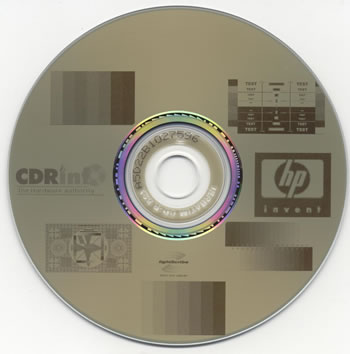
That's about it for the LightScribe capabilities of the SHW-16H5S. Now let's move on to the last page and the conclusion of the LiteOn review.
Review Pages
2. Reading Tests
3. CD Error Correction
4. DVD Error Correction
5. Protected Discs
6. CD Recording Tests
7. CD Writing Quality - Plextools
8. CD Writing Quality - Clover System
9. DVD Writing Tests
10. Supported Media List
11. DVD Writing Quality - Page 1
12. DVD Writing Quality - Page 2
13. DVD Writing Quality - Page 3
14. DVD Writing Quality - Page 4
15. DVD Writing Quality - Page 5
16. DVD Writing Quality - Almedio
17. DVDR DL - Page 1
18. DVDR DL - Page 2
19. Booktype Setting
20. 16H5S vs SA300 - Page 1
21. 16H5S vs SA300 - Page 2
22. 16H5S vs SA300 - Page 3
23. 16H5S vs SA300 - Page 4
24. Firmware Hacks
25. LightScribe Feature
26. Conclusion