
Breaking News

ASUS Announces New 64GB Configuration of ASUS Ascent GX10 LIAN LI Announces Edge Platinum V2, Edge Gold V2, and GPU Cable Thermal Monitoring via Edge Hub ADV Razer Unveils the Huntsman V3 Pro Mini 8KHz ASRock DeskSlim Series Delivers RTX PRO Blackwell Performance in a Compact 5L Workstation Samsung Introduces Galaxy Tab S12 Series

logo

  • Share Us
    • Facebook
    • Twitter
  • Home
  • Home
  • News
  • Reviews
  • Essays
  • About
    • Submit News

    • Contact Us
    • Privacy

    • Promotion
    • Advertise

    • RSS Feed

Search form

Noctua NH-C12P SE14 review

Jun 21,2010 0

4. Results


Review Pages

1. Features, specifications
2. Package, installation
3. Testbed
4. Results
5. Final words


Let's see now whether installing the 1400 mm fan on the top of the heatsink will result in efficient cooling.

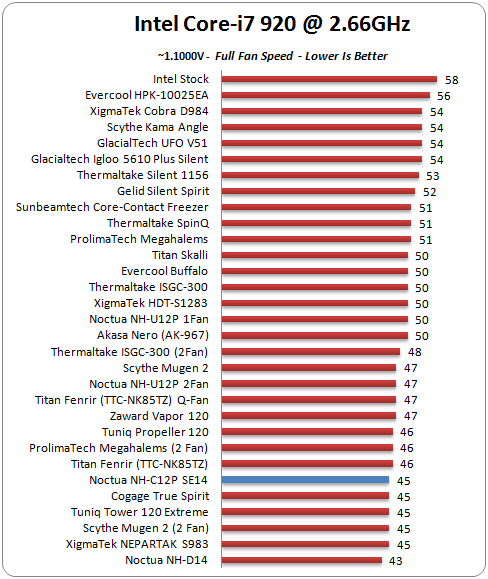
We start with the temperature measurements with our system (Intel Core i7-920) running at stock voltage - which is already producing enough heat. As you can see in the comparison chart below, the Noctua NH-C12P SE14 lowered the temperature of the CPU at 45 degrees Celsius, which is a great performance for such a compact heatsink:
The next step is to overclock the CPU to 3.60GHz. The Noctua NH-C12P SE14 gave a surprisingly good performance and the logged CPU temperature was 65 degrees C. Although other heatsinks were even more efficient, they were not comparable with the Noctua NH-C12P SE14 in terms of size. In addition, the Noctua NH-C12P SE14 makes the difference among other heatsinks that have their single fan installed on the top side. Typically and according to our previous tests, this design did not help these coolers reach top performance.

Noctua has been promoting its coolers generally designed for efficient and quiet operation. The NH-C12P SE14 confirms this claim. The heatsink was very quiet and produced just 44dB of noise, measured at a 30cm distance from the unit. That's a great performance for a 140mm fan and positions the NH-C12P SE14 in a high position in our comparison chart:

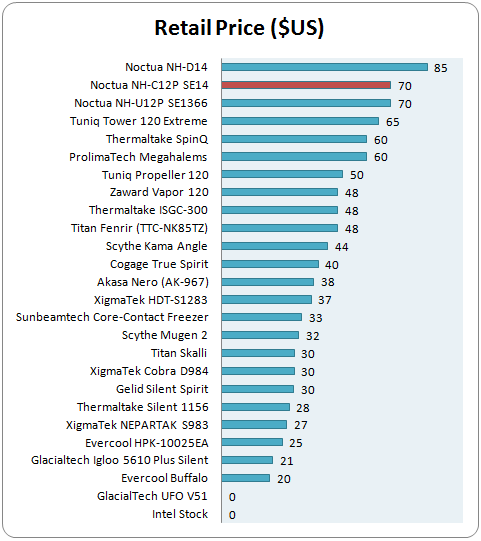
The Noctua NH-C12P SE14 is a little bit pricey and would cost you around $70:
 

Review Pages

1. Features, specifications
2. Package, installation
3. Testbed
4. Results
5. Final words


Pages

  • « first
  • ‹ previous
  • 1
  • 2
  • 3
  • 4
  • 5
  • next ›
  • last »

Noctua

Tags: Noctua
Previous Post
Noctua NH-U9B SE2 review
Next Post
Gainward GTX 465 GOOD Edition review

Related Posts

  • Thermal Grizzly and Noctua introduce WireView Pro II Noctua Edition GPU monitoring device

  • Forced Physics DCT and Noctua announce research partnership on micro-channel array cooling

  • Noctua and Prusa Research release PETG filaments in signature Noctua colours

  • Noctua NL-LC1-36

  • Noctua introduces NL-LC1 all-in-one liquid coolers

  • Noctua at Computex 2026

  • Carbice and Noctua announce strategic partnership for DIY PC cooling applications

  • Noctua presents NF-A12x25 G2 chromax.black 120mm fans

Latest Reviews

Fanxiang MP83 M.2 NVMe SSD Enclosure
Enterprise & IT

Fanxiang MP83 M.2 NVMe SSD Enclosure

Ugreen CM642 USB4.0 Enclosure
PC components

Ugreen CM642 USB4.0 Enclosure

be quiet! Dark Power 14 IO
PC components

be quiet! Dark Power 14 IO

SanDisk High Endurance 512GB microSDXC
Cameras

SanDisk High Endurance 512GB microSDXC

Samsung PRO Ultimate 512GB microSDXC
Cameras

Samsung PRO Ultimate 512GB microSDXC

Popular News

MSI’s Latest AMD X870E MAX & EVO Series Motherboards

MSI’s Latest AMD X870E MAX & EVO Series Motherboards

COLORFUL Launches iGame B850M ULTRA Series Micro-ATX Motherboards

COLORFUL Launches iGame B850M ULTRA Series Micro-ATX Motherboards

COLORFUL Presents Limited Edition Chitu MAG-60 Magnetic Keyboard Inspired by the Year of the Horse

COLORFUL Presents Limited Edition Chitu MAG-60 Magnetic Keyboard Inspired by the Year of the Horse

COLORFUL Launches iGame B850I MINI OC V14 Motherboard

COLORFUL Launches iGame B850I MINI OC V14 Motherboard

COLORFUL Presents iGame Z890 ULTRA-S W and iGame Z890M ULTRA Z Motherboards

COLORFUL Presents iGame Z890 ULTRA-S W and iGame Z890M ULTRA Z Motherboards

COLORFUL Expands B850 Motherboard Lineup with New CVN, Battle-Ax, and MEOW Models

COLORFUL Expands B850 Motherboard Lineup with New CVN, Battle-Ax, and MEOW Models

COLORFUL Launches the iGame X870E VULCAN W OC Motherboard

COLORFUL Launches the iGame X870E VULCAN W OC Motherboard

ASRock Adds Support for One Sub-Channel DRAM Module on Intel DDR5 Motherboards

ASRock Adds Support for One Sub-Channel DRAM Module on Intel DDR5 Motherboards

Main menu

  • Home
  • News
  • Reviews
  • Essays
  • About
    • Submit News

    • Contact Us
    • Privacy

    • Promotion
    • Advertise

    • RSS Feed
  • About
  • Privacy
  • Contact Us
  • Promotional Opportunities @ CdrInfo.com
  • Advertise on out site
  • Submit your News to our site
  • RSS Feed