Breaking News

LIAN LI Announces Edge Platinum V2, Edge Gold V2, and GPU Cable Thermal Monitoring via Edge Hub ADV Razer Unveils the Huntsman V3 Pro Mini 8KHz ASRock DeskSlim Series Delivers RTX PRO Blackwell Performance in a Compact 5L Workstation Samsung Introduces Galaxy Tab S12 Series PlayStation Plus Monthly Games for October 2026

logo

  • Share Us
    • Facebook
    • Twitter
  • Home
  • Home
  • News
  • Reviews
  • Essays
  • About
    • Submit News

    • Contact Us
    • Privacy

    • Promotion
    • Advertise

    • RSS Feed

Search form

Noctua NH-D15 chromax.black CPU Cooler

Jul 4,2021 0

3. Installation process


Review Pages

1. Introduction
2. Retail Package
3. Installation process
4. Test Bed - Performance
5. Overclocking results
6. Conclusion


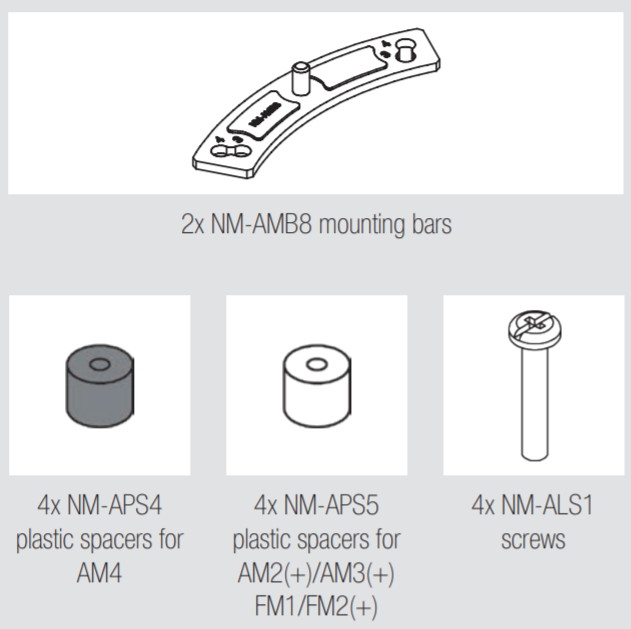
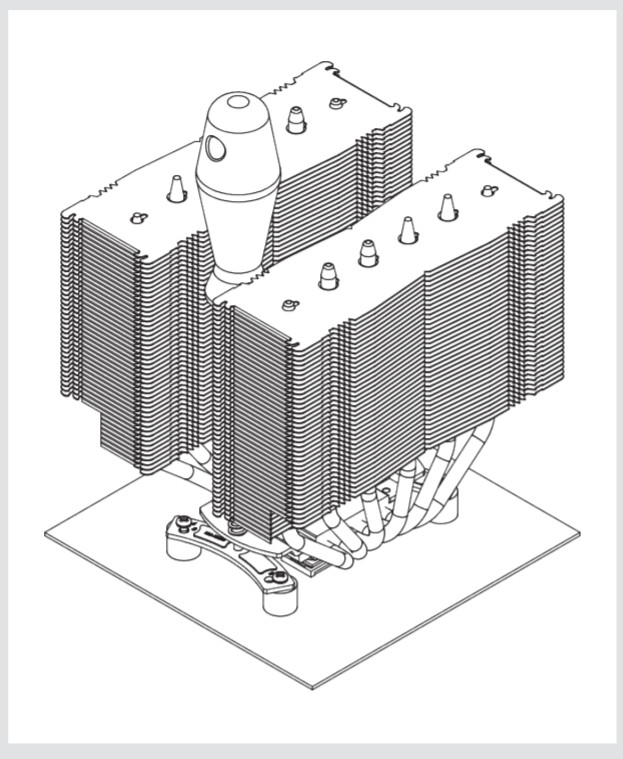
Installing the CPU cooler requires several steps. The retail box includes all the needed information in order to install the CPU cooler either with Intel or AMD platform. For our tests we used the AMD Ryzen 5600X, so we had to unpack the AMD labeled plastic sleeve. There are two mounting bars and four (4) plastic spacers with long screws to attach to the motherboard backplate.
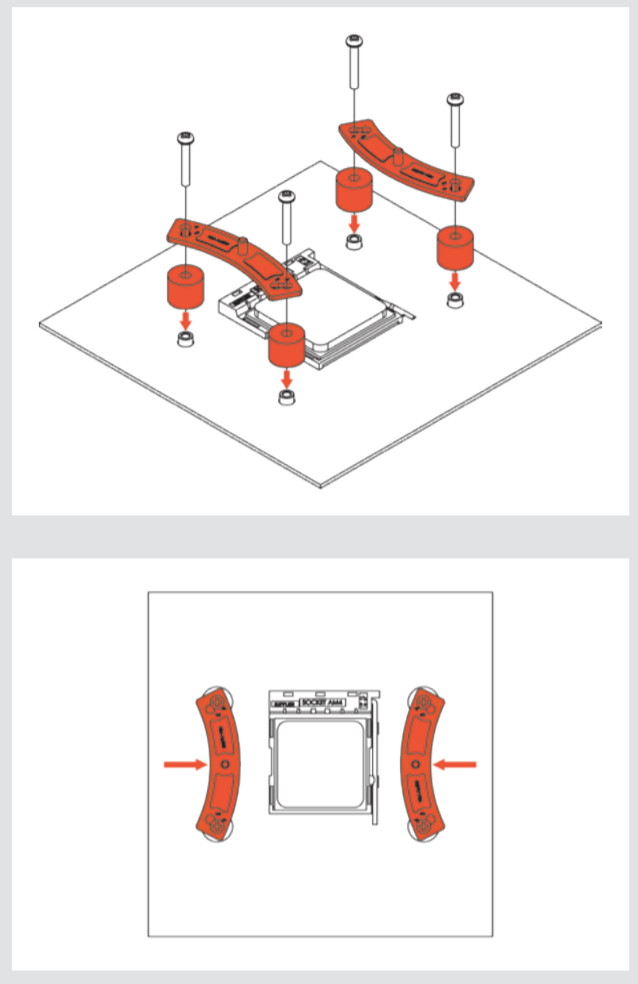
Afterwards you need to remove the central CPU fan and after placing the included thermal compound secure the CPU cooler to the already pre-installed base brackets.
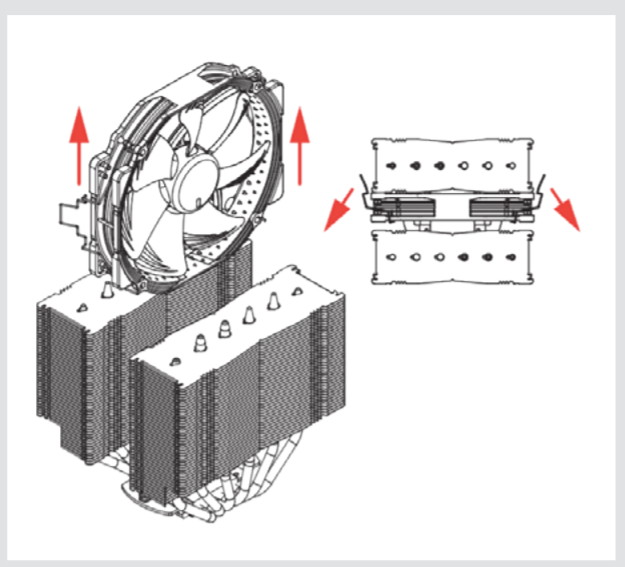
Using the included screwdriver secure the fan, by turning 2-3 times the screwdriver to put even pressure to both sides.
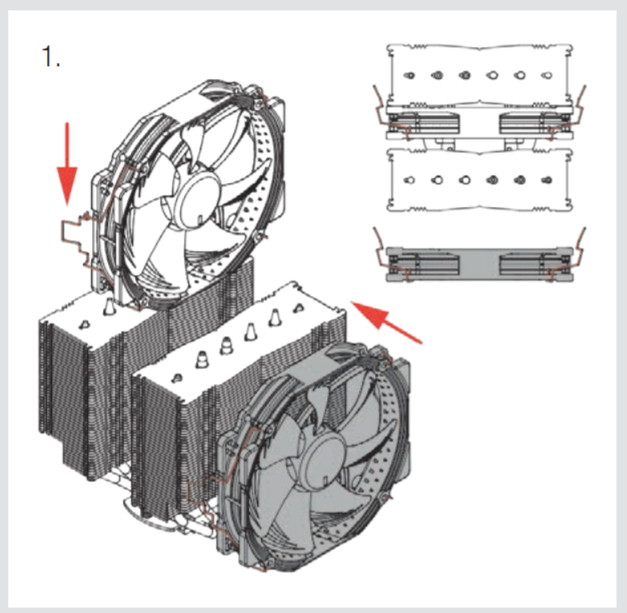
Placing again back the central and front CPU coolers.
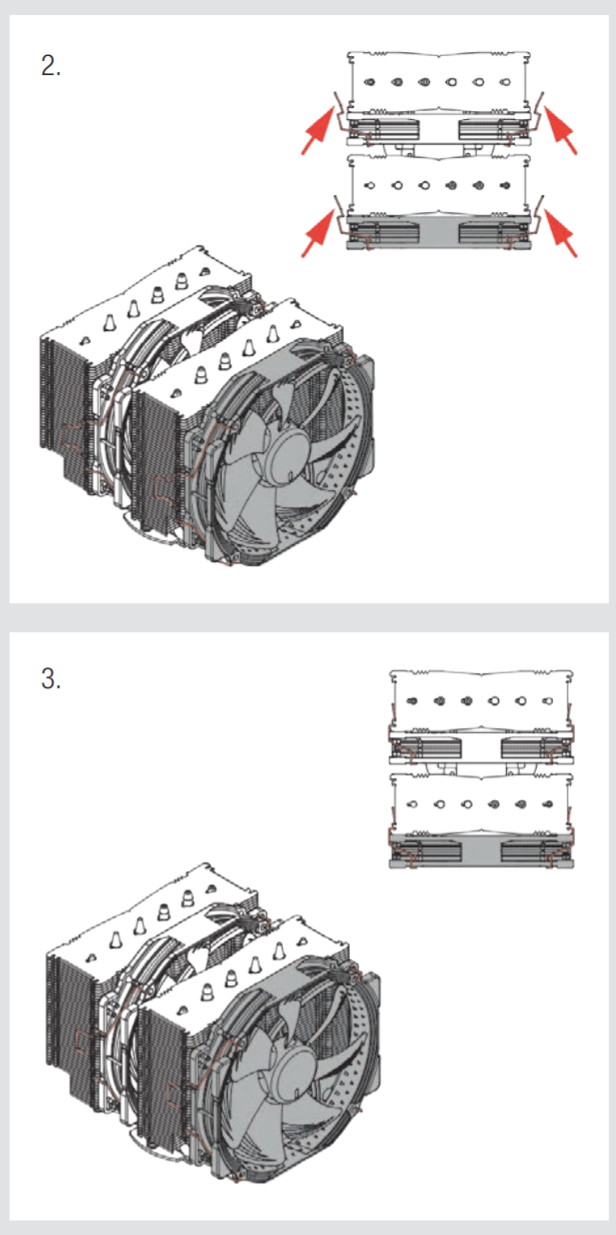
Both of the should have the SAME fan rotation direction (air blows towards outside the case). Connect the fan(s) to the motherboard’s CPU fan header(s). If necessary, use the supplied NA-YC1 y-cable to connect both fans to one fan header. Due to the fact that the front CPU cooler stands above memory banks...so you need around 20cm clearance from the motherboard. However you can use the front 140mm to the other side and place an 120mm in front, it all depends upon your motherboard setup and case...
 

Review Pages

1. Introduction
2. Retail Package
3. Installation process
4. Test Bed - Performance
5. Overclocking results
6. Conclusion


Pages

  • « first
  • ‹ previous
  • 1
  • 2
  • 3
  • 4
  • 5
  • 6
  • next ›
  • last »

Noctua

Tags: Noctua
Previous Post
Terramaster F2-422 NAS Server
Next Post
Noctua NH-P1 passive CPU cooler

Related Posts

  • Thermal Grizzly and Noctua introduce WireView Pro II Noctua Edition GPU monitoring device

  • Forced Physics DCT and Noctua announce research partnership on micro-channel array cooling

  • Noctua and Prusa Research release PETG filaments in signature Noctua colours

  • Noctua NL-LC1-36

  • Noctua introduces NL-LC1 all-in-one liquid coolers

  • Noctua at Computex 2026

  • Carbice and Noctua announce strategic partnership for DIY PC cooling applications

  • Noctua presents NF-A12x25 G2 chromax.black 120mm fans

Latest Reviews

Fanxiang MP83 M.2 NVMe SSD Enclosure
Enterprise & IT

Fanxiang MP83 M.2 NVMe SSD Enclosure

Ugreen CM642 USB4.0 Enclosure
PC components

Ugreen CM642 USB4.0 Enclosure

be quiet! Dark Power 14 IO
PC components

be quiet! Dark Power 14 IO

SanDisk High Endurance 512GB microSDXC
Cameras

SanDisk High Endurance 512GB microSDXC

Samsung PRO Ultimate 512GB microSDXC
Cameras

Samsung PRO Ultimate 512GB microSDXC

Popular News

MSI’s Latest AMD X870E MAX & EVO Series Motherboards

MSI’s Latest AMD X870E MAX & EVO Series Motherboards

COLORFUL Launches iGame B850M ULTRA Series Micro-ATX Motherboards

COLORFUL Launches iGame B850M ULTRA Series Micro-ATX Motherboards

COLORFUL Presents Limited Edition Chitu MAG-60 Magnetic Keyboard Inspired by the Year of the Horse

COLORFUL Presents Limited Edition Chitu MAG-60 Magnetic Keyboard Inspired by the Year of the Horse

COLORFUL Launches iGame B850I MINI OC V14 Motherboard

COLORFUL Launches iGame B850I MINI OC V14 Motherboard

COLORFUL Presents iGame Z890 ULTRA-S W and iGame Z890M ULTRA Z Motherboards

COLORFUL Presents iGame Z890 ULTRA-S W and iGame Z890M ULTRA Z Motherboards

COLORFUL Expands B850 Motherboard Lineup with New CVN, Battle-Ax, and MEOW Models

COLORFUL Expands B850 Motherboard Lineup with New CVN, Battle-Ax, and MEOW Models

ASRock Adds Support for One Sub-Channel DRAM Module on Intel DDR5 Motherboards

ASRock Adds Support for One Sub-Channel DRAM Module on Intel DDR5 Motherboards

COLORFUL Launches the iGame X870E VULCAN W OC Motherboard

COLORFUL Launches the iGame X870E VULCAN W OC Motherboard

Main menu

  • Home
  • News
  • Reviews
  • Essays
  • About
    • Submit News

    • Contact Us
    • Privacy

    • Promotion
    • Advertise

    • RSS Feed
  • About
  • Privacy
  • Contact Us
  • Promotional Opportunities @ CdrInfo.com
  • Advertise on out site
  • Submit your News to our site
  • RSS Feed