Breaking News

LG Display launches 24.5-inch 720Hz Gaming OLED Panel Razer Unveils the Mako Desktop Gaming Speakers TerraMaster Launches 725 Series Xeon Rackmount NAS Viltrox Brings Its Full-Frame Air Series to L-Mount with Four Compact Prime Lenses CORSAIR Deploys the WARTHOG Airflow Mid-Tower PC Case

logo

  • Share Us
    • Facebook
    • Twitter
  • Home
  • Home
  • News
  • Reviews
  • Essays
  • About
    • Submit News

    • Contact Us
    • Privacy

    • Promotion
    • Advertise

    • RSS Feed

Search form

Noctua NH-U12A Chromax.black

Nov 15,2021 0

7. Performance


Review Pages

1. Introduction
2. Retail Package
3. NA-HC7 chromax.black.swap
4. NA-HC8 chromax.black heatsink cover
5. NA-HC8 chromax.white heatsink cover
6. NF-A12x25 PWM chromax-black-swap
7. Performance
8. Conclusion


In order to test the CPU cooler we used the following configuration:

  • CPU: AMD Ryzen 5 5600X
  • Thermal compound: bequiet! DC1
  • Case: bequiet! Silent Base 802
  • Case fans: 2x140 bequiet! Silent Wings 3 High-Speed RPM speed controllable via SmartFan BIOS + Asus Xpert4 software
  • CPU Fan: Stock 2x120mm Noctua
  • Motherboard: Asus X570 E-Gaming with 4021 BIOS
  • Memory: 2x16GB G.skill Trident Z RGB CL14 @ 3200MHz CL14 (XMP Profile) @ 1.35V
  • PSU: be quiet! Straight Power 11 650Watt
  • HDD: Crucial MX500 SSD
  • VGA: Asus 1060 6GB Dual
  • Ambient room temperature ~ 25 Celsius (with AC climate control) - Environment Temperature measurements: Precision Gold N09AQ Envirometer Meter
  • Sound measurements at 1m distance: miniDSP UMIK-1 microphone with calibration file and latest REW software
  • Operating system: Windows 10 x64 with all the latest updates installed
  • Software: AIDA64 / HWInfo / OCCT Enterprise Edition (Latest builds)

Before each run we left the CPU cooler cooled down and we reset the HWiNFO values to be accurate. Before starting our tests, we set the CPU fans speeds at "Smart Mode" with the Asus Xpert4 software. The case fans were also set at SmartFan mode with the option for Auto Fan Stop at low loads down to 0% for the two front fans and auto for the back case fan. The CPU fans were detected from them Asus motherboard and gave us the following fan curve

Bios settings:

  • Ai Overclock Tuner: D.O.C.P -> XMP DDR-3200 CL14
  • BCLK Frequency: 100MHz
  • FCLK Frequency: 1600MHz
  • CPU core ratio: Auto
  • TPU: Keep Current Setting
  • Performance Bias: Auto
  • VDDCR CPU Voltage: 1.100V
  • VDDCD SOC Voltage: 0.900V
  • DRAM Voltage: 1.350V (XMP)
  • Precision Boost Overdrive: Auto
  • Rest BIOS options: Auto

For further evaluation, we also used OCCT Enterprise Edition with a 30min run and we noted all temperatures as were noted from the software. For maximum temperature we used the following settings:

  • Data Set: Small
  • Mode: Extreme
  • Load Type: Steady

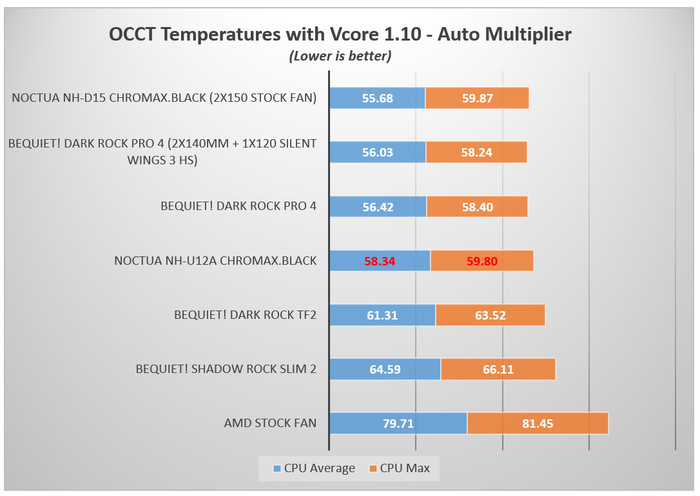
With stock running speeds, the Noctua NH-U12A chromax.black will perform very well, almost in par with the much bigger Dark Rock Pro 4 and we cannot say that three Celsius difference from the Noctua NH-D15 chromax.black is a bad performance difference. For sure the under 60 Celsius performance is very good, considering the size of this CPU cooler.
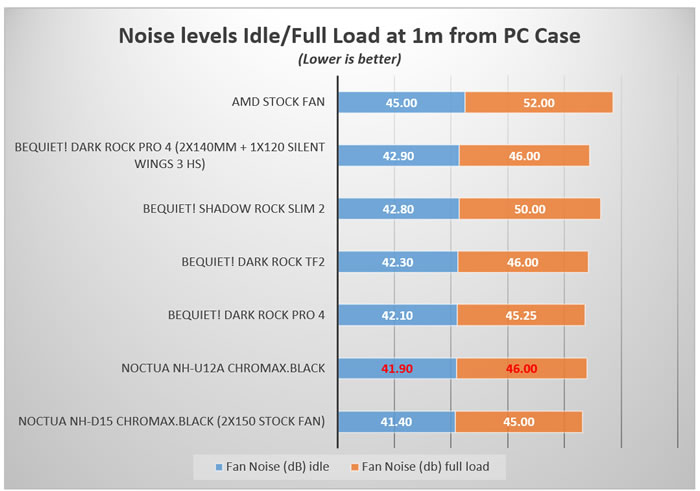
Placing the miniDSP UMIK-1 microphone around 1m from the closed case, we got good noise levels, in any case we didn't exceeded 46db (including the three fans from the case).
Overclocking

Bios settings:

  • Ai Overclock Tuner: D.O.C.P -> XMP DDR-3200 CL14
  • BCLK Frequency: 100MHz
  • FCLK Frequency: 1600MHz
  • CPU core ratio: 45Χ
  • TPU: Keep Current Setting
  • Performance Bias: Auto
  • VDDCR CPU Voltage: 1.180V
  • VDDCD SOC Voltage: 0.900V
  • DRAM Voltage: 1.350V (XMP)
  • Precision Boost Overdrive: Auto
  • Rest BIOS options: Auto

Lastly, we wanted to see how this CPU cooler will handle even higher temperature loads, so we set CPU multiplier to 45X and set CPU Vcore at 1.18V. At this test, the Noctua NH-U12A chromax.black, gave again a run for its money at much bigger CPU coolers like the bequiet! Dark rock pro 4 and even the Noctua NH-D15 chromax.black, with almost 1.20celcious difference (average), which is more or less at the margin of error. Top performance from such a small CPU cooler.


Review Pages

1. Introduction
2. Retail Package
3. NA-HC7 chromax.black.swap
4. NA-HC8 chromax.black heatsink cover
5. NA-HC8 chromax.white heatsink cover
6. NF-A12x25 PWM chromax-black-swap
7. Performance
8. Conclusion


Pages

  • « first
  • ‹ previous
  • 1
  • 2
  • 3
  • 4
  • 5
  • 6
  • 7
  • 8
  • next ›
  • last »

Noctua

Tags: Noctua
Previous Post
Jobs IT
Next Post
The benefits of owning an internet phone number

Related Posts

  • Noctua and Prusa Research release PETG filaments in signature Noctua colours

  • Noctua NL-LC1-36

  • Noctua introduces NL-LC1 all-in-one liquid coolers

  • Noctua at Computex 2026

  • Carbice and Noctua announce strategic partnership for DIY PC cooling applications

  • Noctua presents NF-A12x25 G2 chromax.black 120mm fans

  • Noctua and Asetek Announce Flagship AIO Liquid Coolers

  • Antec and Noctua introduce Antec Flux Pro Noctua Edition PC case

Latest Reviews

Fanxiang MP83 M.2 NVMe SSD Enclosure
Enterprise & IT

Fanxiang MP83 M.2 NVMe SSD Enclosure

Ugreen CM642 USB4.0 Enclosure
PC components

Ugreen CM642 USB4.0 Enclosure

be quiet! Dark Power 14 IO
PC components

be quiet! Dark Power 14 IO

SanDisk High Endurance 512GB microSDXC
Cameras

SanDisk High Endurance 512GB microSDXC

Samsung PRO Ultimate 512GB microSDXC
Cameras

Samsung PRO Ultimate 512GB microSDXC

Popular News

CORSAIR announces Vanguard Pro 96 and Vanguard 96 Gaming Keyboards

CORSAIR announces Vanguard Pro 96 and Vanguard 96 Gaming Keyboards

MSI’s Latest AMD X870E MAX & EVO Series Motherboards

MSI’s Latest AMD X870E MAX & EVO Series Motherboards

Panasonic Introduces the First Ultra-Telephoto Zoom Lens in the LUMIX S Series

Panasonic Introduces the First Ultra-Telephoto Zoom Lens in the LUMIX S Series

COLORFUL Launches iGame B850M ULTRA Series Micro-ATX Motherboards

COLORFUL Launches iGame B850M ULTRA Series Micro-ATX Motherboards

COLORFUL Presents Limited Edition Chitu MAG-60 Magnetic Keyboard Inspired by the Year of the Horse

COLORFUL Presents Limited Edition Chitu MAG-60 Magnetic Keyboard Inspired by the Year of the Horse

COLORFUL Presents iGame Z890 ULTRA-S W and iGame Z890M ULTRA Z Motherboards

COLORFUL Presents iGame Z890 ULTRA-S W and iGame Z890M ULTRA Z Motherboards

COLORFUL Launches iGame B850I MINI OC V14 Motherboard

COLORFUL Launches iGame B850I MINI OC V14 Motherboard

COLORFUL Expands B850 Motherboard Lineup with New CVN, Battle-Ax, and MEOW Models

COLORFUL Expands B850 Motherboard Lineup with New CVN, Battle-Ax, and MEOW Models

Main menu

  • Home
  • News
  • Reviews
  • Essays
  • About
    • Submit News

    • Contact Us
    • Privacy

    • Promotion
    • Advertise

    • RSS Feed
  • About
  • Privacy
  • Contact Us
  • Promotional Opportunities @ CdrInfo.com
  • Advertise on out site
  • Submit your News to our site
  • RSS Feed