
Breaking News

ASUS Announces T1 GeForce RTX 5070 and RTX 5060 Ti Graphics Cards COLORFUL Launches iGame B850M ULTRA Series Micro-ATX Motherboards Sony Unveils 1000X THE COLLEXION Samsung Launches Next-Gen Odyssey, ViewFinity and The Movingstyle Essential Monitors LG Electronics Introduces World’s First Native 1000Hz Full HD Gaming Monitor

logo

  • Share Us
    • Facebook
    • Twitter
  • Home
  • Home
  • News
  • Reviews
  • Essays
  • Forum
  • Legacy
  • About
    • Submit News

    • Contact Us
    • Privacy

    • Promotion
    • Advertise

    • RSS Feed
    • Site Map

Search form

Pay with Google Speeds Up Checkout

Pay with Google Speeds Up Checkout

Smartphones Oct 23,2017 0

Google is easing the purchasing process on Android devices with the launch of Pay with Google. Now you simply choose the preferred credit or debit card you gave Google; authenticate the purchase with a security code or your Android device and then check out.

If you've ever paid for something on your phone or tablet, you know just how frustrating checkout can be. Maybe you had to fill in a bunch of forms. Maybe your session timed out. Maybe you encountered an error and had to start all over again. Pay with Google changes that.

When you pay with Google, you can use any of the credit or debit cards you've added to your Google Account from products like Google Play, YouTube, Chrome or Android Pay. Google sends the merchant your payment info and shipping address using the information from your account - no typing required. Then, the merchant will handle all the details just like any other purchase.
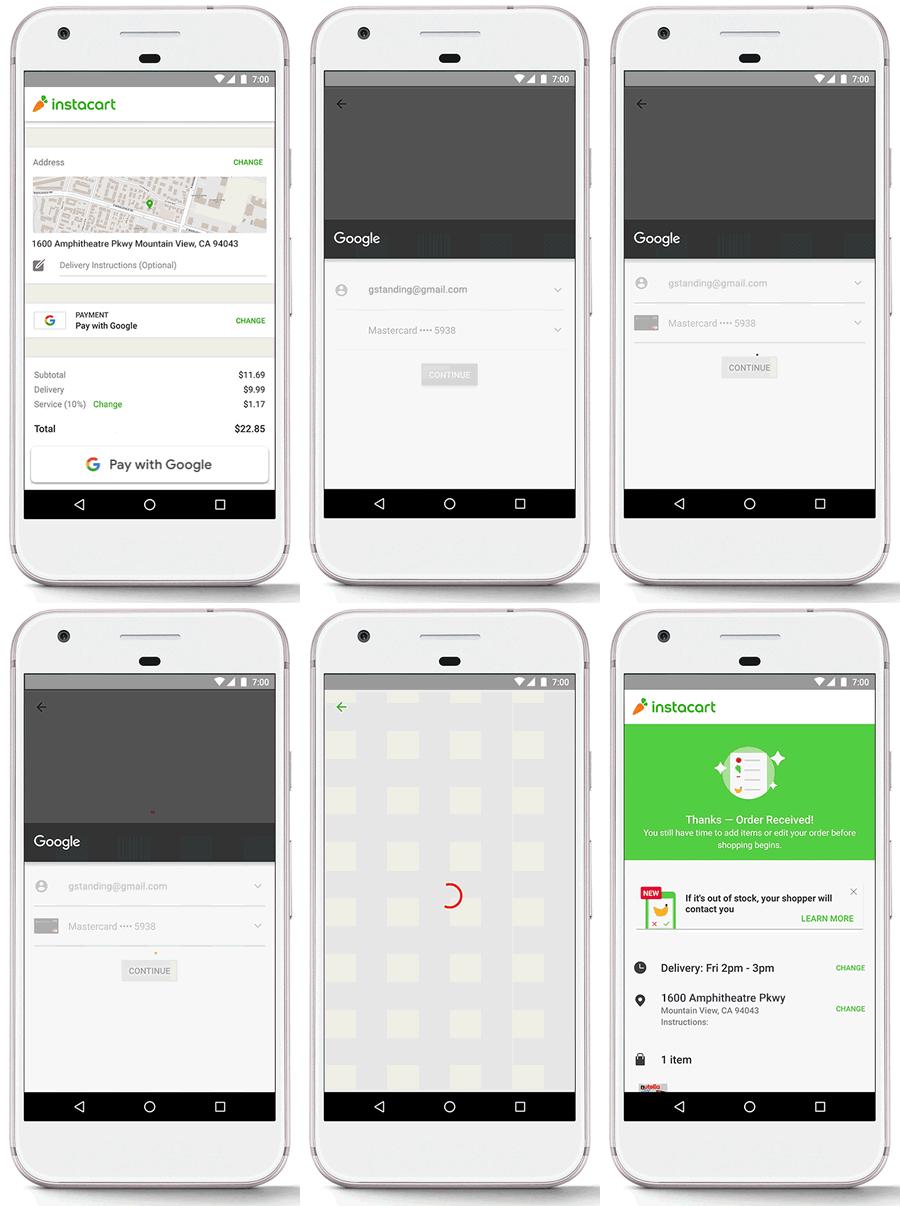
At launch, Pay with Google can be used in the Android app or Chrome browser at the following 15 places, with a dozen or so more listed as "coming soon":

The Google Payment API that enables the improved checkout process was rolled out to developers worldwide at Google I/O in May. Google says it doesn't charge any transaction fee for its use and requires "only a few lines of code" to implement.

Tags:
Previous Post
Kaspersky Lab Seeks To Restore Reliability By Opening Software to Review
Next Post
Tesla Said to Set up China Plant

Related Posts

Latest News

ASUS Announces T1 GeForce RTX 5070 and RTX 5060 Ti Graphics Cards
GPUs

ASUS Announces T1 GeForce RTX 5070 and RTX 5060 Ti Graphics Cards

COLORFUL Launches iGame B850M ULTRA Series Micro-ATX Motherboards
PC components

COLORFUL Launches iGame B850M ULTRA Series Micro-ATX Motherboards

Sony Unveils 1000X THE COLLEXION
Consumer Electronics

Sony Unveils 1000X THE COLLEXION

Samsung Launches Next-Gen Odyssey, ViewFinity and The Movingstyle Essential Monitors
Enterprise & IT

Samsung Launches Next-Gen Odyssey, ViewFinity and The Movingstyle Essential Monitors

LG Electronics Introduces World’s First Native 1000Hz Full HD Gaming Monitor
Consumer Electronics

LG Electronics Introduces World’s First Native 1000Hz Full HD Gaming Monitor

Popular Reviews

Akaso 360 Action camera

Akaso 360 Action camera

Dragon Touch Digital Calendar

Dragon Touch Digital Calendar

be quiet! Pure Loop 3 280mm

be quiet! Pure Loop 3 280mm

Noctua NF-A12x25 G2 fans

Noctua NF-A12x25 G2 fans

Soft2bet and the unseen hardware that makes instant play possible

Soft2bet and the unseen hardware that makes instant play possible

Endorfy Thock V2 Wireless Keyboard

Endorfy Thock V2 Wireless Keyboard

Crucial T710 2TB NVME SSD

Crucial T710 2TB NVME SSD

JSAUX 65Wh Rog Ally Battery

JSAUX 65Wh Rog Ally Battery

Main menu

  • Home
  • News
  • Reviews
  • Essays
  • Forum
  • Legacy
  • About
    • Submit News

    • Contact Us
    • Privacy

    • Promotion
    • Advertise

    • RSS Feed
    • Site Map
  • About
  • Privacy
  • Contact Us
  • Promotional Opportunities @ CdrInfo.com
  • Advertise on out site
  • Submit your News to our site
  • RSS Feed



