
Plextor UltraPleX PX-40TS SCSI CD-ROM
4. More Plextor Capabilities
Plextor PX-40TS SCSI CD ROM - Page 4
More Plextor Capabilities
Using USB Speakers with Digital Audio
Any Windows 98 system equipped with USB speakers, a Plextor drive, and Plextor
Manager 2000 can be used to play audio CDs digitally. The data is sent from
the Plextor drive directly over the SCSI bus and through a USB port to USB speakers.
At this writing, no SCSI CD-based drive and very few ATAPI CD-ROM drives can
stream digital audio directly to USB speakers. This makes Plextor CD Roms the
only SCSI devices that support this feature.
Why Use Digital Audio?
Normally, your drive transmits an analog signal from its audio output to
the sound card. This can be limiting because if you have more then one drive,
you don't want to open your computer and re-connect the analog signal wire to
another drive just to play a CD. There is a limit as to how many devices can
have an analog sound connection to a sound card.
Plextor Manager 2000 and Plextor drives allow you to play digital audio on Windows 98 systems equipped with USB speakers. With this combination of hardware and software, music from a CD is now played digitally over the SCSI bus straight to your USB speakers. This provides you with digital sound, which is much better quality than that from the analog speakers normally used with sound cards. Digital audio also allows for multiple drives to be used as a source, without restrictions caused by cabling.
High Read Retry Count
If you try making an Image of an protected CD (ex. LaserLock protected) with
Plextor 40x you must wait some days for finish. So is this really a problem
?No. High read retry count make sure that your data are reading 100% correct.
So for normal jobs as reading CDs it's ok. But when you want to work with CDs
that contain erros into them you will have big problem. What you can do ?
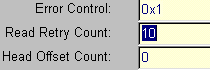 You
can reduce the high default value (10) with Scsi
Mechanic . Just go to Device Properties >> Error Recovery >>
Current >>Read Retry Count (put 3 or 5). Keep in mind that this change
will be lost as soon you reset or close your computer. So you have to do it
every time you need to work with CDs that contain errors. Also latest Instand
CD Wizard Pro v5.0 MultiCopy has this setting buld in (so no need to have Scsi
Mechanic to change it..).
You
can reduce the high default value (10) with Scsi
Mechanic . Just go to Device Properties >> Error Recovery >>
Current >>Read Retry Count (put 3 or 5). Keep in mind that this change
will be lost as soon you reset or close your computer. So you have to do it
every time you need to work with CDs that contain errors. Also latest Instand
CD Wizard Pro v5.0 MultiCopy has this setting buld in (so no need to have Scsi
Mechanic to change it..).





