Breaking News

SAMA Introduces the S32 WOOD, a Compact M-ATX Case Bundled with an 80 PLUS Gold PSU Thypoch Completes Simera-C Cine Prime Lineup with New 100mm T1.9 Lens CORSAIR Launches the RM1200e Power Supply with Built-in PinProtect GPU Overcurrent Protection and Platinum-certified Efficiency CORSAIR Changes the Game with PureVector, a Science-Based Personalized Aiming Technology, Launching Exclusively in the SABRE v3 PRO PureVector Mouse Series AMD FSR Upscaling 4.1 Boosts Frames and Image Quality on More Devices

logo

  • Share Us
    • Facebook
    • Twitter
  • Home
  • Home
  • News
  • Reviews
  • Essays
  • About
    • Submit News

    • Contact Us
    • Privacy

    • Promotion
    • Advertise

    • RSS Feed

Search form

Sunbeamtech Core-Contact Freezer LGA1366

Oct 15,2009 0

3. How we test


Review Pages

1. Features
2. Retail package, installation
3. How we test
4. Results
5. Final words


For our tests we used an open air testbed with the following configuration:

  • CPU: Intel Core7-920 Retail
  • Case: Open Air testbed
  • Motherboard: Asus P6T Deluxe Bios 1403
  • Memory: 3x1GB Crucial PC3-1066
  • PSU: OCZ 720W
  • HDD: WD 80JB
  • Operating system Windows XP with all the latest updates installed
  • Software: OCCT v2.0.1 & CoreTemp 0.99.3
  • Thermal Paste: Tuniq TX-2
  • Idle time: ~30min
  • Load time: ~30min
  • RPM speed controllable via SmartFan BIOS or via external hardware controller

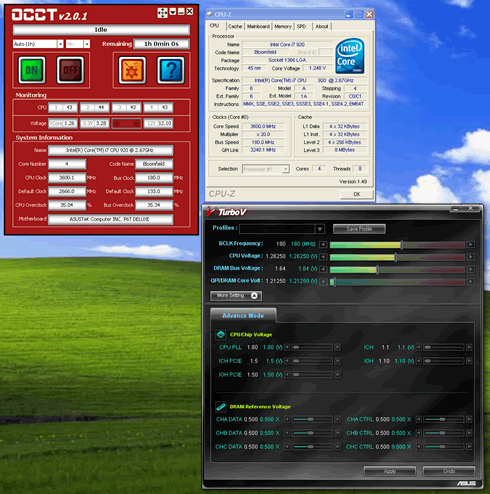
We tried to produce the the highest possible temperature inside our test PC using the OCCT v2.0.1 software with a custom 30mins (mixed) operation.

We left both CPU cores running at full load for ~30 minutes. All temperatures were logged using the CoreTemp 0.99.3 and the software. We also followed two overclocking scenarios:

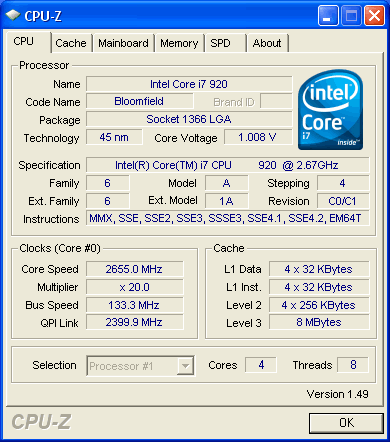
  • Intel Core i7-920 @ 2.66GHz
  • Vcore: 1.1000V
  • Other BIOS values: Auto

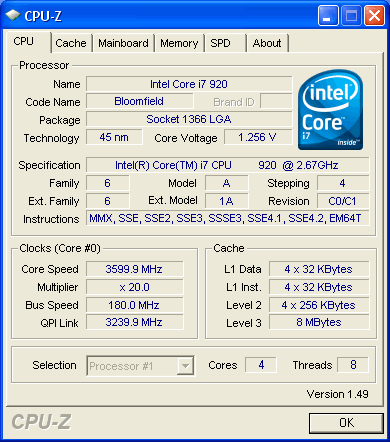
  • Intel Core i7-920 @ 3.60GHz
  • Vcore: 1.26250V
  • DDR3 Voltage: 1.64V
  • Other BIOS values: Auto

We measured the produced noise with a Precision Gold N09AQ Environment Meter. All measurements were made at a distance of 30cm away from the cpu cooler running at full speed. For all the coolers we used the same thermal compound from Tuniq, the TX-2.


Review Pages

1. Features
2. Retail package, installation
3. How we test
4. Results
5. Final words


Pages

  • « first
  • ‹ previous
  • 1
  • 2
  • 3
  • 4
  • 5
  • next ›
  • last »

Sunbeamtech

Tags: Sunbeamtech
Previous Post
Glacialtech Igloo 5610 Plus Silent
Next Post
Crucial 128GB SSD

Related Posts

  • Sunbeamtech - Tuniq Release Latest CPU Cooler

Latest Reviews

Why Intelligent Firmware Matters More Than Peak Throughput in NAS Systems
Enterprise & IT

Why Intelligent Firmware Matters More Than Peak Throughput in NAS Systems

Fanxiang MP83 M.2 NVMe SSD Enclosure
Enterprise & IT

Fanxiang MP83 M.2 NVMe SSD Enclosure

Ugreen CM642 USB4.0 Enclosure
PC components

Ugreen CM642 USB4.0 Enclosure

be quiet! Dark Power 14 IO
PC components

be quiet! Dark Power 14 IO

SanDisk High Endurance 512GB microSDXC
Cameras

SanDisk High Endurance 512GB microSDXC

Popular News

MSI’s Latest AMD X870E MAX & EVO Series Motherboards

MSI’s Latest AMD X870E MAX & EVO Series Motherboards

COLORFUL Launches iGame B850M ULTRA Series Micro-ATX Motherboards

COLORFUL Launches iGame B850M ULTRA Series Micro-ATX Motherboards

COLORFUL Presents Limited Edition Chitu MAG-60 Magnetic Keyboard Inspired by the Year of the Horse

COLORFUL Presents Limited Edition Chitu MAG-60 Magnetic Keyboard Inspired by the Year of the Horse

COLORFUL Launches iGame B850I MINI OC V14 Motherboard

COLORFUL Launches iGame B850I MINI OC V14 Motherboard

COLORFUL Launches the iGame X870E VULCAN W OC Motherboard

COLORFUL Launches the iGame X870E VULCAN W OC Motherboard

COLORFUL Presents iGame Z890 ULTRA-S W and iGame Z890M ULTRA Z Motherboards

COLORFUL Presents iGame Z890 ULTRA-S W and iGame Z890M ULTRA Z Motherboards

COLORFUL Expands B850 Motherboard Lineup with New CVN, Battle-Ax, and MEOW Models

COLORFUL Expands B850 Motherboard Lineup with New CVN, Battle-Ax, and MEOW Models

ASRock Adds Support for One Sub-Channel DRAM Module on Intel DDR5 Motherboards

ASRock Adds Support for One Sub-Channel DRAM Module on Intel DDR5 Motherboards

Main menu

  • Home
  • News
  • Reviews
  • Essays
  • About
    • Submit News

    • Contact Us
    • Privacy

    • Promotion
    • Advertise

    • RSS Feed
  • About
  • Privacy
  • Contact Us
  • Promotional Opportunities @ CdrInfo.com
  • Advertise on out site
  • Submit your News to our site
  • RSS Feed