
Breaking News

Sony Introduces New Colour to INZONE H9 II Headset and INZONE E9 In-ear Headphones Club 3D announces new products for October 2026 Razer Unveils All-New Wolverine V4 Line ASUS Republic of Gamers Ships ROG Rapture GT-BN98 Router GMK Unveils TriggerKey, a New Mechanical Key System for Greater Precision and Comfort

logo

  • Share Us
    • Facebook
    • Twitter
  • Home
  • Home
  • News
  • Reviews
  • Essays
  • About
    • Submit News

    • Contact Us
    • Privacy

    • Promotion
    • Advertise

    • RSS Feed

Search form

Test Methodlogy

Jan 27,2002 0

2. SCSI Mechanic


Review Pages

1. Test Machine
2. SCSI Mechanic
3. WinBench
4. IPEAK
5. Heat


Test Methodlogy - Page 2

Measurement software

- SCSI Mechanic

SCSI Mechanic 3.0x is used to perform LINEAR reading/writing tests.

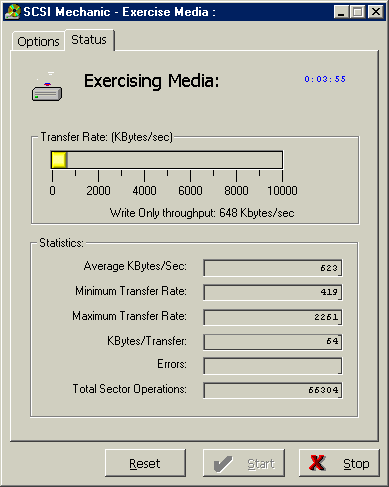
Under the Exercise Media tab we find the following picture:

In this mode both Reading and writing tests can be performed. In first we are using the "Read Only" test mode option and we perform in row all 3 tests:

a) Random
b) Sequential
c) Butterfly

The Kbytes/transfer are settled in default value (64kb/s). The time which each test last depends from the disk drive's total sectors since the test starts and counts the total sector operations. When SCSI Mechanic reaches the outer limit of the drive, it stop the reading/writing test and we take the average Kb/s test number:

As we said earlier also writing tests are performed. We select trough the pull down menu "Write Only" and we make all tests in ROW, 3 times repeadetly:

After you press ok the software prompts that this test will destroy all data (and partitions) in the select drive:

As long the test continues, it gives back information about the drive's writing performance in the particular test and we track down the average Kbytes/sec value, when the test completed:
 

Review Pages

1. Test Machine
2. SCSI Mechanic
3. WinBench
4. IPEAK
5. Heat


Pages

  • « first
  • ‹ previous
  • 1
  • 2
  • 3
  • 4
  • 5
  • next ›
  • last »

Tags:
Previous Post
32x CD-RW Roundup Vol2
Next Post
Ultra 320 SCSI

Related Posts

Latest Reviews

Fanxiang MP83 M.2 NVMe SSD Enclosure
Enterprise & IT

Fanxiang MP83 M.2 NVMe SSD Enclosure

Ugreen CM642 USB4.0 Enclosure
PC components

Ugreen CM642 USB4.0 Enclosure

be quiet! Dark Power 14 IO
PC components

be quiet! Dark Power 14 IO

SanDisk High Endurance 512GB microSDXC
Cameras

SanDisk High Endurance 512GB microSDXC

Samsung PRO Ultimate 512GB microSDXC
Cameras

Samsung PRO Ultimate 512GB microSDXC

Popular News

MSI’s Latest AMD X870E MAX & EVO Series Motherboards

MSI’s Latest AMD X870E MAX & EVO Series Motherboards

COLORFUL Launches iGame B850M ULTRA Series Micro-ATX Motherboards

COLORFUL Launches iGame B850M ULTRA Series Micro-ATX Motherboards

COLORFUL Presents Limited Edition Chitu MAG-60 Magnetic Keyboard Inspired by the Year of the Horse

COLORFUL Presents Limited Edition Chitu MAG-60 Magnetic Keyboard Inspired by the Year of the Horse

COLORFUL Launches iGame B850I MINI OC V14 Motherboard

COLORFUL Launches iGame B850I MINI OC V14 Motherboard

COLORFUL Presents iGame Z890 ULTRA-S W and iGame Z890M ULTRA Z Motherboards

COLORFUL Presents iGame Z890 ULTRA-S W and iGame Z890M ULTRA Z Motherboards

COLORFUL Launches the iGame X870E VULCAN W OC Motherboard

COLORFUL Launches the iGame X870E VULCAN W OC Motherboard

COLORFUL Expands B850 Motherboard Lineup with New CVN, Battle-Ax, and MEOW Models

COLORFUL Expands B850 Motherboard Lineup with New CVN, Battle-Ax, and MEOW Models

ASRock Adds Support for One Sub-Channel DRAM Module on Intel DDR5 Motherboards

ASRock Adds Support for One Sub-Channel DRAM Module on Intel DDR5 Motherboards

Main menu

  • Home
  • News
  • Reviews
  • Essays
  • About
    • Submit News

    • Contact Us
    • Privacy

    • Promotion
    • Advertise

    • RSS Feed
  • About
  • Privacy
  • Contact Us
  • Promotional Opportunities @ CdrInfo.com
  • Advertise on out site
  • Submit your News to our site
  • RSS Feed
