Breaking News

Sony Expands Its Turntable Lineup with New Wireless Models ENDORFY introduces Atlas Electric desks Sony Unveils LinkBuds Clip Open Earbuds be quiet! enters high-end gaming mouse market with Dark Perk Ergo and Dark Perk Sym ASUS ROG announces ROG Strix GS-BE7200 Dual-Band WiFi 7 Gaming Router

logo

  • Share Us
    • Facebook
    • Twitter
  • Home
  • Home
  • News
  • Reviews
  • Essays
  • Forum
  • Legacy
  • About
    • Submit News

    • Contact Us
    • Privacy

    • Promotion
    • Advertise

    • RSS Feed
    • Site Map

Search form

Thermaltake Massive 23 LX Notebook cooler

Oct 12,2010 0

3. Tests


Review Pages

1. Features
2. A closer look
3. Tests


Let's now play with the cooler a little bit. We need to find out how efficient a cooling product can be with our laptop operating under normal conditions. Out laptop is a Sony Vaio SR-19VA with a 7200rpm HDD as well as an Intel P8400 processor on board.. For our tests we used the Everest Ultime Edition software combined with the Kombuster GPU stretch utility. We logged the laptop's internal temperatures while it is operating and placed on the Thermaltake Massive 23 LX cooler:

We should mention here that our 13.3" laptop could not be placed in the right position on the cooler. The Vaio's feet did not match with the coolers rubber strips. As a result, the air circulation below the notebook's bottom surface was not the appropriate and the cooler's fan possibly lost some efficiency. However, the Thermaltake Massive 23 LX cooler is supposed to support 13.3" laptops so let's move on with the results.

Below you see the internal temperatures of the various components of the laptop with the cooler installed and also not installed. Depending on the component we look at, the Thermaltake Massive 23 LX will keep your laptop cooler by just 2.3~2.5 degrees Celsius. The cooler could be more efficient if the fan was spinning at higher RPM:


The Thermaltake Massive 23 LX did not perform as well as we would love to see. The cooler's poor efficiency could be attributed to the size (13.3") of the laptop that we used for this test. As we previously mentioned, out laptop could not be properly positioned ont the available pads, possibly affecting the cooling efficiency of the fan. We assume that 15.6" of larger laptops would benefit more by this product. Besides cooling efficiency issues, the Massive 23 LX operates silently.

We would also like to see a longer USB cable that could allow you to plug it into your notebook's USB ports easier, especially if your notebook does not have its USB ports at the left side panel.
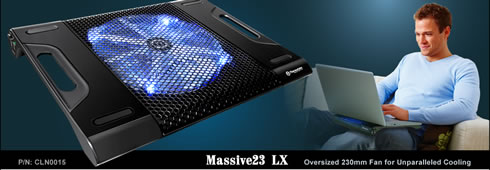
The Thermaltake Massive 23 LX is properly priced at just $20. It offers a comfortable typing angle, a stylish design, silent operation. and also some cooling efficiency, which is highly dependant on your notebook's size.


Review Pages

1. Features
2. A closer look
3. Tests


Pages

  • « first
  • ‹ previous
  • 1
  • 2
  • 3

Thermaltake

Tags: Thermaltake
Previous Post
Xtreamer Pro Media Player Review
Next Post
Thermaltake Element V Case review

Related Posts

  • Thermaltake Launches AW360/420 AIO Liquid Cooler and WAir CPU Cooler for Workstations

  • Begin the Racing Journey with the Thermaltake GR300 Racing Simulator Cockpit

  • Thermaltake Unveils the Massive EXTREME with Cross-flow Fan

  • Thermaltake Releases the Toughpower TF3 1300W with Support for RTX50 Series GPUs

  • Thermaltake Unveils G6 Direct Drive Racing Wheel Bundle and GM5 3DOF Motion System

  • Thermaltake Launches the TT150 LED Bag in Different Sizes and New Colors

  • Thermaltake New TH V2 Ultra EX ARGB Sync AIO – Snow Edition is Now Available Worldwide

  • Thermaltake Coolers Support New-Gen Intel and AMD CPUs

Latest Reviews

The Difference Between American and European Stakes and Why It Changes How People Bet
Enterprise & IT

The Difference Between American and European Stakes and Why It Changes How People Bet

Endorfy Thock V2 Wireless Keyboard
PC components

Endorfy Thock V2 Wireless Keyboard

Noctua NH-D15 G2 Chromax.Black
Cooling Systems

Noctua NH-D15 G2 Chromax.Black

EnGenius ECW520 AP
Enterprise & IT

EnGenius ECW520 AP

Noctua NP-DM3 desk mat
Gaming

Noctua NP-DM3 desk mat

Popular News

COLORFUL Introduces CVN B850I GAMING FROZEN Motherboard

COLORFUL Introduces CVN B850I GAMING FROZEN Motherboard

COLORFUL Presents CVN X870 ARK FROZEN Motherboard for AMD Ryzen 9000 CPUs

COLORFUL Presents CVN X870 ARK FROZEN Motherboard for AMD Ryzen 9000 CPUs

TEAMGROUP Launches EXPERT P34F Find My External SSD

TEAMGROUP Launches EXPERT P34F Find My External SSD

ASRock AM5 Motherboards Now Fully Support AMD Ryzen 9 9950X3D & 9900X3D Processors

ASRock AM5 Motherboards Now Fully Support AMD Ryzen 9 9950X3D & 9900X3D Processors

Samsung announces Galaxy Tab S11 and Galaxy S25 FE series

Samsung announces Galaxy Tab S11 and Galaxy S25 FE series

Viltrox Showcases Upcoming Lens Lineup and New TTL Flash at IBC 2025

Viltrox Showcases Upcoming Lens Lineup and New TTL Flash at IBC 2025

CORSAIR announces Vanguard Pro 96 and Vanguard 96 Gaming Keyboards

CORSAIR announces Vanguard Pro 96 and Vanguard 96 Gaming Keyboards

Panasonic Introduces the First Ultra-Telephoto Zoom Lens in the LUMIX S Series

Panasonic Introduces the First Ultra-Telephoto Zoom Lens in the LUMIX S Series

Main menu

  • Home
  • News
  • Reviews
  • Essays
  • Forum
  • Legacy
  • About
    • Submit News

    • Contact Us
    • Privacy

    • Promotion
    • Advertise

    • RSS Feed
    • Site Map
  • About
  • Privacy
  • Contact Us
  • Promotional Opportunities @ CdrInfo.com
  • Advertise on out site
  • Submit your News to our site
  • RSS Feed