Breaking News

Samsung Introduces Galaxy Tab S12 Series PlayStation Plus Monthly Games for October 2026 Logitech announces Zone Vibe Pro Headset Razer Expands Sanrio Collection With Pompompurin Eared Headset And Kuromi Earbuds TerraMaster Launches Storage Upgrade Season with Up to 30% Off During Prime Big Deal Days

logo

  • Share Us
    • Facebook
    • Twitter
  • Home
  • Home
  • News
  • Reviews
  • Essays
  • About
    • Submit News

    • Contact Us
    • Privacy

    • Promotion
    • Advertise

    • RSS Feed

Search form

Vantec iCEBERQ6

Apr 19,2007 0

4. Installation - 2


Review Pages

1. Introduction
2. Retail package
3. Installation - 1
4. Installation - 2
5. Tests
6. Conclusion


With the VGA cooler lying face down, place the VGA card face down onto cooler, allowing the mounting screws to pass through the card's mounting hole. Be careful with this step!
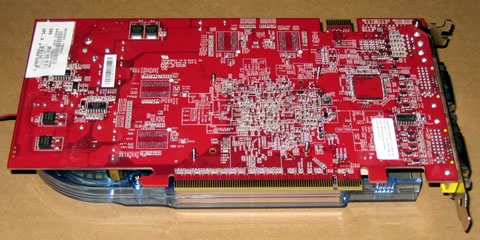
Next, place an insulation spacer on each mounting screw
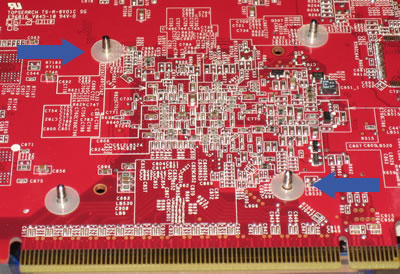
Attach a spring nut to each mounting screw and fasten with a screwdriver. Give each spring nut a few turns until it is secure:

Our air cooled MSI 7600 GT is ready to roll! Note that now our card is double the width and will take up an extra backplane slot.

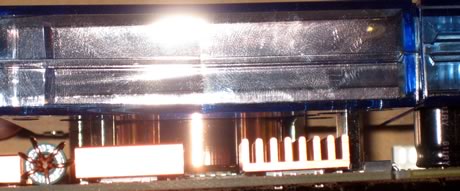
The copper core has enough distance between it and the surrounding components, not to cause any damage:
The time has come to install your card. There shouldn't be any problems here, just find two adjacent backplane slots and make sure that the card wont interfere with any nearby chipsets that could prevent the card from being installed correct. In our case (Asus P5B Deluxe), there is a capacitor close by, so we had to be careful when installing or removing the VGA card:

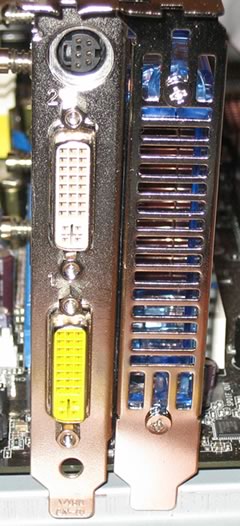
As we mentioned earlier, you need at least two empty backplane slots for the VGA card and the iCEBERQ 6 cooler.The photo below shows the setup at the rear of the case. Note the ventilation holes of the iCEBERQ 6, which blows hot air out of the case.
A panoramic view of the the MSI 7600GT cooled with Vantec's iCEbErQ6. As a last minute tip, don't forget to plug-in the cooler's power connector to a 3-pin fan header:


Review Pages
1. Introduction
2. Retail package
3. Installation - 1
4. Installation - 2
5. Tests
6. Conclusion


Pages

  • « first
  • ‹ previous
  • 1
  • 2
  • 3
  • 4
  • 5
  • 6
  • next ›
  • last »

coolers

Vantec

Tags: coolers Vantec
Previous Post
Linux Hardware Monitoring
Next Post
Foxconn P9657AB

Related Posts

  • Akasa presents Maxwell Pro, the most powerful case for cooling Mini-ITX motherboards

  • Thermaltake at CES 2020

  • CORSAIR Offers Components for 3rd Gen AMD Ryzen Threadripper Builds

  • Noctua Showcased Many New Prototypes at Computex 2019

  • Corsair Introduces Hydro X Series

  • Noctua NF-P12

  • Swiftech Apex Ultra H20-220

  • Thermaltake T2000 Notebook Cooler

Latest Reviews

Fanxiang MP83 M.2 NVMe SSD Enclosure
Enterprise & IT

Fanxiang MP83 M.2 NVMe SSD Enclosure

Ugreen CM642 USB4.0 Enclosure
PC components

Ugreen CM642 USB4.0 Enclosure

be quiet! Dark Power 14 IO
PC components

be quiet! Dark Power 14 IO

SanDisk High Endurance 512GB microSDXC
Cameras

SanDisk High Endurance 512GB microSDXC

Samsung PRO Ultimate 512GB microSDXC
Cameras

Samsung PRO Ultimate 512GB microSDXC

Popular News

MSI’s Latest AMD X870E MAX & EVO Series Motherboards

MSI’s Latest AMD X870E MAX & EVO Series Motherboards

COLORFUL Launches iGame B850M ULTRA Series Micro-ATX Motherboards

COLORFUL Launches iGame B850M ULTRA Series Micro-ATX Motherboards

COLORFUL Presents Limited Edition Chitu MAG-60 Magnetic Keyboard Inspired by the Year of the Horse

COLORFUL Presents Limited Edition Chitu MAG-60 Magnetic Keyboard Inspired by the Year of the Horse

COLORFUL Launches iGame B850I MINI OC V14 Motherboard

COLORFUL Launches iGame B850I MINI OC V14 Motherboard

COLORFUL Presents iGame Z890 ULTRA-S W and iGame Z890M ULTRA Z Motherboards

COLORFUL Presents iGame Z890 ULTRA-S W and iGame Z890M ULTRA Z Motherboards

COLORFUL Expands B850 Motherboard Lineup with New CVN, Battle-Ax, and MEOW Models

COLORFUL Expands B850 Motherboard Lineup with New CVN, Battle-Ax, and MEOW Models

ASRock Adds Support for One Sub-Channel DRAM Module on Intel DDR5 Motherboards

ASRock Adds Support for One Sub-Channel DRAM Module on Intel DDR5 Motherboards

Exceed the Infinite with New ASRock X870E Taichi White Motherboard

Exceed the Infinite with New ASRock X870E Taichi White Motherboard

Main menu

  • Home
  • News
  • Reviews
  • Essays
  • About
    • Submit News

    • Contact Us
    • Privacy

    • Promotion
    • Advertise

    • RSS Feed
  • About
  • Privacy
  • Contact Us
  • Promotional Opportunities @ CdrInfo.com
  • Advertise on out site
  • Submit your News to our site
  • RSS Feed