Breaking News

PROGRADE DIGITAL ANNOUNCES TWO NEW HIGH-SPEED, USB 4.0 CFEXPRESS & SDXC UHS-II DUAL-SLOT READERS Intel Launches Intel Core Series 3 Processors Sony at NAB Show 2026 ADATA Launches URBAN TAPSAFE External SSD Sony Expands Gaming Gear Range with INZONE H6 Air and INZONE M10S II

logo

  • Share Us
    • Facebook
    • Twitter
  • Home
  • Home
  • News
  • Reviews
  • Essays
  • Forum
  • Legacy
  • About
    • Submit News

    • Contact Us
    • Privacy

    • Promotion
    • Advertise

    • RSS Feed
    • Site Map

Search form

Viewsonic VP930b

Jul 28,2006 0

3. Installation


Review Pages

1. Introduction
2. Package
3. Installation
4. Using the device
5. Final thoughts


The VP930b was installed on several PCs with different display cards, from Intel 865g to NVidia 7600GT. Plug the display cable (either D-Sub15 or DVI) to the VGA card and power up the device. Viewsonic recommends setting the resolution to 1280x1024x60Hz, while the monitor can handle up to 75Hz without any problems. Below, we can see the properties for the monitor, according to Everest Ultimate Edition 2006:
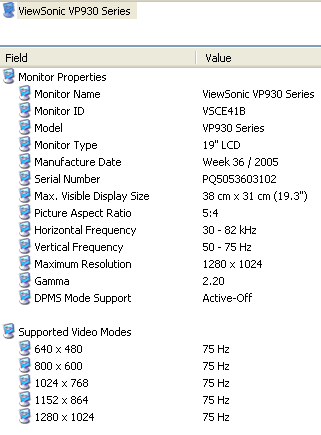
Something that is not supported is a resolution of 1280x720, which represents HD 720p mode. If you want to directly connect a player to the VP930b, you will have problems at that resolution since the VP930b won't be able to hardware downscale.

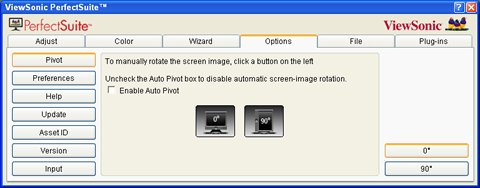
Viewsonic offers an interesting application that can be used to control most of the LCD's display functions, called PerfectSuite. With Viewsonic's PerfectSuite, you can use the built-in wizard and adjust accordingly for the "best" settings for your eyes.

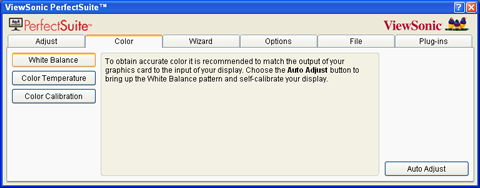
There is also an option for the pivot setting, so if you plan on using it, just tick "Auto Enable":
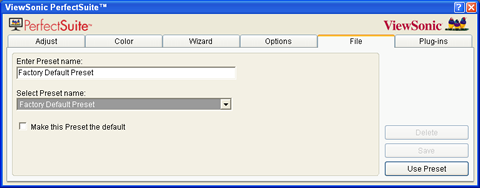
Settings can be saved as presets or use the factory default:
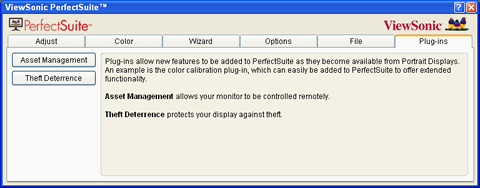
As a last option, you can use a built-in function that "protects" your display against theft. If the monitor is connected to a different SVGA card, it will prompt the user to enter the corresponding password (PIN), otherwise it will not function.
Under Windows properties, you can find the Pivot Pro software to rotate your display:


Review Pages

1. Introduction
2. Package
3. Installation
4. Using the device
5. Final thoughts


Pages

  • « first
  • ‹ previous
  • 1
  • 2
  • 3
  • 4
  • 5
  • next ›
  • last »

ViewSonic

Tags: ViewSonic
Previous Post
Evermore BT-R900
Next Post
OCZ PC2-5400

Related Posts

  • ViewSonic's Latest 4K Presentation Displays Harness Video Conferencing AI to Put the Focus on All Meeting Participants

  • ViewSonic Launches New Docking Monitor for Workspaces

  • ViewSonic Introduces the VX85 Series of Monitors for Home or Office

  • CES: ViewSonic Unveils New Gaming Monitors, Portable and 4K Projectors

  • ViewSonic Launches Two New Projectors for Home Theater and Gaming

  • ViewSonic Introduces the Ultra-Portable M1 Mini LED Projector

  • New ViewSonic ELITE Gaming Monitors Support G-SYNC IPS Nano Colour and 1ms Response Time

  • ViewSonic Launches New ViewSonic ELITE Sub-Brand of Monitors, X Series of Smart 4K Ultra HD LED Projectors

Latest Reviews

In the Age of AI Phishing, the Best User Experience Might Be the One That Feels Safest
Enterprise & IT

In the Age of AI Phishing, the Best User Experience Might Be the One That Feels Safest

SoundPeats C30
Consumer Electronics

SoundPeats C30

Why Streaming Live Casino Games Demands Smarter Tech
Enterprise & IT

Why Streaming Live Casino Games Demands Smarter Tech

Kioxia Exceria Plus G3 512GB microSD
Cameras

Kioxia Exceria Plus G3 512GB microSD

SoundPeats Cove Pro
Consumer Electronics

SoundPeats Cove Pro

Popular News

TEAMGROUP Launches EXPERT P34F Find My External SSD

TEAMGROUP Launches EXPERT P34F Find My External SSD

Samsung announces Galaxy Tab S11 and Galaxy S25 FE series

Samsung announces Galaxy Tab S11 and Galaxy S25 FE series

Viltrox Showcases Upcoming Lens Lineup and New TTL Flash at IBC 2025

Viltrox Showcases Upcoming Lens Lineup and New TTL Flash at IBC 2025

CORSAIR announces Vanguard Pro 96 and Vanguard 96 Gaming Keyboards

CORSAIR announces Vanguard Pro 96 and Vanguard 96 Gaming Keyboards

Panasonic Introduces the First Ultra-Telephoto Zoom Lens in the LUMIX S Series

Panasonic Introduces the First Ultra-Telephoto Zoom Lens in the LUMIX S Series

MSI Launches FORGE GK600 TKL WIRELESS Special Edition Compact Mechanical Keyboard

MSI Launches FORGE GK600 TKL WIRELESS Special Edition Compact Mechanical Keyboard

MSI Launches DATAMAG 40Gbps Magnetic Portable SSD

MSI Launches DATAMAG 40Gbps Magnetic Portable SSD

Viltrox Joins the L-Mount Alliance, Expanding Creative Possibilities

Viltrox Joins the L-Mount Alliance, Expanding Creative Possibilities

Main menu

  • Home
  • News
  • Reviews
  • Essays
  • Forum
  • Legacy
  • About
    • Submit News

    • Contact Us
    • Privacy

    • Promotion
    • Advertise

    • RSS Feed
    • Site Map
  • About
  • Privacy
  • Contact Us
  • Promotional Opportunities @ CdrInfo.com
  • Advertise on out site
  • Submit your News to our site
  • RSS Feed