Breaking News

Thermal Grizzly and Noctua introduce WireView Pro II Noctua Edition GPU monitoring device Nikon releases the Z5IIC full-frame mirrorless camera Announcing the New ASUS Googlebook 14 Razer Unveils Kiyo V2 Pro 4K Webcam Transcend Launches 64GB DDR5-6400 Embedded DRAM Modules for High-Speed Performance and Enhanced System Stability

logo

  • Share Us
    • Facebook
    • Twitter
  • Home
  • Home
  • News
  • Reviews
  • Essays
  • About
    • Submit News

    • Contact Us
    • Privacy

    • Promotion
    • Advertise

    • RSS Feed

Search form

XFX 7800GTX

Mar 2,2006 0

13. Overclocking


Review Pages

1. Introduction
2. A Closer Look
3. Test System
4. 3DMark2005
5. 3DMark2003
6. Codecreatures
7. Aquamark - 3DMark01
8. Half Life 2
9. Ground Control II
10. Quake 4
11. Need For Speed - Most Wanted
12. F.E.A.R.
13. Overclocking
14. Conclusion


No matter your graphics card, there comes a time in your computer's life when it can no longer cope with the latest technological demands the ever so popular games impose. This is one of the main reasons for overclocking your graphics card. Gamers are always looking forward to a little extra boost in terms of framerate. Even though most of the time the boost is far from noticeable, overclocking remains the last resort when you can't afford to buy a brand new VGA card.

The XFX 7800 GTX comes already overclocked. The default running frequencies for the 7800 GTX series cards are 430MHz core clock and 1.2GHz memory clock. But the default core and memory clock for the XFX 7800 GTX Edition are set at 450MHz and 1.25GHz respectively.

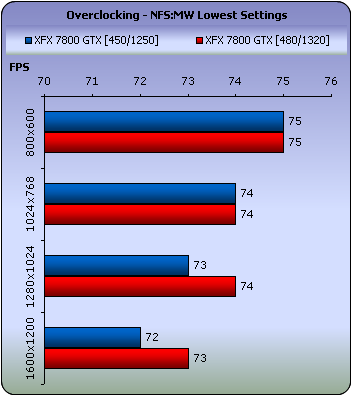
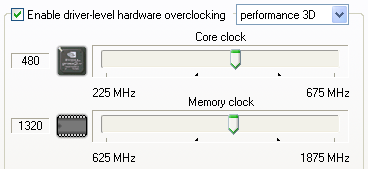
We ran some tests to see how far we can go with this card and we managed to get a stable system running at 480MHz core and 1.32GHz memory clocks. This might not seem like much, considering the default frequencies for this card (450MHz/1.25GHz), but they are significant when we look at nVidia's suggested clock frequencies.
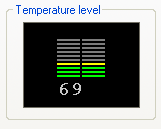
When running games at the stock clock frequencies, the card registered 69°C, while when overclocked, with no artifacts or screen distortions of any kind, the temperature level rose to 74°C. Maybe you don't need to worry about temperatures when overclocking the XFX 7800 GTX, but as we said earlier, we think that operating at this temperature is pushing it a little, especially for such a small increase in clock speeds. Unfortunately, we saw no affects of the cooling system that XFX declares is 2x cooler than its competitors. If this was indeed the case, overclocking this already overclocked card may have produced better results.
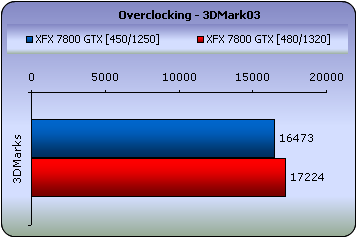
Nevertheless, let's see if we have achieved any increase in performance.

There was a maximum difference of 5 fps with F.E.A.R and only 1 fps with NFS: MW at high resolutions.

 

Review Pages

1. Introduction
2. A Closer Look
3. Test System
4. 3DMark2005
5. 3DMark2003
6. Codecreatures
7. Aquamark - 3DMark01
8. Half Life 2
9. Ground Control II
10. Quake 4
11. Need For Speed - Most Wanted
12. F.E.A.R.
13. Overclocking
14. Conclusion


Pages

  • « first
  • ‹ previous
  • …
  • 6
  • 7
  • 8
  • 9
  • 10
  • 11
  • 12
  • 13
  • 14
  • next ›
  • last »

XFX

Tags: XFX
Previous Post
Spire Verticool II
Next Post
Sansun Arctic Power Supply

Related Posts

  • XFX HD4770

  • XFX Releases Top Gun Package for HD4890

  • XFX to Market ATI Graphics Cards

  • XFX 260GTX

  • XFX 8800GTS 512 Alpha Dog Edition

  • XFX Introduces 8800 GTS 512 MB Alpha Dog Edition

  • Introducing the XFX GeForce 8800 GT 256 MB Graphics Card

  • XFX Debuts its 8800 GTS Fatal1ty Graphics Card

Latest Reviews

Fanxiang MP83 M.2 NVMe SSD Enclosure
Enterprise & IT

Fanxiang MP83 M.2 NVMe SSD Enclosure

Ugreen CM642 USB4.0 Enclosure
PC components

Ugreen CM642 USB4.0 Enclosure

be quiet! Dark Power 14 IO
PC components

be quiet! Dark Power 14 IO

SanDisk High Endurance 512GB microSDXC
Cameras

SanDisk High Endurance 512GB microSDXC

Samsung PRO Ultimate 512GB microSDXC
Cameras

Samsung PRO Ultimate 512GB microSDXC

Popular News

MSI’s Latest AMD X870E MAX & EVO Series Motherboards

MSI’s Latest AMD X870E MAX & EVO Series Motherboards

COLORFUL Launches iGame B850M ULTRA Series Micro-ATX Motherboards

COLORFUL Launches iGame B850M ULTRA Series Micro-ATX Motherboards

COLORFUL Presents Limited Edition Chitu MAG-60 Magnetic Keyboard Inspired by the Year of the Horse

COLORFUL Presents Limited Edition Chitu MAG-60 Magnetic Keyboard Inspired by the Year of the Horse

COLORFUL Presents iGame Z890 ULTRA-S W and iGame Z890M ULTRA Z Motherboards

COLORFUL Presents iGame Z890 ULTRA-S W and iGame Z890M ULTRA Z Motherboards

COLORFUL Launches iGame B850I MINI OC V14 Motherboard

COLORFUL Launches iGame B850I MINI OC V14 Motherboard

COLORFUL Expands B850 Motherboard Lineup with New CVN, Battle-Ax, and MEOW Models

COLORFUL Expands B850 Motherboard Lineup with New CVN, Battle-Ax, and MEOW Models

ASRock Adds Support for One Sub-Channel DRAM Module on Intel DDR5 Motherboards

ASRock Adds Support for One Sub-Channel DRAM Module on Intel DDR5 Motherboards

Exceed the Infinite with New ASRock X870E Taichi White Motherboard

Exceed the Infinite with New ASRock X870E Taichi White Motherboard

Main menu

  • Home
  • News
  • Reviews
  • Essays
  • About
    • Submit News

    • Contact Us
    • Privacy

    • Promotion
    • Advertise

    • RSS Feed
  • About
  • Privacy
  • Contact Us
  • Promotional Opportunities @ CdrInfo.com
  • Advertise on out site
  • Submit your News to our site
  • RSS Feed