
Breaking News

Razer Unveils the Naga V3 Pro CORSAIR Expands Its Everyday Gaming Lineup with Versatile Keyboards and an Ergonomic Wireless Mouse New 3D flash memory technology from KIOXIA and Sandisk achieves industry's highest bit density for QLC NAND TerraMaster Rolls Out Official Storage Upgrade Program PlayStation Plus Game Catalog for August 2026

logo

  • Share Us
    • Facebook
    • Twitter
  • Home
  • Home
  • News
  • Reviews
  • Essays
  • About
    • Submit News

    • Contact Us
    • Privacy

    • Promotion
    • Advertise

    • RSS Feed

Search form

Asus Maximus Extreme

Mar 28,2008 0

13. Overclocking


Review Pages

1. Features, specifications
2. The package
3. BIOS settings
4. Testing configuration
5. Benchmarks - EVEREST Ultimate Edition
6. Benchmarks - SiSoftware Sandra
7. Benchmarks - PCMark05, 3DMark 06
8. Benchmarks - Science Mark 2.0, Pov-Ray
9. Benchmarks - MAXON CINEBENCH
10. Benchmarks - SuperPI
11. Benchmarks - SYSmark 2007 Preview, WorldBench
12. Lost Planet: Extreme Condition
13. Overclocking
14. Asus AI Gear 3
15. Summary


1st Test

In our first test, all motherboards must achieve the highest overclocking speed with all the BIOS settings left to Auto. This means that each motherboard must calculate how much voltage the CPU needs in order to be absolutely stable while operating in higher clock speed. The memory dividers and the memory/FSB/MCH voltages are also left to Auto. In other words this is the easiest overclocking you can do. For this test we use a retail Intel E6600 with it's CPU multiplier locked at x9 and we raise the FSB until we get a stable system (Orthos2004+PovRay running).
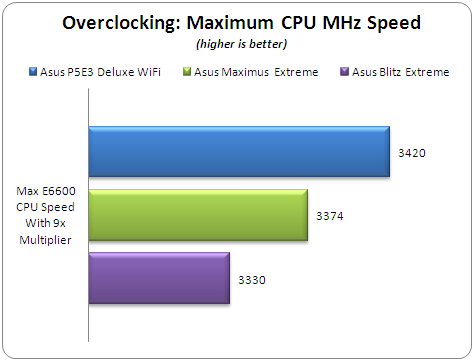
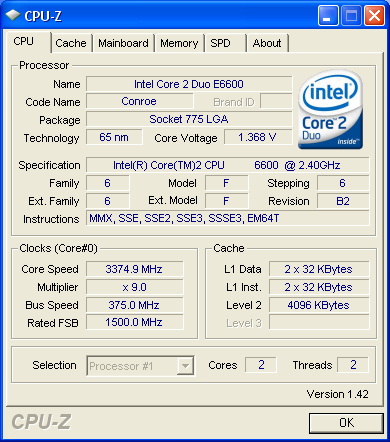
Keeping the CPU multiplier at 9x, the Maximus Extreme reached 3374MHz stable with Orthos/PovRay stretching the system. We noticed that with an earlier BIOS (0802) installed, the overclocking performance was somewhat higher...

2nd Test

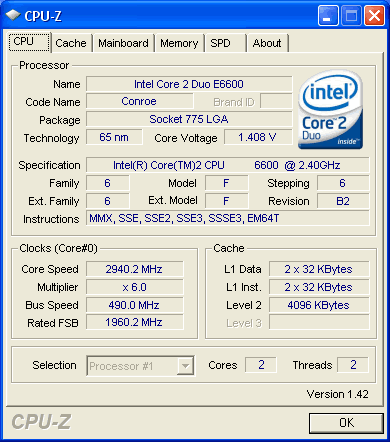
Apart from the maximum overclocking speed, we have to examine the maximum possible FSB frequency with the specific CPU installed. Again all BIOS settings are left to Auto and the CPU multiplier is dropped to 6x. The memory timings and the dividers are also left to auto. An additional 8cm fan was used to further cool the whole system.
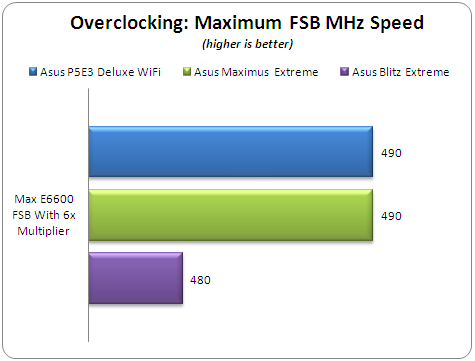
The Asus Maximus Extreme and P5E3 Deluxe gave similar performance with 490MHz FSB.
3rd Test

Our final overclocking test focuses on how good a motherboard is when the memory is overclocked. In this test we used one pair of SuperTalent's DDR3-1600CL7 with the following settings:

  • Timings: 8-8-8-24-2T
  • Voltage: 2.25V
  • FSB:DRAM divider: 1:2
  • Additional 8cm rotating fan
  • All other BIOS settings left to Auto

We had a hard time to make the system boot under Windows when the memory was overclocked. As a result, we had to skip this test and run it again with a newer BIOS installed.

- Overclocking stability

During our overclocking attempts, we noticed that after some overclocking failures, the system didn't POST back and we had power off/or use the clr CMOS button to get everything back in order. While this is the way things are supposed to work, we didn't have so many problems with Asus P5E3 Deluxe WiFi Edition.


Review Pages

1. Features, specifications
2. The package
3. BIOS settings
4. Testing configuration
5. Benchmarks - EVEREST Ultimate Edition
6. Benchmarks - SiSoftware Sandra
7. Benchmarks - PCMark05, 3DMark 06
8. Benchmarks - Science Mark 2.0, Pov-Ray
9. Benchmarks - MAXON CINEBENCH
10. Benchmarks - SuperPI
11. Benchmarks - SYSmark 2007 Preview, WorldBench
12. Lost Planet: Extreme Condition
13. Overclocking
14. Asus AI Gear 3
15. Summary


Pages

  • « first
  • ‹ previous
  • …
  • 7
  • 8
  • 9
  • 10
  • 11
  • 12
  • 13
  • 14
  • 15
  • next ›
  • last »

ASUS

Tags: ASUS
Previous Post
Krusell Mobile Cases
Next Post
LITEON DH-20A4P EZ-DUB

Related Posts

  • ASUS Announces Prime AP304 PC Case

  • ASUS Announces ProArt Display OLED PA279CDV and PA329CDV

  • ASUS Announces T1 GeForce RTX 5070 and RTX 5060 Ti Graphics Cards

  • ASUS Announces ProArt GeForce RTX 5090 Graphics Card

  • ASUS Announces ProArt Display OLED PA27USD and PA32USD

  • ASUS Announces TUF Gaming Platinum Power Supply Series

  • ASUS Announces ProArt PA40SU USB4 SSD Enclosure

  • ASUS Showcases Comprehensive AI-Powered Creator Workflows at NAB Show 2026

Latest Reviews

be quiet! Light Loop IO LCD
Cooling Systems

be quiet! Light Loop IO LCD

KIOXIA Exceria Pro G2 NVME 2TB
PC components

KIOXIA Exceria Pro G2 NVME 2TB

Online Casino Games That Offer Something Different
Consumer Electronics

Online Casino Games That Offer Something Different

SOUNDPEATS Air6 HS
Consumer Electronics

SOUNDPEATS Air6 HS

Arctic MX-7
Cooling Systems

Arctic MX-7

Popular News

CORSAIR announces Vanguard Pro 96 and Vanguard 96 Gaming Keyboards

CORSAIR announces Vanguard Pro 96 and Vanguard 96 Gaming Keyboards

MSI Launches FORGE GK600 TKL WIRELESS Special Edition Compact Mechanical Keyboard

MSI Launches FORGE GK600 TKL WIRELESS Special Edition Compact Mechanical Keyboard

TEAMGROUP Launches EXPERT P34F Find My External SSD

TEAMGROUP Launches EXPERT P34F Find My External SSD

Samsung announces Galaxy Tab S11 and Galaxy S25 FE series

Samsung announces Galaxy Tab S11 and Galaxy S25 FE series

Viltrox Showcases Upcoming Lens Lineup and New TTL Flash at IBC 2025

Viltrox Showcases Upcoming Lens Lineup and New TTL Flash at IBC 2025

Panasonic Introduces the First Ultra-Telephoto Zoom Lens in the LUMIX S Series

Panasonic Introduces the First Ultra-Telephoto Zoom Lens in the LUMIX S Series

MSI Launches DATAMAG 40Gbps Magnetic Portable SSD

MSI Launches DATAMAG 40Gbps Magnetic Portable SSD

Viltrox Joins the L-Mount Alliance, Expanding Creative Possibilities

Viltrox Joins the L-Mount Alliance, Expanding Creative Possibilities

Main menu

  • Home
  • News
  • Reviews
  • Essays
  • About
    • Submit News

    • Contact Us
    • Privacy

    • Promotion
    • Advertise

    • RSS Feed
  • About
  • Privacy
  • Contact Us
  • Promotional Opportunities @ CdrInfo.com
  • Advertise on out site
  • Submit your News to our site
  • RSS Feed