Breaking News

Samsung Introduces Galaxy Tab S12 Series PlayStation Plus Monthly Games for October 2026 Logitech announces Zone Vibe Pro Headset Razer Expands Sanrio Collection With Pompompurin Eared Headset And Kuromi Earbuds TerraMaster Launches Storage Upgrade Season with Up to 30% Off During Prime Big Deal Days

logo

  • Share Us
    • Facebook
    • Twitter
  • Home
  • Home
  • News
  • Reviews
  • Essays
  • About
    • Submit News

    • Contact Us
    • Privacy

    • Promotion
    • Advertise

    • RSS Feed

Search form

Asus P5B Premium Vista

Jun 26,2007 0

2. The package


Review Pages

1. Introduction
2. The package
3. The BIOS
4. Everest Ultimate Edition 2006 - SiSoft Sandra
5. PC MARK 05 and 3D MARK 06
6. Science Mark, Pov-Ray and Nero Digital
7. CineBench and SuperPi
8. Overclocking
9. ScreenDuo
10. Conclusion


- The Package

The Asus P5B Premium Vista Edition costs around €180~200, as found at several online stores. The retail package has all the logos on the front of the package, which identify the motherboard's features:

All included accessories can be seen in the photo below:

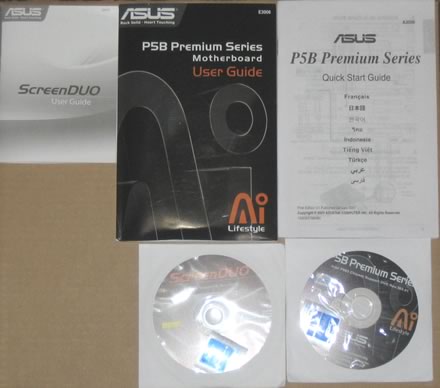
The manuals and CDs:
The ScreenDuo is a 320x240 pixel TFT screen, that can display various messages/pictures from your system:

The device is connected via USB2.0/1.1 to your system and needs a PC application to display all messages:

All the cables are shown below:

The package includes all information about the board's design and special features. Below is a list of what's included in the retail package:

  • ScreenDUO
  • AI Remote
  • UltraDMA 133/100/66 cable
  • FDD cable
  • SATA cables
  • SATA power cables
  • I/O Shield
  • User's manual
  • USB2.0 port module
  • 3 in 1 Q-connector
  • IEEE1394 port module
  • Optional Fan for Water-Cooling or Passive-Cooling only
  • Array Mic
  • 2x CD-ROM with drivers and software

The board itself is well laid out and all parts can be identified easily:

Let's zoom in on the CPU area.

Here, we can clearly see the passive cooling solution used on the northbridge and nearby low height components. As Asus comments "...The Heat Pipe design effectively directs the heat generated by the chipsets to the heatsink near the back IO ports, where it can be carried away by existing airflow from CPU fan or bundled optional fan...".

All nearby components are low profile, so they won't interfere with larger, 3rd party cooling solutions. After installing Intel's stock fan however, there's very little space between the passive heatsink and the CPU cooler. So, perhaps some of the larger 3rd party coolers could prove difficult to install. Before purchasing such a cooler, check the compatibility list:

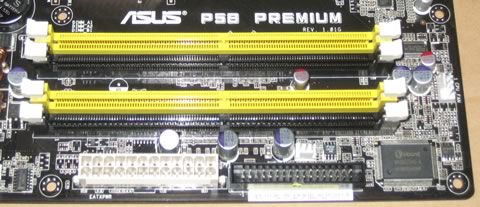
The passive heatsinks do their job, and keep the northbridge cool. However, it is advisable not to touch the heatsink during operation as it gets quite hot. The motherboard has four banks for memory modules.
Click to Enlarge!

Moving to the south area on the board, we can see the use of a passive heatsink for the southbridge as well, and the 6x SATA 2 connectors, well organized, not crowded. But, it is advised to connect the cables before seating the motherboard inside the case:

The motherboard supports the CrossFire Technology. There are 2x PCI-E x16 slots, in case you need both channels. The blue PCI-E lanes work at 16x & 4x. As with other P965 motherboards, you can run nVidia's SLI, with hacked drivers of course. There is enough space between the two PCI-E slots so no problems here for extra big VGA cards:

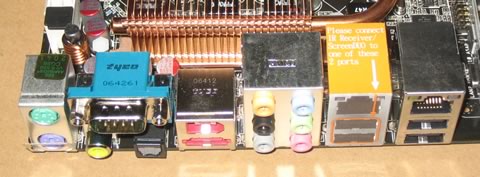
There are several extra connections for USB, Front Panel Audio, COM2 and Firewire on the back panel. Asus has include all modules in the retail package. The back I/O panel has the usual connections:

  • 1 x PS/2 Keyboard
  • 1 x PS/2 Mouse
  • 1 x Serial port
  • 1 x S/PDIF Out (Coaxial + Optical)
  • 1 x External SATA
  • 1 x IEEE1394a
  • 2 x RJ45 port
  • 4 x USB 2.0/1.1
  • 8-Channel Audio I/O

The ScreenDuo should be installed in the yellow framed USB ports, which are also covered with a corresponding sticker.


Review Pages

1. Introduction
2. The package
3. The BIOS
4. Everest Ultimate Edition 2006 - SiSoft Sandra
5. PC MARK 05 and 3D MARK 06
6. Science Mark, Pov-Ray and Nero Digital
7. CineBench and SuperPi
8. Overclocking
9. ScreenDuo
10. Conclusion


Pages

  • « first
  • ‹ previous
  • 1
  • 2
  • 3
  • 4
  • 5
  • 6
  • 7
  • 8
  • 9
  • next ›
  • last »

ASUS

windows vista

Tags: ASUS windows vista
Previous Post
LG HL-DT-ST GSA-H62N
Next Post
Pioneer BD-ROM BDC-202

Related Posts

  • Announcing the New ASUS Googlebook 14

  • ASUS Announces Ascent QN10 Mini PC

  • ASUS Announces WiFi 8 Router

  • Asus announces ExpertBook B3 G2 and ExpertBook P3 G2

  • ASUS Announces Prime AP304 PC Case

  • ASUS Announces ProArt Display OLED PA279CDV and PA329CDV

  • ASUS Announces T1 GeForce RTX 5070 and RTX 5060 Ti Graphics Cards

  • ASUS Announces ProArt GeForce RTX 5090 Graphics Card

Latest Reviews

Fanxiang MP83 M.2 NVMe SSD Enclosure
Enterprise & IT

Fanxiang MP83 M.2 NVMe SSD Enclosure

Ugreen CM642 USB4.0 Enclosure
PC components

Ugreen CM642 USB4.0 Enclosure

be quiet! Dark Power 14 IO
PC components

be quiet! Dark Power 14 IO

SanDisk High Endurance 512GB microSDXC
Cameras

SanDisk High Endurance 512GB microSDXC

Samsung PRO Ultimate 512GB microSDXC
Cameras

Samsung PRO Ultimate 512GB microSDXC

Popular News

MSI’s Latest AMD X870E MAX & EVO Series Motherboards

MSI’s Latest AMD X870E MAX & EVO Series Motherboards

COLORFUL Launches iGame B850M ULTRA Series Micro-ATX Motherboards

COLORFUL Launches iGame B850M ULTRA Series Micro-ATX Motherboards

COLORFUL Presents Limited Edition Chitu MAG-60 Magnetic Keyboard Inspired by the Year of the Horse

COLORFUL Presents Limited Edition Chitu MAG-60 Magnetic Keyboard Inspired by the Year of the Horse

COLORFUL Launches iGame B850I MINI OC V14 Motherboard

COLORFUL Launches iGame B850I MINI OC V14 Motherboard

COLORFUL Presents iGame Z890 ULTRA-S W and iGame Z890M ULTRA Z Motherboards

COLORFUL Presents iGame Z890 ULTRA-S W and iGame Z890M ULTRA Z Motherboards

COLORFUL Expands B850 Motherboard Lineup with New CVN, Battle-Ax, and MEOW Models

COLORFUL Expands B850 Motherboard Lineup with New CVN, Battle-Ax, and MEOW Models

ASRock Adds Support for One Sub-Channel DRAM Module on Intel DDR5 Motherboards

ASRock Adds Support for One Sub-Channel DRAM Module on Intel DDR5 Motherboards

Exceed the Infinite with New ASRock X870E Taichi White Motherboard

Exceed the Infinite with New ASRock X870E Taichi White Motherboard

Main menu

  • Home
  • News
  • Reviews
  • Essays
  • About
    • Submit News

    • Contact Us
    • Privacy

    • Promotion
    • Advertise

    • RSS Feed
  • About
  • Privacy
  • Contact Us
  • Promotional Opportunities @ CdrInfo.com
  • Advertise on out site
  • Submit your News to our site
  • RSS Feed