
Breaking News

ASUS ProArt RTX Spark Windows PCs Available for Immediate Pre-Order Kioxia Introduces E1.L QLC-based SSDs for Hyperscale Data Centers CORSAIR Launches the HS80 v2 MAX WIRELESS Gaming Headset Sony Announces the World's First Eclipsa Audio Certified Microphone1 for Smartphones Razer Unveils the Basilisk V4 Line

logo

  • Share Us
    • Facebook
    • Twitter
  • Home
  • Home
  • News
  • Reviews
  • Essays
  • About
    • Submit News

    • Contact Us
    • Privacy

    • Promotion
    • Advertise

    • RSS Feed

Search form

Asus P5GD2 Premium

Apr 28,2005 0

3. Board Layout


Review Pages

1. Introduction
2. Features
3. Board Layout
4. 3DMark03
5. Performance Part 2
6. Half Life 2
7. Ground Control II
8. Bios & Overclocking
9. Bundled Software
10. Conclusion


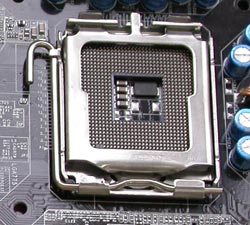
CPU Socket

In the socket 775 architecture, the pins have moved from the processor and onto the motherboard socket. This way, breaking one of the pins no longer results in a destroyed processor but a destroyed motherboard, which is easier and cheaper to replace.
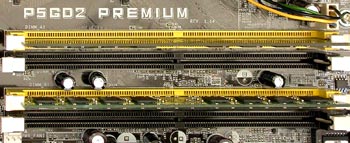
Memory Banks

The mainboard supports Symmetric and Asymmetric Dual Channel mode and of course Single Channel access to the memory. Asymmetric Dual Channel mode is activated when two opposite channels (two yellow or two black) are populated by different capacity memories. However even Intel has admitted it offers no performance increase over Single Channel mode.
 

Back Panel

The rear panel input/output provides the following connections:

From left to right and top to bottom:

  • parallel connection
  • the mouse PS/2 female connection
  • the keyboard connection
  • two SPDIF ports
  • one firewire IEEE 1394a and two USB 2.0 ports
  • one gigabyte lan port and two USB 2.0
  • Rear/Side/Center Speaker Out
  • Line In/Line Out/Mic In
  • Wireless LAN led and Antenna connection
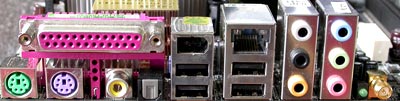
One thing to notice here is the lack of a serial COM port. However, if you are really in need of such a port, you can construct it yourself using a serial COM cable from an older computer and connecting it on the available pins located at the southeast corner of the motherboard.


Drive Connectors

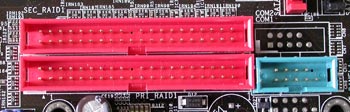
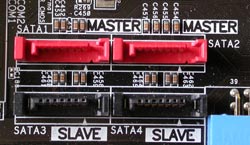
The P5GD2 motherboard features 3 connectors for IDE and 8 for Serial ATA drives. The primary connector is coloured blue and is located on the edge of the motherboard.

As with the P5AD2-E, there's no distinct secondary controller on the motherboard. Instead the RAID controller should be used to install any extra devices..

The RAID controller consists of two red connectors which can be seen in the picture below and can be set up to form RAID 0, RAID 1 and RAID 0+1 disk arrays or even be used as a secondary IDE.
The SATA connectors are divided into two sets of four. The first set is controlled by a Silicon Image chip and supports RAID 0, RAID 1, RAID 10 and software RAID 5.

The second set, being controlled by the ICH6 chipset on the southbridge, is only capable of supporting RAID 0 and RAID 1 disk arrays.
Slots

Here's another point where the P5GD2 differs from the P5AD2-E. The P5GD2 has one more PCI-Express x1 slot located in the strangest position just above the x16 PCI-E, but one less regular PCI slot.
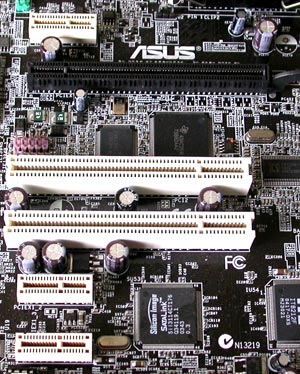
As currently there are no PCI-E x1 compatible hardware on the market, having only two PCI slots might seem a problem. However, as the P5GD2 is a very rich in features motherboard, it is very unlikely you'll need to use a third slot.


Review Pages

1. Introduction
2. Features
3. Board Layout
4. 3DMark03
5. Performance Part 2
6. Half Life 2
7. Ground Control II
8. Bios & Overclocking
9. Bundled Software
10. Conclusion


Pages

  • « first
  • ‹ previous
  • 1
  • 2
  • 3
  • 4
  • 5
  • 6
  • 7
  • 8
  • 9
  • next ›
  • last »

ASUS

Tags: ASUS
Previous Post
LiteON vs LG
Next Post
VSO latest results April 24th 2005

Related Posts

  • ASUS ProArt RTX Spark Windows PCs Available for Immediate Pre-Order

  • ASUS Announces New 64GB Configuration of ASUS Ascent GX10

  • Announcing the New ASUS Googlebook 14

  • ASUS Announces Ascent QN10 Mini PC

  • ASUS Announces WiFi 8 Router

  • Asus announces ExpertBook B3 G2 and ExpertBook P3 G2

  • ASUS Announces Prime AP304 PC Case

  • ASUS Announces ProArt Display OLED PA279CDV and PA329CDV

Latest Reviews

Fanxiang MP83 M.2 NVMe SSD Enclosure
Enterprise & IT

Fanxiang MP83 M.2 NVMe SSD Enclosure

Ugreen CM642 USB4.0 Enclosure
PC components

Ugreen CM642 USB4.0 Enclosure

be quiet! Dark Power 14 IO
PC components

be quiet! Dark Power 14 IO

SanDisk High Endurance 512GB microSDXC
Cameras

SanDisk High Endurance 512GB microSDXC

Samsung PRO Ultimate 512GB microSDXC
Cameras

Samsung PRO Ultimate 512GB microSDXC

Popular News

MSI’s Latest AMD X870E MAX & EVO Series Motherboards

MSI’s Latest AMD X870E MAX & EVO Series Motherboards

COLORFUL Launches iGame B850M ULTRA Series Micro-ATX Motherboards

COLORFUL Launches iGame B850M ULTRA Series Micro-ATX Motherboards

COLORFUL Presents Limited Edition Chitu MAG-60 Magnetic Keyboard Inspired by the Year of the Horse

COLORFUL Presents Limited Edition Chitu MAG-60 Magnetic Keyboard Inspired by the Year of the Horse

COLORFUL Launches iGame B850I MINI OC V14 Motherboard

COLORFUL Launches iGame B850I MINI OC V14 Motherboard

COLORFUL Presents iGame Z890 ULTRA-S W and iGame Z890M ULTRA Z Motherboards

COLORFUL Presents iGame Z890 ULTRA-S W and iGame Z890M ULTRA Z Motherboards

COLORFUL Launches the iGame X870E VULCAN W OC Motherboard

COLORFUL Launches the iGame X870E VULCAN W OC Motherboard

COLORFUL Expands B850 Motherboard Lineup with New CVN, Battle-Ax, and MEOW Models

COLORFUL Expands B850 Motherboard Lineup with New CVN, Battle-Ax, and MEOW Models

ASRock Adds Support for One Sub-Channel DRAM Module on Intel DDR5 Motherboards

ASRock Adds Support for One Sub-Channel DRAM Module on Intel DDR5 Motherboards

Main menu

  • Home
  • News
  • Reviews
  • Essays
  • About
    • Submit News

    • Contact Us
    • Privacy

    • Promotion
    • Advertise

    • RSS Feed
  • About
  • Privacy
  • Contact Us
  • Promotional Opportunities @ CdrInfo.com
  • Advertise on out site
  • Submit your News to our site
  • RSS Feed
