Breaking News

Samsung Brings Satellite Communication Support to Galaxy Smartphones Across the Globe vivo Announces MWC 2026 Attendance and sets to Showcase New Flagship X300 Ultra Razer Elevates Everyday Carry with the Laptop Sleeve 16” with Wireless Charging Samsung Unveils Galaxy S26 Series and Galaxy Buds4 Razer announces Kiyo V2 4K AI Webcamera

logo

  • Share Us
    • Facebook
    • Twitter
  • Home
  • Home
  • News
  • Reviews
  • Essays
  • Forum
  • Legacy
  • About
    • Submit News

    • Contact Us
    • Privacy

    • Promotion
    • Advertise

    • RSS Feed
    • Site Map

Search form

Asus P5GD2 Premium

Apr 28,2005 0

8. Bios & Overclocking


Review Pages

1. Introduction
2. Features
3. Board Layout
4. 3DMark03
5. Performance Part 2
6. Half Life 2
7. Ground Control II
8. Bios & Overclocking
9. Bundled Software
10. Conclusion


As with all the latest and feature-rich motherboards, so too the P5GD2 has an option in the BIOS where you can enable or disable all the intergrated peripherals. HD-Audio, Firewire, Gigabit Lan and the WiFi controller can all be disabled so that they don't even get detected by the operating system. Disabling the RAID controller is strongly suggested if you don't need it, as it takes up quite some time during boot scanning checking for available RAID configurations.

Overclocking is really easy with the Asus P5GD2 from the Advanced tab menu in the BIOS. AI Overclocking powers this Asus motherboard too, with the options you can see in the picture below.

As soon as you set the "N.O.S." value to the AI Overclocking option, there's nothing else to worry about. The next time the system boots into the operating system and the chipset detects heavy CPU load, it will automatically adjust the FSB clock and CPU core voltage and overclock your processor. N.O.S. is quite a safe overclocking method as it tends to clock the processor only a little higher than it's stock clock frequency.

We used N.O.S to overclock our P4 3.0GHz processor. When idling, the processor settings are the following as detected by CPU-Z:
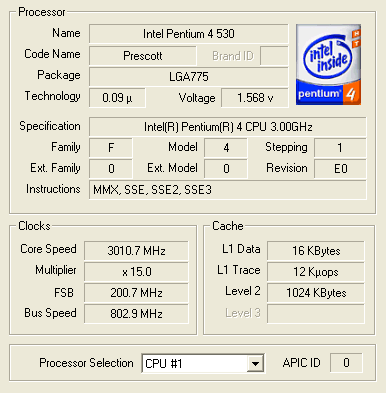
However, when running an application that required a little more CPU power, N.O.S. was activated and we had the following:

Apart from N.O.S. Asus offers another easy way of overclocking the CPU. Choosing for "Overclocking Profile" the "Overclock 30%" option, our Intel 3.0GHz is automatically clocked to 3.9GHz at all times :
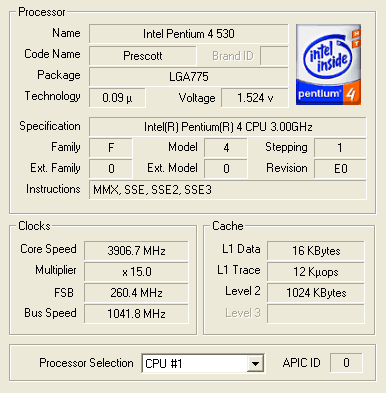
As you can see, the FSB speed was boosted up to 260MHz and consequently, the Bus Speed reached 1040MHz.

Both N.O.S. and Overclocking profiles are excellent choices for the average computer user since they don't require much knowledge to use them. Voltage settings, memory speeds and everything else is taken care off by the BIOS.

In the picture above you can see the BIOS setting allowing you to choose whether the RAID controller should be used as a Standard IDE controller or RAID 0/1/0+1.

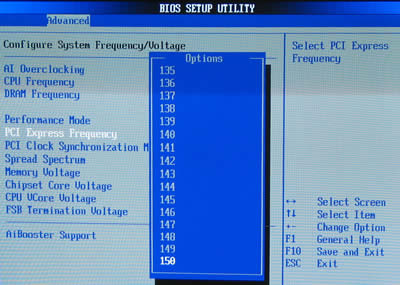
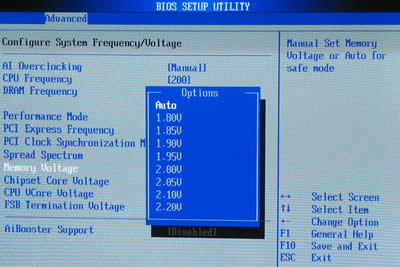
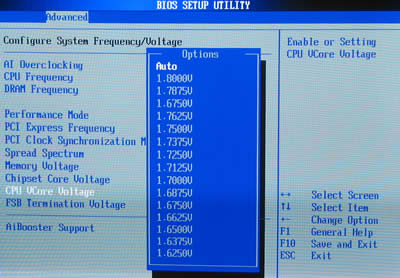
Just like the P5AD2-E, apart from automatic overclocking the P5GD2 allows you to manually overclock the processor with a large variety of settings to mess with, if you have the time and knowledge for it.
 

Review Pages

1. Introduction
2. Features
3. Board Layout
4. 3DMark03
5. Performance Part 2
6. Half Life 2
7. Ground Control II
8. Bios & Overclocking
9. Bundled Software
10. Conclusion


Pages

  • « first
  • ‹ previous
  • …
  • 2
  • 3
  • 4
  • 5
  • 6
  • 7
  • 8
  • 9
  • 10
  • next ›
  • last »

ASUS

Tags: ASUS
Previous Post
LiteON vs LG
Next Post
VSO latest results April 24th 2005

Related Posts

  • ASUS Unveils ExpertBook B3 G2

  • Announcing ASUS ExpertBook B5 G2

  • ASUS Unveils Mac-Friendly Features on ProArt Displays to Enhance Workflows

  • Asus at CES 2026

  • ASUS Announces ProArt PF120 Case Fan

  • ASUS Announces Prime AP303 Compact Mid-Tower ATX Case

  • ASUS TUF Gaming Unveils Call of Duty Black Ops 7 Edition AMD Radeon RX 9070 XT

  • ASUS Announces October Availability of ProArt Display 8K PA32KCX

Latest Reviews

Kioxia Exceria Plus G3 512GB microSD
Cameras

Kioxia Exceria Plus G3 512GB microSD

SoundPeats Cove Pro
Consumer Electronics

SoundPeats Cove Pro

Asustor AS5404T 4-Bay NAS System
Enterprise & IT

Asustor AS5404T 4-Bay NAS System

be quiet! Pure Power 13M 1200W
PC components

be quiet! Pure Power 13M 1200W

Server-Side Gaming Why Canadian Online Casinos Are Abandoning Local Clients for HTML5 Clouds
Enterprise & IT

Server-Side Gaming Why Canadian Online Casinos Are Abandoning Local Clients for HTML5 Clouds

Popular News

COLORFUL Introduces CVN B850I GAMING FROZEN Motherboard

COLORFUL Introduces CVN B850I GAMING FROZEN Motherboard

COLORFUL Presents CVN X870 ARK FROZEN Motherboard for AMD Ryzen 9000 CPUs

COLORFUL Presents CVN X870 ARK FROZEN Motherboard for AMD Ryzen 9000 CPUs

TEAMGROUP Launches EXPERT P34F Find My External SSD

TEAMGROUP Launches EXPERT P34F Find My External SSD

Samsung announces Galaxy Tab S11 and Galaxy S25 FE series

Samsung announces Galaxy Tab S11 and Galaxy S25 FE series

Viltrox Showcases Upcoming Lens Lineup and New TTL Flash at IBC 2025

Viltrox Showcases Upcoming Lens Lineup and New TTL Flash at IBC 2025

CORSAIR announces Vanguard Pro 96 and Vanguard 96 Gaming Keyboards

CORSAIR announces Vanguard Pro 96 and Vanguard 96 Gaming Keyboards

Panasonic Introduces the First Ultra-Telephoto Zoom Lens in the LUMIX S Series

Panasonic Introduces the First Ultra-Telephoto Zoom Lens in the LUMIX S Series

MSI Launches DATAMAG 40Gbps Magnetic Portable SSD

MSI Launches DATAMAG 40Gbps Magnetic Portable SSD

Main menu

  • Home
  • News
  • Reviews
  • Essays
  • Forum
  • Legacy
  • About
    • Submit News

    • Contact Us
    • Privacy

    • Promotion
    • Advertise

    • RSS Feed
    • Site Map
  • About
  • Privacy
  • Contact Us
  • Promotional Opportunities @ CdrInfo.com
  • Advertise on out site
  • Submit your News to our site
  • RSS Feed