Breaking News

Apple introduces new AirTag with expanded connectivity range and improved findability The Highly Anticipated Samsung Galaxy Z TriFold will be Available in U.S. Starting this Week Sharkoon announces SKILLER SGB15 bundle Firewalla Introduces a Simpler Way to Remodel Large, Flat Home Networks with Zero Trust LG Electronics Unveils New LG MAGNIT Micro LED Display at ISE 2026

logo

  • Share Us
    • Facebook
    • Twitter
  • Home
  • Home
  • News
  • Reviews
  • Essays
  • Forum
  • Legacy
  • About
    • Submit News

    • Contact Us
    • Privacy

    • Promotion
    • Advertise

    • RSS Feed
    • Site Map

Search form

be quiet! Light Mount Keyboard

Apr 29,2025 0

4. Conclusion


Review Pages

1. Introduction
2. Retail Package
3. Software
4. Conclusion


The Light Mount mechanical keyboard follows the be quiet! moto, dark black color, and minimal design. The device is fully armed with all the best you can get from be quiet! In terms of mechanical switches and sound dampening the result is excellent, fast typing without harassing others near you. There is also an aluminum rotating knob for controlling sound and five programmable keys that can change according to your liking via the be quiet! IO Center software.
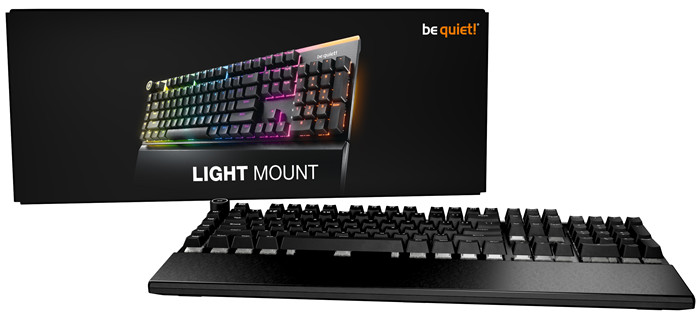
The retail package is complete, it includes a very nice palm rest and a keycap puller, in case you need it. The included 2.0m USB C cable has very good quality, as you may expected from a be quiet! product. The ARGB is pleasend and there are tons of adjustments depending your taste. The typing angle also can be adjusted with the included plastic feets feet from 3, 6 or 9 degrees.
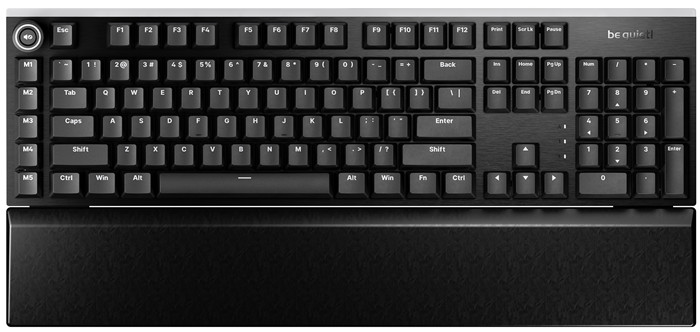
The software support is very good, and the Light Mount uses the written-from-scratch IO Center software. be quiet! moved a step forward, offering most of the functions of its software via WEB, making the Light Mount very appealing to Linux/MAC users or simply for users who simply won't wish to install additional software on their systems. Most functions are present even firmware update functions and as time passes both software will become even better. The Light Mount is being offered with two different switches (orange/black) and up to four (4) different layouts. The orange is more oriented to silent users (near silent) while for those who need some kind of tactile feedback, the black switches can be ordered. You can use any type of 5-pin MX-style switch, so the options here are limitless.
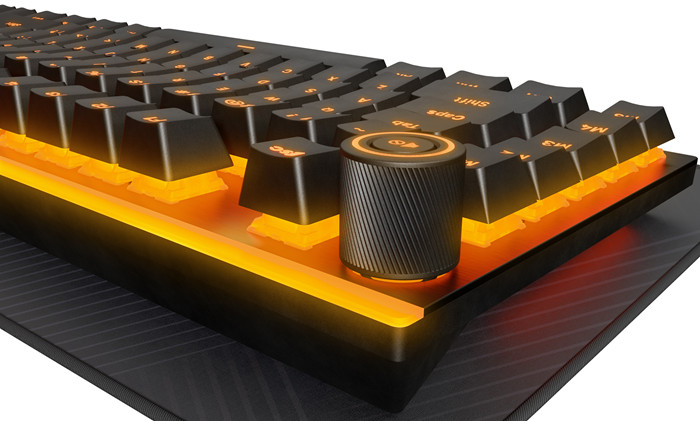
If we had to nag about something, that would be the placement of the five mechanical keys, we kept pressing them since due to muscle memory fingers tend to move to the left key. Perhaps having used small LCD screens, like with the Dark Mount, would be a better design solution. There is also no cable routing for the USB cable. Apart from those two issues, we don't have any other complaints. The product has two (2) years of warranty and comes at a suggested retail price of $169.90 / €169.90 / £169.90 with a lot of competition at this price range and layout. The be quiet! name does guarantee a solid product and if you can afford its retail price is a product you should look for.
 

Review Pages

1. Introduction
2. Retail Package
3. Software
4. Conclusion


Pages

  • « first
  • ‹ previous
  • 1
  • 2
  • 3
  • 4

be quiet!

Tags: be quiet!
Previous Post
be quiet! Dark Mount Keyboard
Next Post
The Evolution of Digital Gaming Platforms in the Tech World

Related Posts

  • be quiet! Power Zone 2 1200W

  • be quiet! enters high-end gaming mouse market with Dark Perk Ergo and Dark Perk Sym

  • be quiet! announces new Power Zone 2 1200W and Pure Power 13 M 1200W

  • be quiet! at CES 2026

  • be quiet! Dark Power 14 1000Watt

  • be quiet! Light Base 500 LX

  • be quiet! raises the bar with the new Dark Power 14 power supply series

  • be quiet! elevates compact cooling with Pure Rock Slim 3

Latest Reviews

be quiet! Power Zone 2 1200W
PC components

be quiet! Power Zone 2 1200W

The Difference Between American and European Stakes and Why It Changes How People Bet
Enterprise & IT

The Difference Between American and European Stakes and Why It Changes How People Bet

Endorfy Thock V2 Wireless Keyboard
PC components

Endorfy Thock V2 Wireless Keyboard

Noctua NH-D15 G2 Chromax.Black
Cooling Systems

Noctua NH-D15 G2 Chromax.Black

EnGenius ECW520 AP
Enterprise & IT

EnGenius ECW520 AP

Popular News

COLORFUL Introduces CVN B850I GAMING FROZEN Motherboard

COLORFUL Introduces CVN B850I GAMING FROZEN Motherboard

COLORFUL Presents CVN X870 ARK FROZEN Motherboard for AMD Ryzen 9000 CPUs

COLORFUL Presents CVN X870 ARK FROZEN Motherboard for AMD Ryzen 9000 CPUs

TEAMGROUP Launches EXPERT P34F Find My External SSD

TEAMGROUP Launches EXPERT P34F Find My External SSD

ASRock AM5 Motherboards Now Fully Support AMD Ryzen 9 9950X3D & 9900X3D Processors

ASRock AM5 Motherboards Now Fully Support AMD Ryzen 9 9950X3D & 9900X3D Processors

Samsung announces Galaxy Tab S11 and Galaxy S25 FE series

Samsung announces Galaxy Tab S11 and Galaxy S25 FE series

Viltrox Showcases Upcoming Lens Lineup and New TTL Flash at IBC 2025

Viltrox Showcases Upcoming Lens Lineup and New TTL Flash at IBC 2025

CORSAIR announces Vanguard Pro 96 and Vanguard 96 Gaming Keyboards

CORSAIR announces Vanguard Pro 96 and Vanguard 96 Gaming Keyboards

Panasonic Introduces the First Ultra-Telephoto Zoom Lens in the LUMIX S Series

Panasonic Introduces the First Ultra-Telephoto Zoom Lens in the LUMIX S Series

Main menu

  • Home
  • News
  • Reviews
  • Essays
  • Forum
  • Legacy
  • About
    • Submit News

    • Contact Us
    • Privacy

    • Promotion
    • Advertise

    • RSS Feed
    • Site Map
  • About
  • Privacy
  • Contact Us
  • Promotional Opportunities @ CdrInfo.com
  • Advertise on out site
  • Submit your News to our site
  • RSS Feed