Breaking News

ASUS Hardware Showcase: AI Accelerators, Collector GPUs, and Esport Monitors Apple Unveils Major Hardware and Creative Suite Ecosystem Updates XPG Launches Third-Generation CORE REACTOR III for Next-Gen Power Safety TCL’s New Monitor Range Fits Every Kind of Gaming Setup Viltrox Launches AF 35mm F1.4 Pro FE/Z

logo

  • Share Us
    • Facebook
    • Twitter
  • Home
  • Home
  • News
  • Reviews
  • Essays
  • About
    • Submit News

    • Contact Us
    • Privacy

    • Promotion
    • Advertise

    • RSS Feed

Search form

be quiet! Light Wings Pro IO fan

Oct 25,2026 0

2. Installation


Review Pages

1. Introduction
2. Installation
3. IO Center
4. 360/420mm
5. 120/140mm
6. Conclusion


Installation is screw-mounted and cable-light, per the included manual (version V4/26): fan, IO cable, then a single controller hookup for the whole system. The steps below cover both formats.

What's in the box

Part

Triple frame (420mm / 360mm)

Expansion (140mm / 120mm)

Fan

1

1

IO Controller

1

Not included

700mm IO Cable

1

Not included

1000mm IO Cable

Not included

1

Fan screws

4

4

Mounting a triple frame (420mm / 360mm)

  1. Screw the fan in place with the four fan screws, tightening carefully by hand with even pressure. The fans use screw fixing only, with no push pins.
  2. For reverse airflow, be quiet! recommends the Reverse versions rather than flipping a regular fan.
  3. Plug the 700mm IO Cable into the port labeled "IN" on the fan.
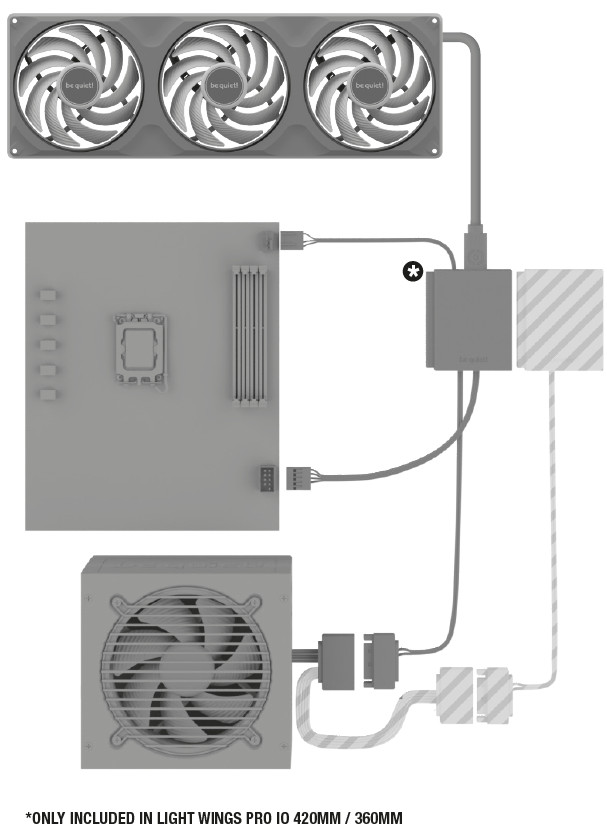
  4. Connect the controller: a 4-pin PWM cable to a free motherboard fan header (only needed for PWM control via the motherboard), the USB 2.0 cable to the motherboard, and the SATA power cable to the PSU.
  5. Attach the magnetic IO Controller to the case. be quiet! recommends the back of the motherboard tray.
  6. Connect the IO Cable from the fan to the IO Controller.
  7. Install IO Center and check for firmware updates.

Adding an Expansion fan (140mm / 120mm)

  1. Screw the fan in place with the four fan screws, hand-tightened evenly.
  2. Connect the 1000mm IO Cable to the fan.
  3. Connect the other end to the port labeled "OUT" on a single-frame fan, or to a free IO Controller port. The Expansion pack has no controller of its own.

Below are some examples upon of how you can connect the Light Wings Pro IO fans to a system:
Chain rules and extras

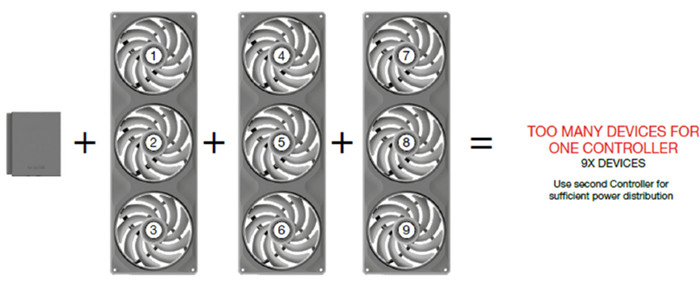
  1. Device limit: one controller supports up to six devices in series, provided each device has a matching IO OUT port to continue the chain. A 420mm single frame counts as three devices.
  2. Display products: an IO product with a display, such as a connected IO LCD cooler, counts as one device and must be first in the chain.
  3. Multiple controllers: several controllers can be daisy-chained, up to four, for tidier cabling in large builds.
  4. Cable length: the optional IO Cable Kit 30/70-6 (BZ030 black, BZ031 white) adds cables and an adapter for large cases. be quiet! says the supplied cables are enough for normal operation.
  5. Warranty: 5 years for consumers on a first purchase from an authorized be quiet! dealer, with proof of purchase required.
 

Review Pages

1. Introduction
2. Installation
3. IO Center
4. 360/420mm
5. 120/140mm
6. Conclusion


Pages

  • « first
  • ‹ previous
  • 1
  • 2
  • 3
  • 4
  • 5
  • 6
  • next ›
  • last »

be quiet!

Tags: be quiet!
Previous Post
Next Post
Why Intelligent Firmware Matters More Than Peak Throughput in NAS Systems

Related Posts

  • be quiet! launches Light Wings Pro IO all in one frame fan series with advanced lighting and cooling options

  • be quiet! Dark Power 14 IO

  • be quiet! Light Mount TKL

  • be quiet! raises the bar with the new Dark Power Pro 14 IO power supply series

  • be quiet! expands its peripheral lineup with Light Mount TKL and Mousepad XL

  • be quiet! Light Loop IO LCD

  • be quiet! introduces Light Loop IO LCD

  • be quiet! unveils new power, cooling, and peripheral lineup

Latest Reviews

be quiet! Light Wings Pro IO fan
Cooling Systems

be quiet! Light Wings Pro IO fan

Why Intelligent Firmware Matters More Than Peak Throughput in NAS Systems
Enterprise & IT

Why Intelligent Firmware Matters More Than Peak Throughput in NAS Systems

Fanxiang MP83 M.2 NVMe SSD Enclosure
Enterprise & IT

Fanxiang MP83 M.2 NVMe SSD Enclosure

Ugreen CM642 USB4.0 Enclosure
PC components

Ugreen CM642 USB4.0 Enclosure

be quiet! Dark Power 14 IO
PC components

be quiet! Dark Power 14 IO

Popular News

MSI’s Latest AMD X870E MAX & EVO Series Motherboards

MSI’s Latest AMD X870E MAX & EVO Series Motherboards

COLORFUL Launches iGame B850M ULTRA Series Micro-ATX Motherboards

COLORFUL Launches iGame B850M ULTRA Series Micro-ATX Motherboards

COLORFUL Presents Limited Edition Chitu MAG-60 Magnetic Keyboard Inspired by the Year of the Horse

COLORFUL Presents Limited Edition Chitu MAG-60 Magnetic Keyboard Inspired by the Year of the Horse

COLORFUL Launches iGame B850I MINI OC V14 Motherboard

COLORFUL Launches iGame B850I MINI OC V14 Motherboard

COLORFUL Launches the iGame X870E VULCAN W OC Motherboard

COLORFUL Launches the iGame X870E VULCAN W OC Motherboard

COLORFUL Presents iGame Z890 ULTRA-S W and iGame Z890M ULTRA Z Motherboards

COLORFUL Presents iGame Z890 ULTRA-S W and iGame Z890M ULTRA Z Motherboards

COLORFUL Expands B850 Motherboard Lineup with New CVN, Battle-Ax, and MEOW Models

COLORFUL Expands B850 Motherboard Lineup with New CVN, Battle-Ax, and MEOW Models

ASRock Adds Support for One Sub-Channel DRAM Module on Intel DDR5 Motherboards

ASRock Adds Support for One Sub-Channel DRAM Module on Intel DDR5 Motherboards

Main menu

  • Home
  • News
  • Reviews
  • Essays
  • About
    • Submit News

    • Contact Us
    • Privacy

    • Promotion
    • Advertise

    • RSS Feed
  • About
  • Privacy
  • Contact Us
  • Promotional Opportunities @ CdrInfo.com
  • Advertise on out site
  • Submit your News to our site
  • RSS Feed