
be quiet! Pure Loop 2 FX (280mm)
4. Performance
In order to test the CPU cooler we used the following configuration:
- CPU: AMD Ryzen 5 5600X
- Thermal compound: bequiet! DC1
- Case: bequiet! Silent Base 802
- Case fans: 2x140 bequiet! Silent Wings 3 High-Speed RPM speed controllable via SmartFan BIOS + Asus Xpert4 software
- CPU Fan: Stock 2x120mm Noctua
- Motherboard: Asus X570 E-Gaming with 4403 BIOS
- Memory: 2x16GB G.skill Trident Z RGB CL14 @ 3200MHz CL14 (XMP Profile) @ 1.35V
- PSU: be quiet! Straight Power 11 650Watt
- HDD: Crucial MX500 SSD
- VGA: Asus 1060 6GB Dual
- Ambient room temperature ~ 25 Celsius (with AC climate control) - Environment Temperature measurements: Precision Gold N09AQ Envirometer Meter
- Sound measurements at 1m distance: miniDSP UMIK-1 microphone with calibration file and latest REW software
- Operating system: Windows 10 x64 with all the latest updates installed
- Software: AIDA64 / HWInfo / OCCT Enterprise Edition (Latest builds)
Before each run we left the CPU cooler cooled down and we reset the OCCT Enteprise Edition values to be accurate.
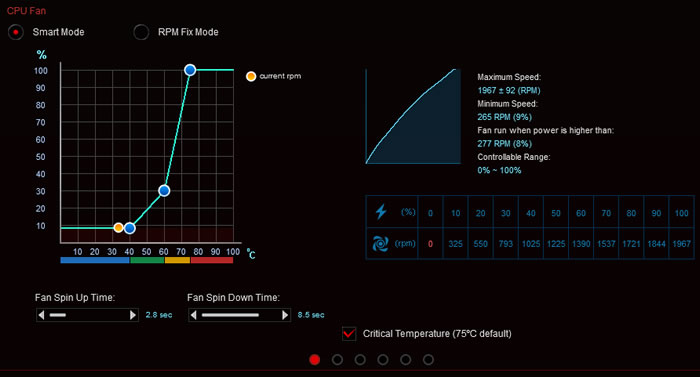
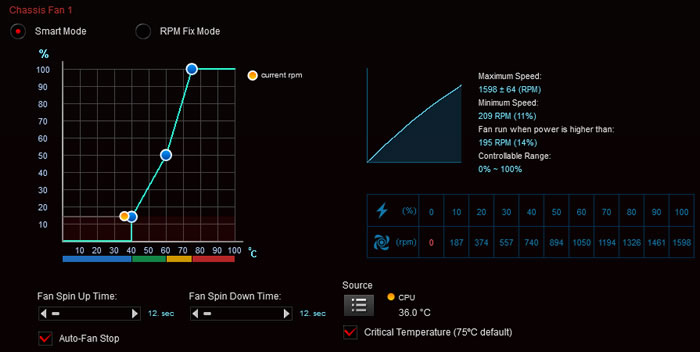
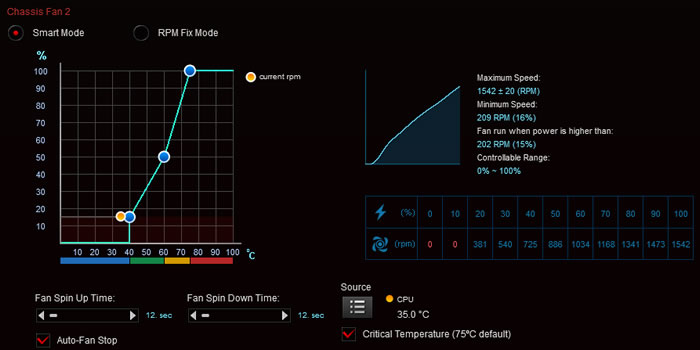
We set the CPU fans speeds at "Smart Mode" with the Asus Xpert4 software. The case fans were also set at SmartFan mode with the option for Auto Fan Stop at low loads down to 0% for the two front fans and auto for the back case fan. The CPU fans were detected from them Asus motherboard and gave us the following fan curve
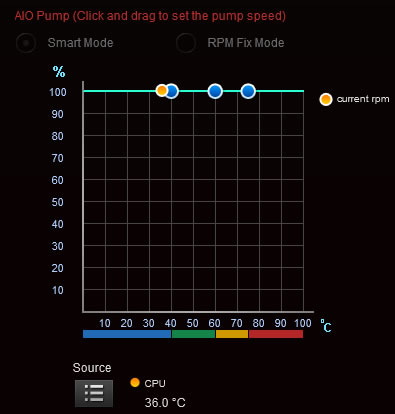
The AIO Pump was left at Auto, meaning the pump runs always 100% (you may adjust this even its not recommended).
Bios settings:
- Ai Overclock Tuner: D.O.C.P -> XMP DDR-3200 CL14
- BCLK Frequency: 100MHz
- FCLK Frequency: 1600MHz
- CPU core ratio: Auto
- TPU: Keep Current Setting
- Performance Bias: Auto
- VDDCR CPU Voltage: 1.100V
- VDDCD SOC Voltage: 0.900V
- DRAM Voltage: 1.350V (XMP)
- Precision Boost Overdrive: Auto
- Rest BIOS options: Auto
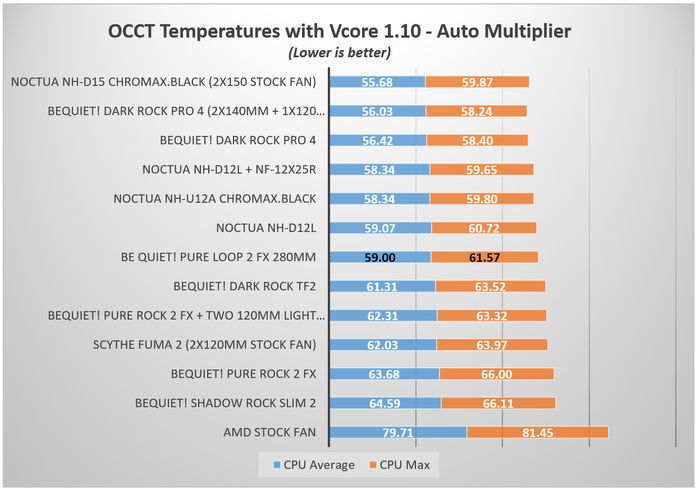
For further evaluation, we also used OCCT Enterprise Edition with a 30min run and we noted all temperatures as were noted from the software. For maximum temperature we used the following settings:
- Data Set: Small
- Mode: Extreme
- Load Type: Steady
Under normal loads the Pure Loop 2 FX performed well, resulting under 60 Celsius, even cannot reach high end CPU coolers like the Dark Rock Pro 4 or what Noctua NH-D15 offers. Further performance can be squeezed if you mess up with the fan curves a bit, making them work harder before CPU temps reach above 60 Celsius, but for comparison reasons we left all at Auto.
Placing the miniDSP UMIK-1 microphone around 1m from the closed case, we were pleased to get very low overall case+cpu cooler noise. What really impressed is that the Pure Loop 2 has very low cpu noise even at full load with "normal" working temperatures.

Overclocking
Bios settings:
- Ai Overclock Tuner: D.O.C.P -> XMP DDR-3200 CL14
- BCLK Frequency: 100MHz
- FCLK Frequency: 1600MHz
- CPU core ratio: 45Χ
- TPU: Keep Current Setting
- Performance Bias: Auto
- VDDCR CPU Voltage: 1.180V
- VDDCD SOC Voltage: 0.900V
- DRAM Voltage: 1.350V (XMP)
- Precision Boost Overdrive: Auto
- Rest BIOS options: Auto
Lastly, we wanted to see how this CPU cooler will handle even higher temperature loads, so we set CPU multiplier to 45X and set CPU Vcore at 1.18V.
At this test, the be quiet! Pure Loop 2 FX showed very good performance that even rivals Dark Rock Pro 4! The main reason behind this is that liquid cooling tends to have a lower heating curve compared with air cooling, so average values would favor with liquid cooling for a 30min run vs air cooling. Running the same test with one hour constant load may produce different test results, but since we test all CPU coolers with the same setup, keep that result with salt in mind.
