Breaking News

KIOXIA expands EXCERIA line with new EXCERIA G3 SSD series TerraMaster TOS 7 Beta Now Open Worldwide CORSAIR announces XENEON EDGE 14.5" LCD Touchscreen Club3D announces new products! Firewalla Announces Firewalla Orange, a Portable Multi-Gigabit Cybersecurity Firewall and WiFi 7 Router that Brings Zero Trust Anywhere

logo

  • Share Us
    • Facebook
    • Twitter
  • Home
  • Home
  • News
  • Reviews
  • Essays
  • Forum
  • Legacy
  • About
    • Submit News

    • Contact Us
    • Privacy

    • Promotion
    • Advertise

    • RSS Feed
    • Site Map

Search form

Biostar T-Force P965

Apr 12,2007 0

2. Package


Review Pages

1. Installation - Specs
2. Package
3. BIOS setup
4. Installation
5. Benchmarks - page 1
6. Benchmarks - page 2
7. Benchmarks - page 3
8. Benchmarks - page 4
9. Benchmarks - page 5
10. Benchmarks - page 6
11. Overclocking
12. Summary


- The Package

The Biostar T-Force P965 costs around €100, making it a very affordable motherboard for entry level users:
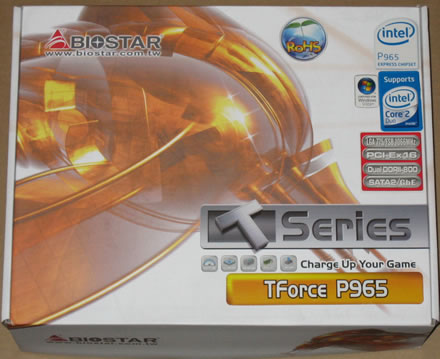
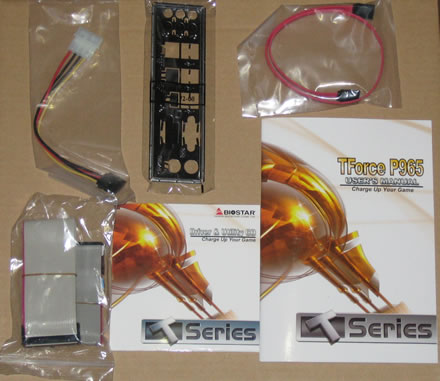
All included accessories are well packaged:

Below is a list of what's included in the retail package
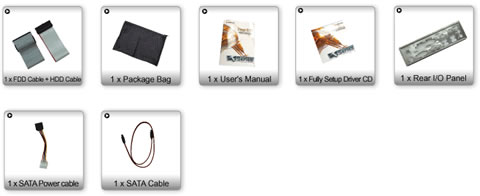
There aren't many cables included nor anything fancy. Biostar has included the bare essentials, keeping the overall cost low:
The board itself, looks very "neat" and all components can be easily identified:
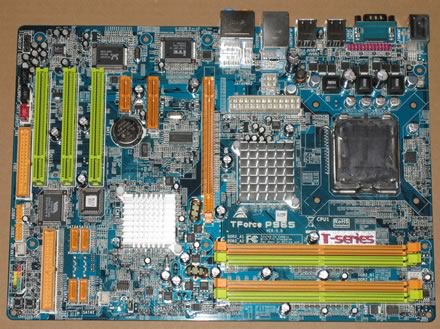
Let's zoom in on the CPU area.
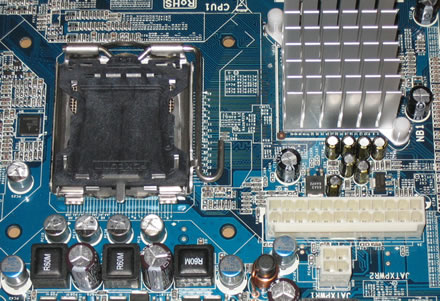
We can clearly see the passive cooling solution for the northbridge. The nearby capacitors are low profile so there shouldn't be any problem with larger cooling solutions. What is rather unpleasant is that both the ATX Power Source Connector (24pin) and ATX Power Source Connector (4pin) are located very close to the CPU are so there might be an issue with free space, something that can also affect air flow, which is illustrated in the following picture:

The motherboard has four slots for memory modules with a total memory capacity of 8GB (4 x 2GB modules)
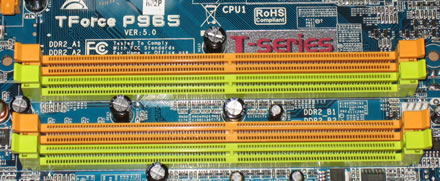
The CPU fan is located very close to the memory modules, and the fan power connection is located between the memory slots. You have to be extra careful when installing or removing the RAM modules :

Moving to the southbridge area on the board, we can see the passive heatsink in use here also, and the 4x SATA 2 connectors:

The Biostar P965 supports 1x PCI-E x16 slot. Most other boards in this category support 2x PCI-E slots, either for SLI or Crossfire setups. Of course, their price is also more expensive than the Biostar P965 motherboard:
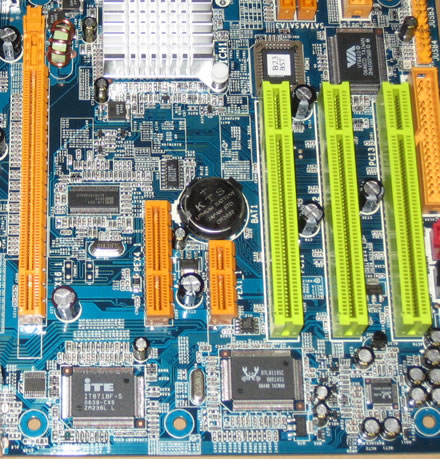
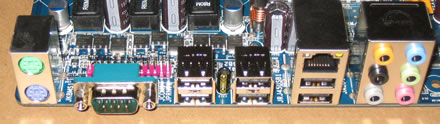
There are several I/O slots available for extra USB, Front Panel connections. However, they are not included in the retail package. The back I/O panel has the usual connections:

  • 1x PS/2 Keyboard
  • 1x PS/2 Mouse
  • 12 x RJ45 port (1GBit LAN)
  • 1x S/PDIF Out (Coaxial + Optical)
  • 64x USB
  • 1x Serial
  • 6-Channel Audio I/O


Review Pages

1. Installation - Specs
2. Package
3. BIOS setup
4. Installation
5. Benchmarks - page 1
6. Benchmarks - page 2
7. Benchmarks - page 3
8. Benchmarks - page 4
9. Benchmarks - page 5
10. Benchmarks - page 6
11. Overclocking
12. Summary


Pages

  • « first
  • ‹ previous
  • 1
  • 2
  • 3
  • 4
  • 5
  • 6
  • 7
  • 8
  • 9
  • …
  • next ›
  • last »

biostar

Tags: biostar
Previous Post
MAYA44 USB External Sound Card
Next Post
OCZ 8GB Mega-Kart

Related Posts

  • BIOSTAR Set to Unveil Cutting-Edge Innovations at COMPUTEX TAIPEI 2025

  • BIOSTAR INTRODUCES THE STORMING V DDR4 MEMORY

  • BIOSTAR INTRODUCES THE BRAND-NEW Z890AX-E PRO MOTHERBOARD

  • AsRock, NZXT, Biostar and Gigabyte announces X870 motherboards

  • BIOSTAR ANNOUNCES THE RADEON RX 580 WHITE GRAPHICS CARD

  • BIOSTAR UNVEILS THE RADEON RX 7600 OC GRAPHICS CARD

  • BIOSTAR INTRODUCES HOME EDGE AI PC COMBO RECOMMENDATION

  • BIOSTAR INTRODUCED EXCITING NEW PRODUCTS AT COMPUTEX TAIPEI 2024

Latest Reviews

Noctua NP-DM3 desk mat
Gaming

Noctua NP-DM3 desk mat

Crucial P510 2TB NMVE
PC components

Crucial P510 2TB NMVE

The Quiet Technology Behind the Spin
Enterprise & IT

The Quiet Technology Behind the Spin

Crucial DDR5 Pro 6400 CL32
PC components

Crucial DDR5 Pro 6400 CL32

SOUNDPEATS Clip1
Consumer Electronics

SOUNDPEATS Clip1

Popular News

COLORFUL Introduces CVN B850I GAMING FROZEN Motherboard

COLORFUL Introduces CVN B850I GAMING FROZEN Motherboard

COLORFUL Presents CVN X870 ARK FROZEN Motherboard for AMD Ryzen 9000 CPUs

COLORFUL Presents CVN X870 ARK FROZEN Motherboard for AMD Ryzen 9000 CPUs

COLORFUL Presents the B860 Series Motherboards

COLORFUL Presents the B860 Series Motherboards

Intel-AMD new motherboards announced

Intel-AMD new motherboards announced

TEAMGROUP Launches EXPERT P34F Find My External SSD

TEAMGROUP Launches EXPERT P34F Find My External SSD

ASRock AM5 Motherboards Now Fully Support AMD Ryzen 9 9950X3D & 9900X3D Processors

ASRock AM5 Motherboards Now Fully Support AMD Ryzen 9 9950X3D & 9900X3D Processors

Samsung announces Galaxy Tab S11 and Galaxy S25 FE series

Samsung announces Galaxy Tab S11 and Galaxy S25 FE series

Viltrox Showcases Upcoming Lens Lineup and New TTL Flash at IBC 2025

Viltrox Showcases Upcoming Lens Lineup and New TTL Flash at IBC 2025

Main menu

  • Home
  • News
  • Reviews
  • Essays
  • Forum
  • Legacy
  • About
    • Submit News

    • Contact Us
    • Privacy

    • Promotion
    • Advertise

    • RSS Feed
    • Site Map
  • About
  • Privacy
  • Contact Us
  • Promotional Opportunities @ CdrInfo.com
  • Advertise on out site
  • Submit your News to our site
  • RSS Feed