Breaking News

Lexar Introduces JumpDrive A50V and C50V Dashcam USB Drives Lexar ARES RGB 2nd Gen DDR5 Passes AMD EXPO Ultra Low Latency Certification Tests Thypoch Introduces New Sculptor AF Lens Series with 23mm f1.4 Prime for Fujifilm X-Mount ASUS Announces Availability of ProArt GR1X Xiaomi and Leica Present the Xiaomi 18 Pro Series

logo

  • Share Us
    • Facebook
    • Twitter
  • Home
  • Home
  • News
  • Reviews
  • Essays
  • About
    • Submit News

    • Contact Us
    • Privacy

    • Promotion
    • Advertise

    • RSS Feed

Search form

Connect3D X800

Jul 8,2005 0

15. Overclocking


Review Pages

1. Introduction
2. Features
3. A closer look
4. Test System
5. 3DMark05
6. 3DMark03
7. Codecreatures
8. Aquamark3 / 3DMark 2001
9. Half life 2
10. Doom 3
11. Far Cry
12. Thief 3
13. Colin McRae 05
14. Ground Control II
15. Overclocking
16. Conclusion


No matter your graphics card, there comes a time in your computer's life when it can no longer cope with the latest technology the ever so popular games use. This is one of the main reasons for overclocking your graphics card. Gamers are always looking forward for a little extra boost in terms of framerate. Even though most of the times the boost is far from noticeable, overclocking remains the last resort when you can't afford to buy a brand new VGA card.
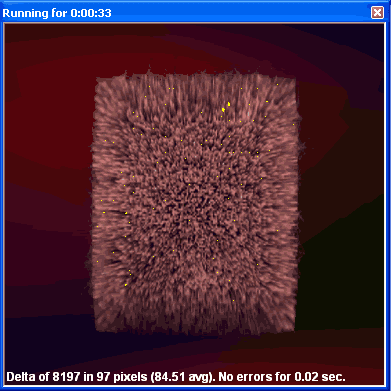
Increasing the memory clock too much,
produces the so-called "artifacts".

The stock clock speeds for the core and memory were 390MHz and 350MHz respectively, as you can see in the ATiTool screenshot below. We mentioned before that the memory parts used by the Connect3D X800 are the 2.0ns K4J55323QF-GC20. The 350MHz frequency to which they are initially set is just too low, so overclocking the memory will be very easy.

First thing we do to overclock the card is to step-by-step increase the memory clock until we find the maximum stable setting that does not produce screen artifacts in either ATiTool test or games. Then, being sure of that frequency, we increase the core clock likewise. Our final settings can be seen in the following screenshot.

The factory frequencies for the Sapphire X800.

That is an extra 50MHz for the core and 200MHz for the memory which is very similar to what the Sapphire X800 could overclock to, only 10MHz lower memory speed increase.

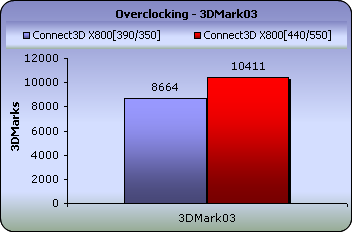
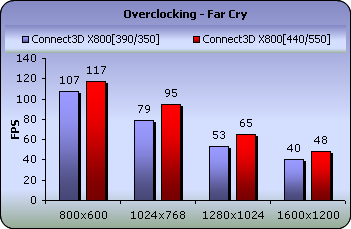
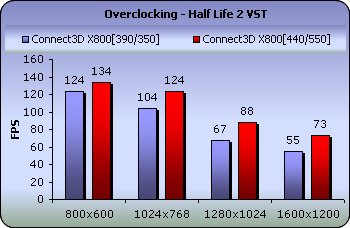
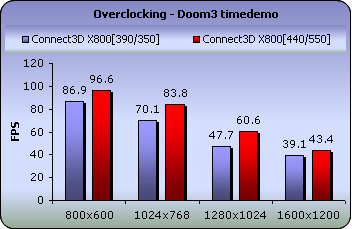
Let's see the performance boost we got from the new clock settings:
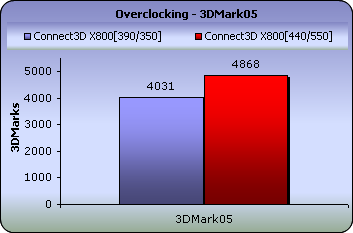
The new framerates for the overclocked Connect3D X800 are exciting. In some cases we even got a 20fps boost and even Doom3, which tends to be much harder to improve the framerate, yielded 13fps under 1024x768.

Even if there's currently no way to unlock the 4 missing pipelines and turn this card into an XT, it's still an excellent overclocker and worth all the risks in messing with the clock settings.


Review Pages

1. Introduction
2. Features
3. A closer look
4. Test System
5. 3DMark05
6. 3DMark03
7. Codecreatures
8. Aquamark3 / 3DMark 2001
9. Half life 2
10. Doom 3
11. Far Cry
12. Thief 3
13. Colin McRae 05
14. Ground Control II
15. Overclocking
16. Conclusion


Pages

  • « first
  • ‹ previous
  • …
  • 8
  • 9
  • 10
  • 11
  • 12
  • 13
  • 14
  • 15
  • 16
  • next ›
  • last »

Connect 3D

Tags: Connect 3D
Previous Post
Corsair CM2X512-8000UL
Next Post
Spire DiamondCool

Related Posts

  • Connect3D X300SE

  • Connect3D X800XL

  • Connect 3D X850XT PE

  • Connect3D X800XT PE

Latest Reviews

NAS Security Is a Matter of Configuration Best Practices for Protecting Systems and Data
Enterprise & IT

NAS Security Is a Matter of Configuration Best Practices for Protecting Systems and Data

GMK TriggerKey
Gadgets

GMK TriggerKey

The Best Online Casino Games to Play on a Browser
Enterprise & IT

The Best Online Casino Games to Play on a Browser

be quiet! Light Wings Pro IO fan
Cooling Systems

be quiet! Light Wings Pro IO fan

Why Intelligent Firmware Matters More Than Peak Throughput in NAS Systems
Enterprise & IT

Why Intelligent Firmware Matters More Than Peak Throughput in NAS Systems

Popular News

MSI’s Latest AMD X870E MAX & EVO Series Motherboards

MSI’s Latest AMD X870E MAX & EVO Series Motherboards

COLORFUL Launches iGame B850M ULTRA Series Micro-ATX Motherboards

COLORFUL Launches iGame B850M ULTRA Series Micro-ATX Motherboards

COLORFUL Launches iGame B850I MINI OC V14 Motherboard

COLORFUL Launches iGame B850I MINI OC V14 Motherboard

COLORFUL Presents Limited Edition Chitu MAG-60 Magnetic Keyboard Inspired by the Year of the Horse

COLORFUL Presents Limited Edition Chitu MAG-60 Magnetic Keyboard Inspired by the Year of the Horse

COLORFUL Launches the iGame X870E VULCAN W OC Motherboard

COLORFUL Launches the iGame X870E VULCAN W OC Motherboard

COLORFUL Presents iGame Z890 ULTRA-S W and iGame Z890M ULTRA Z Motherboards

COLORFUL Presents iGame Z890 ULTRA-S W and iGame Z890M ULTRA Z Motherboards

COLORFUL Launches iGame X870E ULTRA-S V14 Motherboard

COLORFUL Launches iGame X870E ULTRA-S V14 Motherboard

COLORFUL Expands B850 Motherboard Lineup with New CVN, Battle-Ax, and MEOW Models

COLORFUL Expands B850 Motherboard Lineup with New CVN, Battle-Ax, and MEOW Models

Main menu

  • Home
  • News
  • Reviews
  • Essays
  • About
    • Submit News

    • Contact Us
    • Privacy

    • Promotion
    • Advertise

    • RSS Feed
  • About
  • Privacy
  • Contact Us
  • Promotional Opportunities @ CdrInfo.com
  • Advertise on out site
  • Submit your News to our site
  • RSS Feed