Breaking News

G.SKILL Demo New Memory Solutions for Gaming, Server, AI, Workstation Applications at Computex 2026 LIAN LI Launches HydroShift II OLED Curved 360 AIO LIAN LI Unveils O11 VISION-M CORSAIR PRO launches AI Workstations and Servers ASUS Announces T1 GeForce RTX 5070 and RTX 5060 Ti Graphics Cards

logo

  • Share Us
    • Facebook
    • Twitter
  • Home
  • Home
  • News
  • Reviews
  • Essays
  • Forum
  • Legacy
  • About
    • Submit News

    • Contact Us
    • Privacy

    • Promotion
    • Advertise

    • RSS Feed
    • Site Map

Search form

EachLink X3 Mini Smart Box

Apr 7,2020 4

2. Powering on the player, GUI


Review Pages

1. Features and specifications
2. Powering on the player, GUI
3. Audio, Video and streaming tests
4. Conclusion


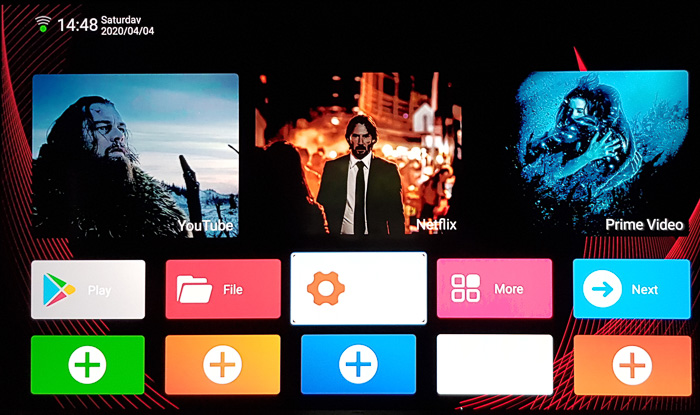
The Android 9.0 box will take some time to power up before the simple GUI shows up, as you see below. The interface is rather snappy, and the main screen

includes the pre-installed apps: Youtube ( a mod of original youtube), Netflix (only in 480p due to licencing restrictions) and Amazon Prime Video. There is also Play Store pre-installed as well as a collection of other apps you can play around. The interface offers some customization options, such as adding some more apps on the main screen by using the "plus" boxes:
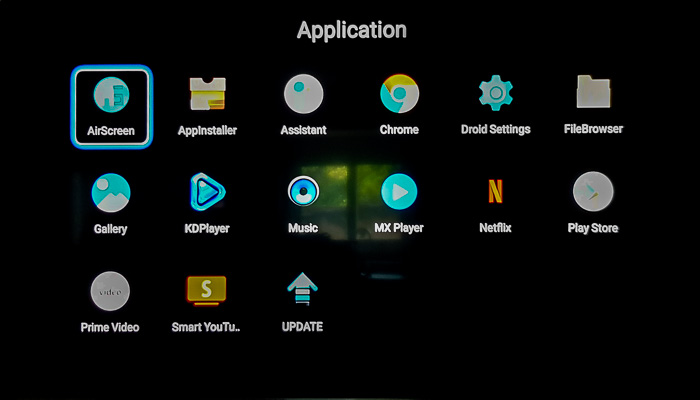
Below you see the applications than come pre-installed.
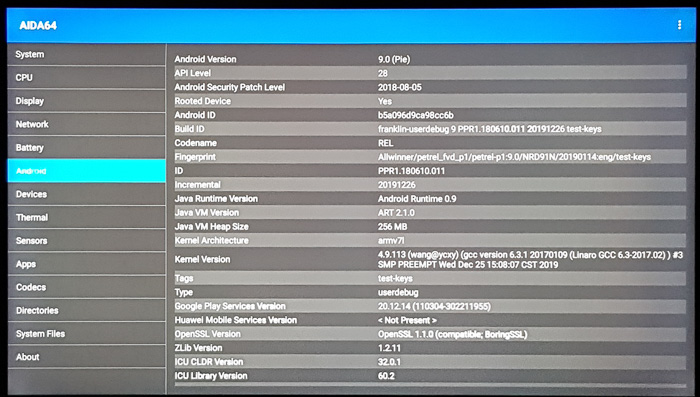
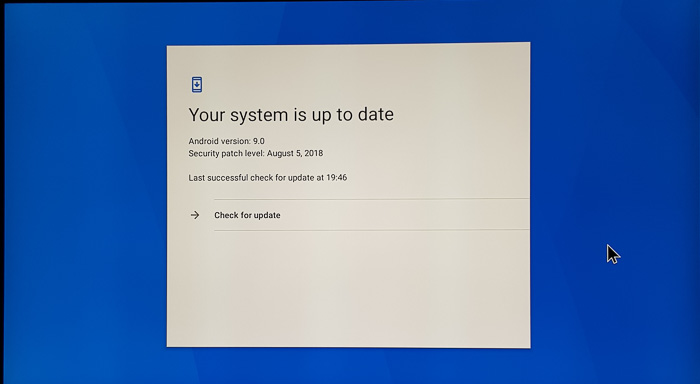
The settings app provides some information bout the player. As you see below, the Android 9.0 OS is installed although the Android security patch is outdated (2018).

Using the firmware update function we checked for a new firmware, with no luck:.
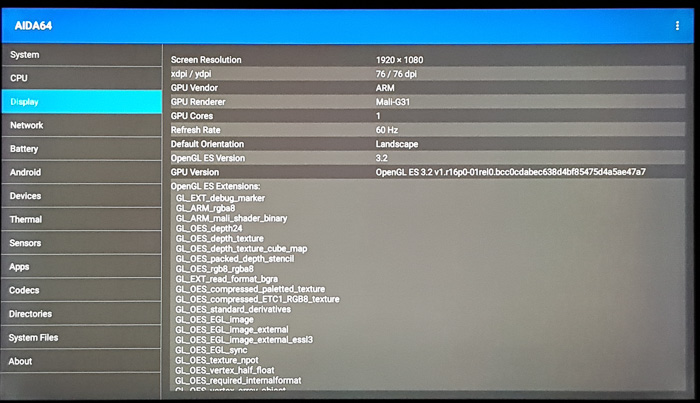
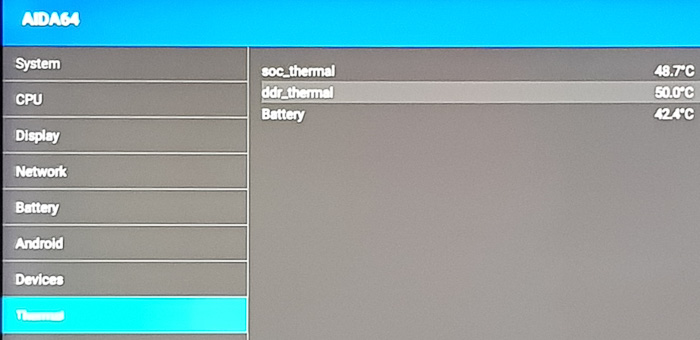
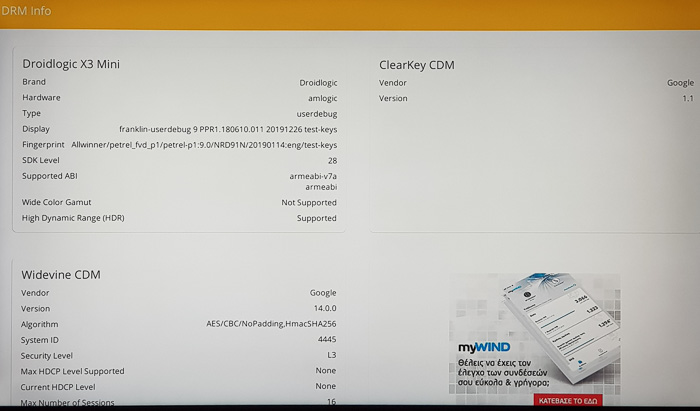
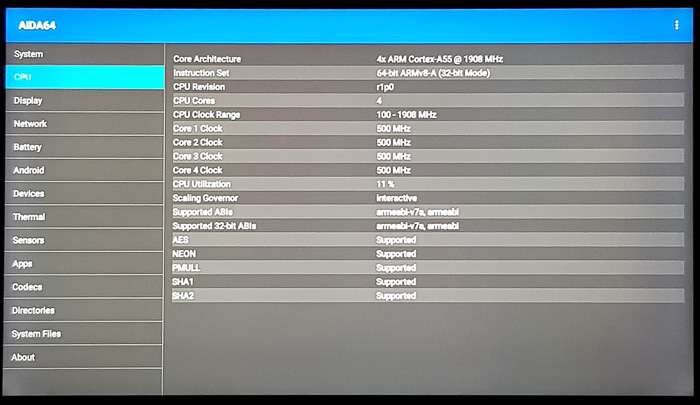
The box hasn't got any Root application installed and there isn't any third party firmware/mod. Below you see some information as it is provided by he AIDA64 and CPU-Z utilities:



Review Pages

1. Features and specifications
2. Powering on the player, GUI
3. Audio, Video and streaming tests
4. Conclusion


Pages

  • « first
  • ‹ previous
  • 1
  • 2
  • 3
  • 4
  • next ›
  • last »

Tags:
Previous Post
Crucial X8 1TB External SSD review
Next Post
Samsung 970 PRO 512GB SSD review

Related Posts

4 Comments

  • Default User Picture
    Andrew (not verified) Apr 7, 2020

    How can I install the official kodi program instead of the kd player because it doesn't allow me to install the kodi. In kdplayer, dolby atmos can only be played in 2.0. How do I fix this? Thanks

    • Log in or register to post comments
  • Default User Picture
    mak Apr 7, 2020

    Dear friend, you have to Side load it, meaning download the KODI apk from official KODI website (arm7 versio), then transfer in a USB and install it via the included software that the player has.

    • Log in or register to post comments
  • Default User Picture
    Andrew (not verified) Apr 7, 2020

    Dear friend!

    I installed kodi from kodi.tv. Unfortunately, dolby Atmos still only plays in 2.0 and does not play dts hd at all, only in plain dts. Did the dolby atmos work in real 5.1 or 7.1 during testing? Thanks for your help!

    • Log in or register to post comments
  • Default User Picture
    mak Apr 7, 2020

    dear friend, from our tests Dolby atmos only plays in 2.0 channels, not 5.1 or 7.1...please read https://www.cdrinfo.com/d7/content/eachlink-x3-mini-smart-box?page=2

    • Log in or register to post comments

Leave a Reply

Latest Reviews

Swit NP-FZ100 Battery
Cameras

Swit NP-FZ100 Battery

The Technology Stack Behind Modern Digital Gaming Platforms
Consumer Electronics

The Technology Stack Behind Modern Digital Gaming Platforms

be quiet! Dark Rock Pro 6
Cooling Systems

be quiet! Dark Rock Pro 6

How Online Casinos Use Encryption, Verification, and Risk Controls to Build User Trust
Enterprise & IT

How Online Casinos Use Encryption, Verification, and Risk Controls to Build User Trust

Why Low-Latency Infrastructure Matters More Than Raw Specs
Enterprise & IT

Why Low-Latency Infrastructure Matters More Than Raw Specs

Popular News

TEAMGROUP Launches EXPERT P34F Find My External SSD

TEAMGROUP Launches EXPERT P34F Find My External SSD

CORSAIR announces Vanguard Pro 96 and Vanguard 96 Gaming Keyboards

CORSAIR announces Vanguard Pro 96 and Vanguard 96 Gaming Keyboards

Samsung announces Galaxy Tab S11 and Galaxy S25 FE series

Samsung announces Galaxy Tab S11 and Galaxy S25 FE series

Viltrox Showcases Upcoming Lens Lineup and New TTL Flash at IBC 2025

Viltrox Showcases Upcoming Lens Lineup and New TTL Flash at IBC 2025

MSI Launches FORGE GK600 TKL WIRELESS Special Edition Compact Mechanical Keyboard

MSI Launches FORGE GK600 TKL WIRELESS Special Edition Compact Mechanical Keyboard

Panasonic Introduces the First Ultra-Telephoto Zoom Lens in the LUMIX S Series

Panasonic Introduces the First Ultra-Telephoto Zoom Lens in the LUMIX S Series

MSI Launches DATAMAG 40Gbps Magnetic Portable SSD

MSI Launches DATAMAG 40Gbps Magnetic Portable SSD

Viltrox Joins the L-Mount Alliance, Expanding Creative Possibilities

Viltrox Joins the L-Mount Alliance, Expanding Creative Possibilities

Main menu

  • Home
  • News
  • Reviews
  • Essays
  • Forum
  • Legacy
  • About
    • Submit News

    • Contact Us
    • Privacy

    • Promotion
    • Advertise

    • RSS Feed
    • Site Map
  • About
  • Privacy
  • Contact Us
  • Promotional Opportunities @ CdrInfo.com
  • Advertise on out site
  • Submit your News to our site
  • RSS Feed