Breaking News

Hollyland Launches Pyro 7 Ultra, an All-in-One Wireless Monitoring System for Professional Film Production ADATA Powers AI Servers, Edge Systems and Intelligent Applications with Enterprise Memory and Storage Acer Expands Gaming Handheld Portfolio with Predator Atlas 7 Sony Expands its ULT POWER SOUND series Lineup with 3 New Bass-Powered Speakers Sonos Introduces Sonos 27, the Next Generation of Its Audio Operating System

logo

  • Share Us
    • Facebook
    • Twitter
  • Home
  • Home
  • News
  • Reviews
  • Essays
  • About
    • Submit News

    • Contact Us
    • Privacy

    • Promotion
    • Advertise

    • RSS Feed

Search form

Eweat EW902 4K Android Media Player review

Nov 13,2014 0

3. Menu, settings


Review Pages

1. Features, specs
2. Unpackaging
3. Menu, settings
4. Video, transfer rate benchmarks
5. Video, audio playback, subtitles
6. XBMC, Miracast
7. Final thoughts


The Eweat EW902 runs on the Android 4.4.2 Kitkat operating system.

The device takes some time to boot up and display the interface, which look since although typical for media players. The left window is the HDMI input screen , and settings related to the internal audio/video player, the program area and the miracast screen are on the right. With the latest firmware installed, the player runs at 1280x720p.

You have full access to the Android market and update or install new apps:

As you see below we have installed several Android applications. You can navigate across them by using either the remote's four way button or with the cursor mode. In order to place icons on the main desktop you have to press the menu button on each app and select to send it to the desktop through the menu.

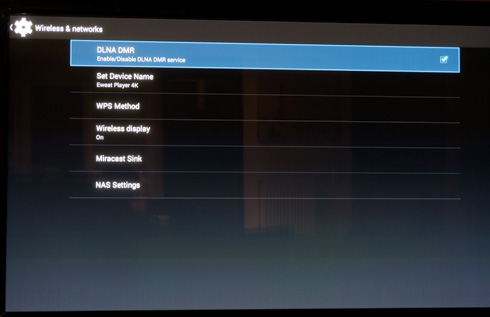
The settings area is illustrated below and should be familiar to Android users:

The OSD languages include simplified Chinese, traditional Chinese, English, Russian, Spanish, Czech,Dutch, Italian, French, German, Turkish, Hebrew and Greek. Since Android natively supports all the currently spoken languages, we feel that the EW902 could offer complete language support as well.
You can set the TV system to "Auto" and let the player select the video output. With not any 4K TV connected, the TV system menu will offer the choices you see below: 480p, 720p 50 Hz /60Hz, 1080i 50Hz/ 60 Hz, 1080p 50 Hz/ 60 Hz.

When we launched a movie it automatically set it to 1080p 24Hz. When the movie was finished the TV went back automatically to 1080p 60 Hz.

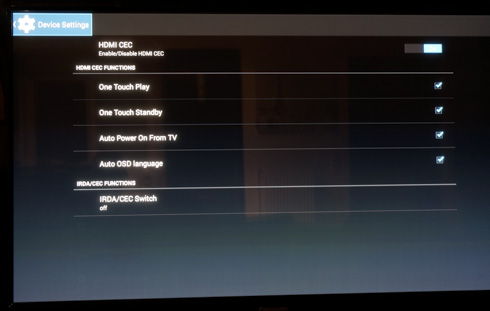
The device also supports also CEC in order to control it by using your TV's remote:
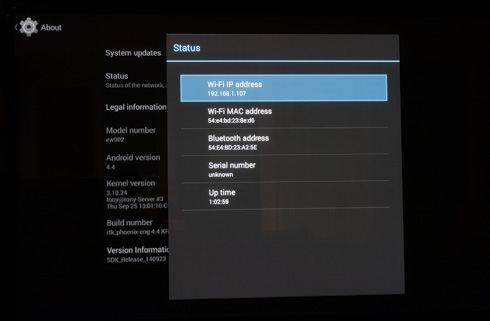
The "About" menu displays information about the Android version, your network (IP addresses), and also possible available updates (OTA):

Firmware upgrades are possible via a USB stick and it takes around 2 minutes to complete. Everything you have installed will be lost following an update so make sure to backup all installed software prior to it.


Review Pages

1. Features, specs
2. Unpackaging
3. Menu, settings
4. Video, transfer rate benchmarks
5. Video, audio playback, subtitles
6. XBMC, Miracast
7. Final thoughts


Pages

  • « first
  • ‹ previous
  • 1
  • 2
  • 3
  • 4
  • 5
  • 6
  • 7
  • next ›
  • last »

Tags:
Previous Post
Lexar Professional Workflow DD512 512GB Review
Next Post
Kingston USB 3.0 Media Reader review

Related Posts

Latest Reviews

be quiet! Dark Power 14 IO
PC components

be quiet! Dark Power 14 IO

SanDisk High Endurance 512GB microSDXC
Cameras

SanDisk High Endurance 512GB microSDXC

Samsung PRO Ultimate 512GB microSDXC
Cameras

Samsung PRO Ultimate 512GB microSDXC

be quiet! Light Mount TKL
Consumer Electronics

be quiet! Light Mount TKL

be quiet! Light Loop IO LCD
Cooling Systems

be quiet! Light Loop IO LCD

Popular News

CORSAIR announces Vanguard Pro 96 and Vanguard 96 Gaming Keyboards

CORSAIR announces Vanguard Pro 96 and Vanguard 96 Gaming Keyboards

MSI Launches FORGE GK600 TKL WIRELESS Special Edition Compact Mechanical Keyboard

MSI Launches FORGE GK600 TKL WIRELESS Special Edition Compact Mechanical Keyboard

TEAMGROUP Launches EXPERT P34F Find My External SSD

TEAMGROUP Launches EXPERT P34F Find My External SSD

Samsung announces Galaxy Tab S11 and Galaxy S25 FE series

Samsung announces Galaxy Tab S11 and Galaxy S25 FE series

Viltrox Showcases Upcoming Lens Lineup and New TTL Flash at IBC 2025

Viltrox Showcases Upcoming Lens Lineup and New TTL Flash at IBC 2025

Panasonic Introduces the First Ultra-Telephoto Zoom Lens in the LUMIX S Series

Panasonic Introduces the First Ultra-Telephoto Zoom Lens in the LUMIX S Series

MSI Launches DATAMAG 40Gbps Magnetic Portable SSD

MSI Launches DATAMAG 40Gbps Magnetic Portable SSD

MSI’s Latest AMD X870E MAX & EVO Series Motherboards

MSI’s Latest AMD X870E MAX & EVO Series Motherboards

Main menu

  • Home
  • News
  • Reviews
  • Essays
  • About
    • Submit News

    • Contact Us
    • Privacy

    • Promotion
    • Advertise

    • RSS Feed
  • About
  • Privacy
  • Contact Us
  • Promotional Opportunities @ CdrInfo.com
  • Advertise on out site
  • Submit your News to our site
  • RSS Feed