Breaking News

LG Electronics Introduces World’s First Native 1000Hz Full HD Gaming Monitor Transcend to Showcase Next-Gen Storage Solutions at COMPUTEX 2026 Giga Computing Enhances Cloud Storage Solutions with AMD EPYC 8005 Server CPU SAMA S50 Rethinks Compact ATX Cases addlink’s 2026 Virtual Showcase

logo

  • Share Us
    • Facebook
    • Twitter
  • Home
  • Home
  • News
  • Reviews
  • Essays
  • Forum
  • Legacy
  • About
    • Submit News

    • Contact Us
    • Privacy

    • Promotion
    • Advertise

    • RSS Feed
    • Site Map

Search form

Eweat EW902 4K Android Media Player review

Nov 13,2014 0

2. Unpackaging


Review Pages

1. Features, specs
2. Unpackaging
3. Menu, settings
4. Video, transfer rate benchmarks
5. Video, audio playback, subtitles
6. XBMC, Miracast
7. Final thoughts


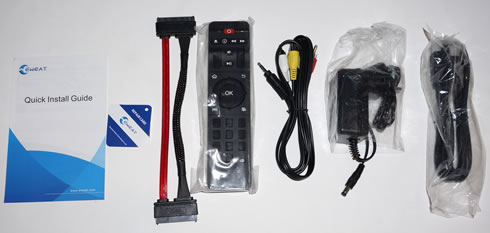
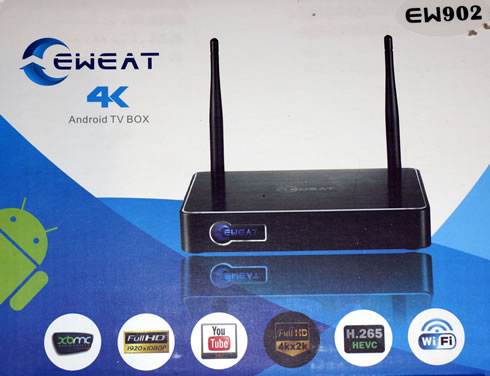
The Eweat EW902 retails online for just $65. Below you see the package you'll get if you decide to get your hands on the player; it includes logos related to the product's main features.
The package includes the following:

  • IR remote control:  ×1pcs(Optional: 2.4G air mouse)
  • HDMI cable:  ×1pcs
  • AV cable: ×1pcs
  • Power adaptor: ×1pcs
  • SATA cable: ×1pcs
  • Warranty Card: ×1pcs
  • Quick Install Guide: ×1pcs


As it happens with most products at this category, an HDMI has been included, along with analog composite video/stereo audio cables :). No 2x AAA batteries for the remote control inside.

Let's move on to the main device. As you see below, its compact (170 x 115 x 24.5 mm) and weigh around 1kg. The black-colored aluminum case looks and feels solid.
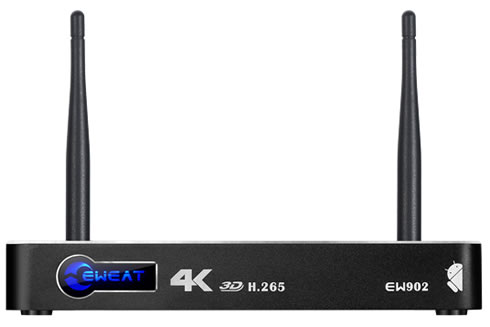
The front includes the Eweat logo, which lights up to blue when the player is on. It is actually operates as the device's IR receiver as well..

An SD/MMC slot, the reset pinhole and a USB3.0 port are located on the right side:
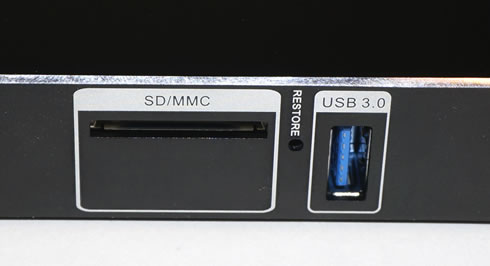
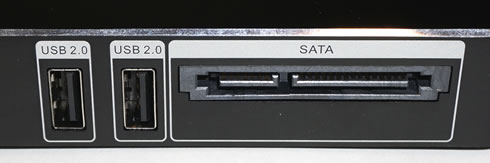
The right side is features two USB2.0 ports and an external SATA interface! Eweat has bundled a 2.5" SATA cable with the device.
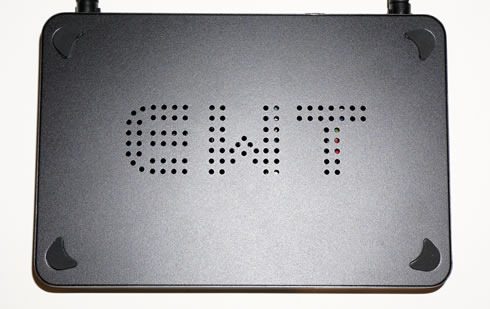
The bottom side has ventilation holes positioned to form the EWT logo. The device has no internal fans so it is totally silent during operation.
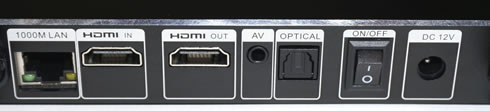
The rear side is covered by the essential DC input, an optical audio output, the RJ45 1Gbit LAN connector, an HDMI 1.4b output, an HDMI-in and an analogue audio/video output for those who still own older TV sets (if any).

The choice of HDMI 1.4b and not HDMI 2.0 means that the player won't delivering the very best quality 3D Bluray ISO and BDMV ISO or 4K playback at 60fps, but don't forget that we are dealing with a $65 player here.
The player has two external antennas that can be rotated and supports the802.11 b/g/n wireless protocols.

The remote control has a typical layout for such devices, with a four way pad that can be used to navigate. It may take sometime to get yourself familiar with but most users will probably have an AIR mouse that works better with Android devices and adds convenience.


Review Pages

1. Features, specs
2. Unpackaging
3. Menu, settings
4. Video, transfer rate benchmarks
5. Video, audio playback, subtitles
6. XBMC, Miracast
7. Final thoughts


Pages

  • « first
  • ‹ previous
  • 1
  • 2
  • 3
  • 4
  • 5
  • 6
  • 7
  • next ›
  • last »

Tags:
Previous Post
Lexar Professional Workflow DD512 512GB Review
Next Post
Kingston USB 3.0 Media Reader review

Related Posts

Latest Reviews

The Technology Stack Behind Modern Digital Gaming Platforms
Consumer Electronics

The Technology Stack Behind Modern Digital Gaming Platforms

be quiet! Dark Rock Pro 6
Cooling Systems

be quiet! Dark Rock Pro 6

How Online Casinos Use Encryption, Verification, and Risk Controls to Build User Trust
Enterprise & IT

How Online Casinos Use Encryption, Verification, and Risk Controls to Build User Trust

Why Low-Latency Infrastructure Matters More Than Raw Specs
Enterprise & IT

Why Low-Latency Infrastructure Matters More Than Raw Specs

In the Age of AI Phishing, the Best User Experience Might Be the One That Feels Safest
Enterprise & IT

In the Age of AI Phishing, the Best User Experience Might Be the One That Feels Safest

Popular News

TEAMGROUP Launches EXPERT P34F Find My External SSD

TEAMGROUP Launches EXPERT P34F Find My External SSD

CORSAIR announces Vanguard Pro 96 and Vanguard 96 Gaming Keyboards

CORSAIR announces Vanguard Pro 96 and Vanguard 96 Gaming Keyboards

Samsung announces Galaxy Tab S11 and Galaxy S25 FE series

Samsung announces Galaxy Tab S11 and Galaxy S25 FE series

Viltrox Showcases Upcoming Lens Lineup and New TTL Flash at IBC 2025

Viltrox Showcases Upcoming Lens Lineup and New TTL Flash at IBC 2025

MSI Launches FORGE GK600 TKL WIRELESS Special Edition Compact Mechanical Keyboard

MSI Launches FORGE GK600 TKL WIRELESS Special Edition Compact Mechanical Keyboard

Panasonic Introduces the First Ultra-Telephoto Zoom Lens in the LUMIX S Series

Panasonic Introduces the First Ultra-Telephoto Zoom Lens in the LUMIX S Series

MSI Launches DATAMAG 40Gbps Magnetic Portable SSD

MSI Launches DATAMAG 40Gbps Magnetic Portable SSD

Viltrox Joins the L-Mount Alliance, Expanding Creative Possibilities

Viltrox Joins the L-Mount Alliance, Expanding Creative Possibilities

Main menu

  • Home
  • News
  • Reviews
  • Essays
  • Forum
  • Legacy
  • About
    • Submit News

    • Contact Us
    • Privacy

    • Promotion
    • Advertise

    • RSS Feed
    • Site Map
  • About
  • Privacy
  • Contact Us
  • Promotional Opportunities @ CdrInfo.com
  • Advertise on out site
  • Submit your News to our site
  • RSS Feed