Breaking News

Western Digital Accelerates Storage Innovation for AI Era Leica LUX Case for the iPhone 17 Pro/Pro Max ASUS Announces ROG Strix Aiolos Viltrox Launches AF 16mm F1.8 L for Full Frame Casio to Release G-SHOCK with Minimalist Metal Design and Even Better Fit

logo

  • Share Us
    • Facebook
    • Twitter
  • Home
  • Home
  • News
  • Reviews
  • Essays
  • Forum
  • Legacy
  • About
    • Submit News

    • Contact Us
    • Privacy

    • Promotion
    • Advertise

    • RSS Feed
    • Site Map

Search form

Haicom 305-III

Feb 3,2006 0

3. Installation


Review Pages

1. Introduction
2. Features
3. Installation
4. The Tests
5. Conclusion


The installation process for Haicom 305-III differs depending on which interface connection you choose. In our case, (Dell Axim x50V with Windows Mobile 2003 SE), the installation process was very easy, just plug the device into the CF slot and... a popup window prompts you to type a name for the 305III GPS receiver. We also noticed the following happens every time the device shuts down or you simply remove the 305III receiver...

In the event you want to use the included SD slot, you have to install a device driver called elSDMMC, with however several limitations:

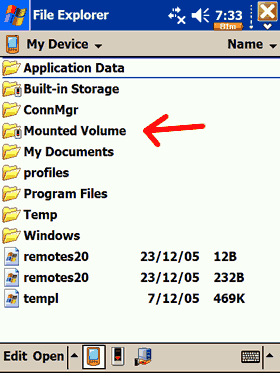
After soft-resetting your PDA, and assuming you have inserted the SD card BEFORE powering up the PDA, a new folder will show up under MyDevice as "Mounted Volume". The 305III was recognized without a hitch, as an Apacer 2GB SD card. As the device driver indicates, you cannot hot-swap SD cards, which is rather inconvenient. We are not very sure if this drive will work well under WM5, or if the device is supported at all...
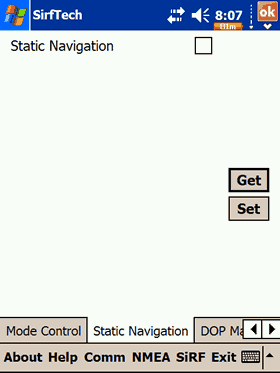
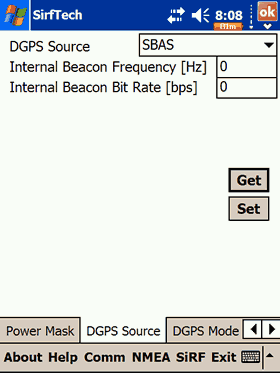
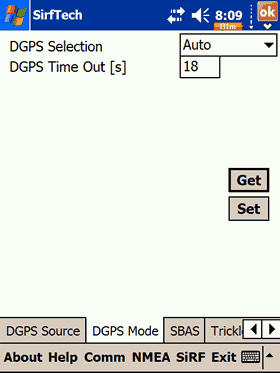
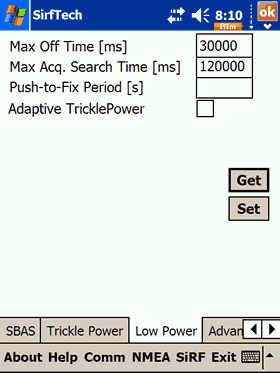
Since the Haicom 305-III uses the SiRFIII chipset, we were able to retrieve several pieces of information about the factory settings, such as firmware revision, if static navigation is turned on or off, etc:


Review Pages

1. Introduction
2. Features
3. Installation
4. The Tests
5. Conclusion


Pages

  • « first
  • ‹ previous
  • 1
  • 2
  • 3
  • 4
  • 5
  • next ›
  • last »

Haicom

Tags: Haicom
Previous Post
NEC ND-4550A
Next Post
Haicom 406BT-C

Related Posts

  • Affordable GPS Navigation by Haicom

  • Haicom 406BT-C

Latest Reviews

Akaso Brave 8 Lite
Cameras

Akaso Brave 8 Lite

Soundpeats Air 5
Consumer Electronics

Soundpeats Air 5

XbotGo Chamaleon
Consumer Electronics

XbotGo Chamaleon

be quiet! Dark Perk Mice
Gaming

be quiet! Dark Perk Mice

Acemagic W1
PC components

Acemagic W1

Popular News

COLORFUL Introduces CVN B850I GAMING FROZEN Motherboard

COLORFUL Introduces CVN B850I GAMING FROZEN Motherboard

COLORFUL Presents CVN X870 ARK FROZEN Motherboard for AMD Ryzen 9000 CPUs

COLORFUL Presents CVN X870 ARK FROZEN Motherboard for AMD Ryzen 9000 CPUs

TEAMGROUP Launches EXPERT P34F Find My External SSD

TEAMGROUP Launches EXPERT P34F Find My External SSD

ASRock AM5 Motherboards Now Fully Support AMD Ryzen 9 9950X3D & 9900X3D Processors

ASRock AM5 Motherboards Now Fully Support AMD Ryzen 9 9950X3D & 9900X3D Processors

Samsung announces Galaxy Tab S11 and Galaxy S25 FE series

Samsung announces Galaxy Tab S11 and Galaxy S25 FE series

Viltrox Showcases Upcoming Lens Lineup and New TTL Flash at IBC 2025

Viltrox Showcases Upcoming Lens Lineup and New TTL Flash at IBC 2025

CORSAIR announces Vanguard Pro 96 and Vanguard 96 Gaming Keyboards

CORSAIR announces Vanguard Pro 96 and Vanguard 96 Gaming Keyboards

Panasonic Introduces the First Ultra-Telephoto Zoom Lens in the LUMIX S Series

Panasonic Introduces the First Ultra-Telephoto Zoom Lens in the LUMIX S Series

Main menu

  • Home
  • News
  • Reviews
  • Essays
  • Forum
  • Legacy
  • About
    • Submit News

    • Contact Us
    • Privacy

    • Promotion
    • Advertise

    • RSS Feed
    • Site Map
  • About
  • Privacy
  • Contact Us
  • Promotional Opportunities @ CdrInfo.com
  • Advertise on out site
  • Submit your News to our site
  • RSS Feed